Table of Content
- Where Windsurf Lives in the AI Ecosystem
- Cascade: The Agent That Treats Your Repo Like a Problem, Not a Prompt
- A Day in Windsurf: From “Open Folder” to “Ship It”
- Workflows, Memories, and DevBox: Teaching the Agent How the Team Works
- The Interface: An IDE Where the Agent is Visible, Not Mysterious
- The Engineering Under the Hood: Models and Context at Speed
- The Cost on the Machine: CPU, RAM, and the Sound of Fans
- What Actually Changes: Productivity and Team Dynamics
- Pricing, Tiers, and Whether It’s Worth It
- Windsurf vs Cursor, Copilot, and JetBrains AI
- Pros, cons, and ideal use cases
- Final Verdict
Windsurf is the kind of IDE that does not politely ask, “What would you like to autocomplete?”
It walks into the repo, rolls up its sleeves, and says, “So, what are we fixing today?”
This is not a thin layer of AI smeared over a text editor. Windsurf is built around an agent Cascade that treats a codebase like a living system: something to understand, refactor, stress‑test, and reshape, not just sprinkle suggestions on. The entire interface, from its Codemaps to its DevBox workflows, is designed for the messy reality of large projects where nobody remembers every module, every side effect, or every hidden dependency.
Where Windsurf Lives in the AI Ecosystem
The AI tooling world is crowded with copilots that whisper suggestions and editors that bolt on chat panels. Windsurf belongs to a smaller, louder category: AI‑native IDEs that expect the agent to actually work.
It takes a very specific stance:
● AI is not an add‑on; it is the organizing principle of the editor.
● The target is not “my weekend script” but sprawling, old, annoying, business‑critical codebases.
● The expectation is not “assist the human” but “share the workload with supervision.”
To make this concrete, consider where Windsurf stands next to its peers.
Windsurf’s positioning snapshot
| Aspect | Windsurf focus | Why it matters |
| Core identity | AI‑native IDE built around the Cascade agent. | The whole UX assumes the agent is doing serious work, not cosmetic help. |
| Target projects | Large, complex, multi‑module or legacy codebases. | Optimized for hard, unglamorous enterprise realities. |
| Usage models | Standalone IDE plus plugins for other editors. | Supports both full adoption and gradual experimentation. |
| Competitors | Cursor, Copilot, JetBrains AI, other AI editors. | Helps frame when a switch is actually justified. |
GitHub Copilot and JetBrains AI feel like very smart teammates sitting in familiar chairs. Windsurf, by contrast, rearranges the furniture.
Cascade: The Agent That Treats Your Repo Like a Problem, Not a Prompt
Most AI dev tools answer questions. Cascade answers tasks.
Instead of “Explain this function,” the conversation looks more like “Replace this entire auth flow with a new library, keep all tests green, and respect our architecture rules.” Cascade responds not with a blob of code, but with a plan. That plan is the heart of the workflow.
Two ways of working emerge:
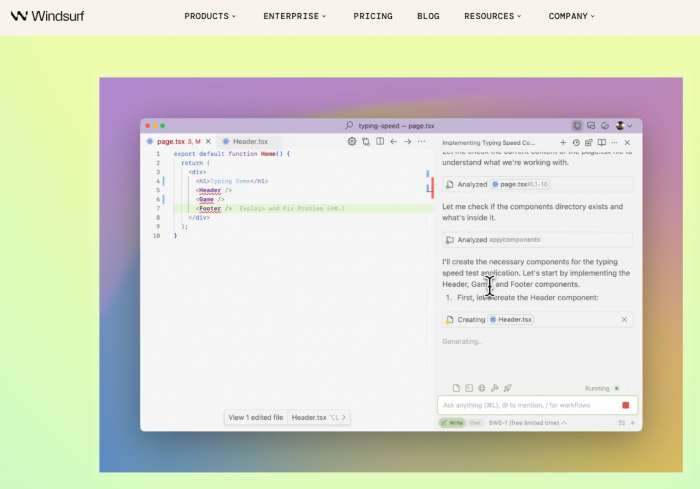
● Write‑style workflows: Cascade proposes a plan, edits multiple files, runs tests and shell commands, and loops until a reasonable stopping point.
● Chat‑style workflows: Cascade behaves more like a traditional assistant explaining, suggesting, and applying tighter edits while the developer stays in full control.
Underneath this is an infrastructure that cares deeply about context. Windsurf uses an engineering‑tuned model (SWE‑1.5) plus tools like SWE‑grep and a Fast Context engine to find the right slices of a huge repo quickly. Codemaps summarize the structure of projects: services, modules, critical paths, and all the hidden backroads. Memories and stored workflows give Cascade a long‑term memory for how a team likes to build and change things.
This combination makes the agent feel less like a chat window and more like a colleague who has actually onboarded to the code.
A Day in Windsurf: From “Open Folder” to “Ship It”
Opening a project in Windsurf is not just loading files, it is onboarding an AI into a codebase.
First, Windsurf indexes the repository, generates Codemaps, and builds its internal understanding of the structure. On a small project, this process is a brief yawn; on a monstrous monolith, it is a noticeable warm‑up. But afterward, the rhythm changes.
Consider a familiar nightmare: a backend library migration in a large monolith. In Windsurf, the story runs like this:
● The goal is expressed in plain language, with links to docs or modules if needed.
● Cascade answers with a multi‑step plan: update dependencies, adjust middleware, touch every call site, adapt tests.
● The plan is edited where it looks too bold or too timid and then approved.
● Cascade edits code across multiple directories, runs tests and commands in the integrated terminal, reads failures, and fixes what broke.
● The result is a set of diffs, not a mystery. Every change can be inspected, accepted, or rolled back.
Front‑end work has its own flavor. The preview pane runs the app right inside the IDE and maps UI elements back to their source. Click a card, button, or section, describe the desired behavior, and Cascade goes straight to the relevant code, edits it, and refreshes the preview. The constant context‑switch between browser and editor quietly disappears.
Workflow breakdown table
| Stage | Developer input | Cascade activity |
| Goal definition | Describes desired change, constraints, and references. | Parses instructions, inspects project structure. |
| Planning | Reviews and tweaks the proposed task plan. | Builds multi‑step plan across files, modules, and tools. |
| Execution | Approves plan and key actions. | Edits code, runs tests/commands, collects results. |
| Iteration | Requests refinements or clarifications. | Fixes failing tests, updates code, adjusts approach. |
| Finalization | Reviews diffs and merges accepted changes. | Stores context in Memories/workflows for future reuse. |
Windsurf is not trying to turn development into button‑click theater; it is trying to compress the distance between “idea” and “candidate implementation.”
Workflows, Memories, and DevBox: Teaching the Agent How the Team Works
Any AI can write code. The more interesting question is: can it write code like this team?
Windsurf’s answer is to embed process into the repo itself. A .windsurf/workflows/ directory can hold reusable task definitions, a structured way to say, “This is how this organization adds a service, rolls out a logging pattern, or hardens security.” Trigger a workflow, and Cascade executes it with live context from the codebase, not as a generic recipe.
Memories push this further. Teams can define rules and preferences once:
● Architecture boundaries that should not be casually crossed.
● Error‑handling patterns that should always be followed.
● Naming conventions or library choices that should be respected.
Rather than repeating these in prose across prompts, they become part of the agent’s mental model of the project. Over time, this means fewer style fights in code reviews and more consistency in the code that AI touches.
For teams living in the cloud or inside containers, DevBox‑style workflows bring the same intelligence to remote environments. Cascade can run builds, tests, and scripts in a cloud devbox while the developer stays in a local UI. This is particularly useful when the phrase “just run it locally” has been a lie for years.
The Interface: An IDE Where the Agent is Visible, Not Mysterious
Windsurf’s UI is organized around visibility. There is a main editor, of course, but also:
● A Cascade panel where plans, steps, and conversations are always in view.
● An integrated terminal that doubles as a canvas for AI‑assisted debugging.
● Optional sidebars for Codemaps, issues, and live previews.
Every command Cascade runs, every file it touches, every error it encounters appear in a chronological, inspectable timeline. Checkpoints make it possible to jump back when an experiment goes sideways instead of manually unrolling chaos.
The terminal is not just a scrolling wall of logs. Highlight a stack trace or test error, hand it to Cascade, and the agent attempts to trace the problem back to code and propose fixes. The debugging loop stops looking like: “read error, search web, stitch together guesses,” and starts to resemble: “read error, ask the system that understands the repo.”
The preview pane completes the picture for UI‑heavy projects. Click the UI, touch the code, and let the agent fix the mismatch in between.
On the integration front, Windsurf offers plugins for VS Code and JetBrains, plus connectors into services like version control and APIs, so the agent can pull in just enough external context when needed.
The Engineering Under the Hood: Models and Context at Speed
Plenty of tools claim to be “powered by AI.” Windsurf’s claim is narrower and more concrete: powered by an AI stack tuned specifically for software engineering and speed.
The SWE‑1.5 model is reported at around 950 tokens per second in vendor benchmarks. In those same comparisons, that throughput is described as roughly 13× faster than Claude Sonnet 4.5 and about 6× faster than Claude Haiku 4.5 on comparable tasks. Whether or not those exact ratios matter, the point is clear: latency is treated as a first‑class citizen.
The context story is similar. Windsurf layers:
● SWE‑grep for fast, code‑aware searching.
● A Fast Context engine for targeted retrieval.
● Codemaps to structure a repo into something the agent can navigate like a map rather than a directory tree.
The result is that when the agent is asked to “clean up all usages of this old API across the system,” it finds the right places quickly instead of drowning in irrelevant files.
Independent reviewers routinely point out that Windsurf feels particularly capable on large repositories: the kind that make other AI tools sweat. Multi‑file refactors and wide queries remain usable instead of turning into “please narrow your prompt” warnings. That said, real‑world users have also documented moments of latency spikes, “request took longer than expected” messages, and sluggishness during heavy, long‑running operations especially in earlier versions and on weaker machines.
Performance and context table
| Dimension | Windsurf characteristics | Practical effect |
| Model throughput | SWE‑1.5 at ~950 tokens/sec. | Keeps interactive workflows responsive. |
| Relative speed | ~13× Sonnet 4.5, ~6× Haiku 4.5 (vendor claims). | Competitive edge in perceived latency. |
| Context engine | SWE‑grep + Fast Context + Codemaps. | Makes large repos feel navigable instead of overwhelming. |
| Observed behavior | Strong on big projects; occasional latency spikes reported. | Generally smooth, with stress points under heavy load. |
The Cost on the Machine: CPU, RAM, and the Sound of Fans
Running an agentic IDE is not free in system terms. Windsurf behaves less like a text editor and more like a full‑blown studio.
Independent measurements suggest that compared to a plain editor, Windsurf adds roughly 8–12% CPU usage during active AI work and around 150–200MB of additional RAM. Initial indexing can hit CPUs harder, especially on older or underpowered setups. Startup times land in the same ballpark as other heavyweight IDEs, with some reports that Linux tends to deliver the smoothest experience.
Long agent runs big refactors, repeated build/test cycles will make themselves known via fans and performance graphs. That is the trade: less manual brain drain, more CPU cycles.
Resource usage comparison
| Environment | CPU behavior | Memory footprint | Commentary |
| VS Code (no AI) | Low with short spikes during builds/tests. | Modest; grows with extensions. | A calm baseline. |
| VS Code + AI plugin | Moderate CPU spikes during completions and chat. | Higher RAM, reliant on plugin mix. | Performance tethered to external services. |
| Windsurf IDE | +8–12% CPU during active AI; more during indexing. | +150–200MB vs baseline editor. | Built for heavy agent workflows and live previews. |
This is not the tool for machines already on life support. It is built for systems that can afford to trade resources for time.
What Actually Changes: Productivity and Team Dynamics
The promised numbers are bold: productivity gains between 40–200%, onboarding times collapsing by 4–9× in some reported cases. The precise figures will vary wildly by team and project, but the pattern is clear from long‑term reviews.
As Windsurf becomes the primary IDE:
● Mechanically painful work duplicating patterns, wiring endpoints, fixing trivial test failures shrinks.
● More energy shifts into describing what the system should do and less into how to spell that in boilerplate.
● Large, risky changes (logging overhauls, API migrations, cross‑cutting refactors) turn into supervised agent runs instead of multi‑day manual campaigns.
Of course, there are friction points. Usage quotas and credit models in lower tiers can feel constraining for developers who want the agent running continuously all day. And in very small projects scripts, hobby apps, quick prototypes the full Windsurf stack can feel like a jumbo jet used for a ten‑minute hop.
Where Windsurf delivers most value
| Scenario | Observed impact | Explanation |
| Large cross‑file refactors | Big time savings and fewer manual mistakes. | Cascade coordinates edits, tests, and retries. |
| Onboarding to big codebases | Noticeably faster understanding and navigation. | Codemaps and chat flatten the learning curve. |
| Design‑driven UI work | Faster iteration with preview and click‑to‑code. | Visual changes stay tied to source code. |
| Small one‑off edits | Mixed benefit. | A light editor plus basic AI can be simpler. |
Windsurf is at its best where “change this system” is the question not “change this one file.”
Pricing, Tiers, and Whether It’s Worth It
The business model is familiar: a free tier with limited completions and agent actions, then paid tiers for heavier use. The Pro tier usually sits around the mid‑teens in USD per month and targets working developers and small teams that intend to lean on agentic workflows rather than treat AI as a sidekick. Enterprise offerings add SOC 2, stricter data controls, and IP protections for organizations where legal and compliance teams like to have their say.

Cheaper copilots absolutely exist and excel at what they aim to do: inline completion and chat inside existing editors. Windsurf’s argument is different: pay more, give it more room on the machine, and in return offload entire categories of work. For teams shipping complex software, the calculus becomes “Is one less week of refactor hell worth the subscription?”
Windsurf vs Cursor, Copilot, and JetBrains AI
Any developer seriously considering Windsurf will line it up next to Cursor, GitHub Copilot, and JetBrains AI.
Comparative overview
| Tool | Core role | Primary strengths | Main limitations |
| Windsurf | AI‑native IDE with deep agentic workflows. | Multi‑file refactors, large‑repo reasoning, Codemaps, DevBox/cloud support. | Heavier, evolving stability, quotas can pinch frequent users. |
| Cursor | AI‑enhanced VS Code‑style editor. | Fast inline AI, familiar UX, great for solo devs and smaller projects. | Less focused on enterprise workflows and long‑lived large systems. |
| GitHub Copilot | AI completion and chat in existing IDEs. | Excellent suggestions, wide language coverage, almost no friction. | Agentic abilities are limited; workflows and commands remain manual. |
| JetBrains AI | Embedded assistant in JetBrains IDEs. | Deep integration with inspections and refactoring tools. | Acts more like a clever helper than a full project‑level agent. |
Windsurf is not trying to be the most convenient first AI assistant a developer uses. It is trying to be the one that earns its keep on the worst, most complicated projects in the portfolio.
Pros, cons, and ideal use cases
The advantages of Windsurf are most evident in complex environments. The combination of Cascade, Codemaps, Memories, and workflow storage creates a system capable of taking on substantial development tasks in a controlled, observable way, particularly in large or legacy codebases where manual refactoring and onboarding are slow and error‑prone. Engineering‑tuned models and specialized context tools provide strong performance characteristics that retain responsiveness under load, especially across multi‑file operations and large repositories.
At the same time, Windsurf remains a relatively new and evolving platform. Reports of occasional crashes, elevated CPU usage during intensive sessions, and intermittent latency issues appear in user feedback, especially in early releases and under heavy workloads. Usage quotas and credit systems can feel restrictive for individual developers who expect to rely on agent workflows continuously throughout the day. For small scripts, simple applications, or developers who prefer minimalistic tooling, the overhead of a full agentic IDE may outweigh the benefits.
In practice, Windsurf tends to be a strong fit for:
● Teams working on large, multi‑module, or legacy systems, where refactors, migrations, and onboarding dominate the cost structure.
● Experienced developers and organizations that are comfortable supervising an AI agent and investing effort into workflows, Memories, and conventions for long‑term gains.
It is less aligned with:
● Very small projects and casual coding scenarios, where a light editor plus basic AI completion is sufficient.
● Users who require maximum stability and minimal resource usage, or who are highly constrained by hardware or policy.
Final Verdict
When evaluated as an AI‑native IDE for serious work on complex systems, Windsurf offers a compelling, forward‑leaning approach that rethinks how development is carried out. The platform is not without trade‑offs, but for the right workloads, the combination of agentic workflows, strong context handling, and performance‑oriented engineering can deliver substantial benefits in both speed and maintainability.
Post Comments
Be the first to post comment!