A cheap, friendly clipper with a shaky first run 2short.ai makes turning long videos into captioned Shorts genuinely easy, and it now bundles idea and script tools too. But in my session the headline clip maker stalled, and nothing generates until you sign in. + Cheap entry $9.90 + Auto captions and face tracking × Clip run hung 10 min × Login to generate |
| What I scored | Rating / 5 |
|---|---|
| Captions and formatting | 4.4 |
| Ease of getting started | 4.3 |
| Value for money | 4.0 |
| Clip quality and AI selection | 3.6 |
| Scripting and idea tools | 3.5 |
| Editing and customization | 3.4 |
| Speed and reliability | 3.0 |
| Overall | 3.8 |
What 2short.ai actually is
At its core, 2short.ai is a video repurposing tool: you give it a long video, usually by pasting a YouTube link, and its AI scans the footage, picks the moments most likely to perform, and cuts them into vertical short clips with animated captions baked in. It is built for spoken-word content, so podcasts, interviews, lectures, and commentary are its sweet spot, and it leans on the source video having captions.
What surprised me is that it is no longer just a clipper. The dashboard now opens onto a small content suite: the Short clip maker, an idea generator, and three scripting tools (Script writer, Script outline, and Rewrite script of any video). It runs entirely in the browser, with a recent option to import footage from Google Drive alongside public URLs.
How I tested 2short.ai
I went in as a brand-new user on the free, signed-out path, exactly how most people first try a tool like this. I started on the homepage, opened the Short clip maker, pasted in a regular YouTube link, and waited to see the clips. When that did not pan out, I switched to the Script writer, picked a template, set a length, and typed a topic to generate from. Every screenshot below is from that single, unedited run, presented as a timeline so you can see not just what happened but when.
The test, in real time
Five moments, start to finish, with what I noticed at each one.
Arriving on 2short.ai
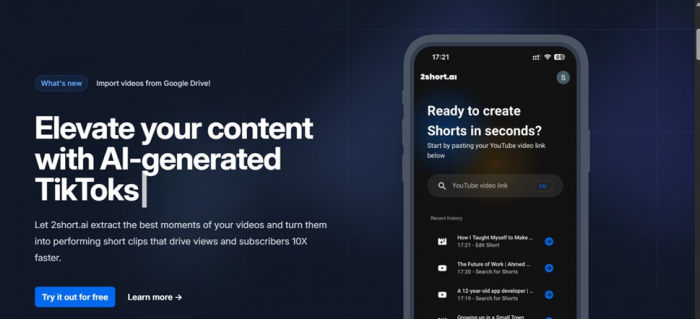
The homepage leads with the core promise and a paste-a-link box, with a phone mockup showing recent clip history.
My observation The pitch is clear and on-message: drop a YouTube link, get Shorts. The phone mockup with a “recent history” list implies a fast, repeatable loop, and a “What's new” note about Google Drive imports signals the product is still being worked on. You see the input before you scroll, so the path in looks effortless. |
Into the dashboard, choosing the clip maker
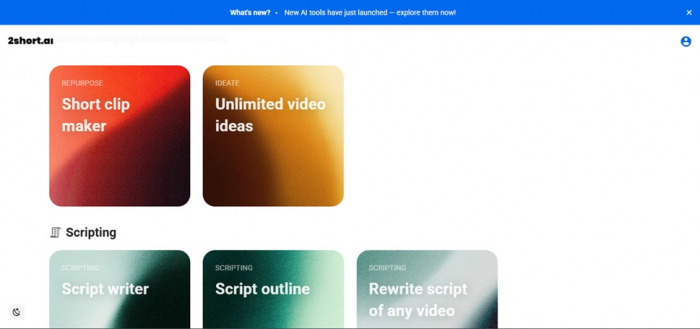
After “Try it out for free,” the dashboard fans out into Repurpose, Ideate, and Scripting tools.
My observation This was a pleasant surprise. 2short isn't only a clipper anymore; it is growing a small suite, a clip maker, an idea generator, and three scripting tools, grouped by job with colour-coded cards. I went straight for the headline feature, the Short clip maker. |
10:00+ · STALLED
The clip maker spins, and keeps spinning
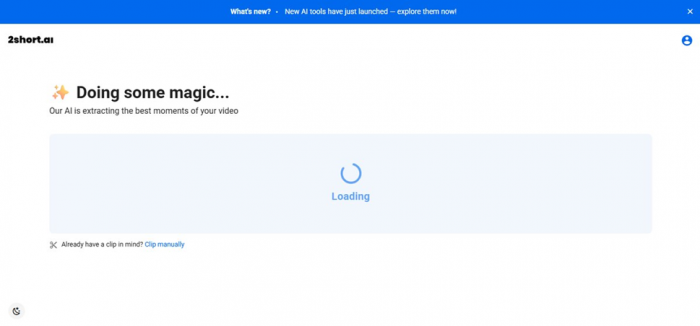
“Doing some magic” appeared and then never resolved; ten minutes later it was still loading.
My observation Here is where my run came undone. After I pasted a YouTube link, the extractor opened a “Doing some magic” screen and then simply kept spinning, past ten minutes, with no clip and no error message. The “Clip manually” escape hatch is a thoughtful touch, but the automatic flow, the entire reason to use the tool, never delivered for me. It could have been the signed-out attempt, a video without usable captions, or server load, yet a silent ten-minute hang is a rough first impression. |
SWITCH
Trying the Script writer instead
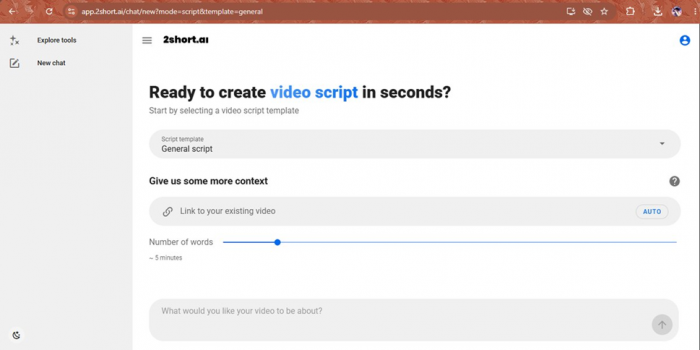
The Script writer setup: choose a template, optionally add a reference link, set a length, describe the topic.
My observation With the clipper stuck, I jumped to the Script writer to see whether the newer tools behaved better. The setup is clean: pick a script template, optionally drop in a reference video, set a length with a simple slider (about five minutes), then describe what you want. It reads like a focused, modern writing assistant rather than an afterthought. |
GATE
The login wall
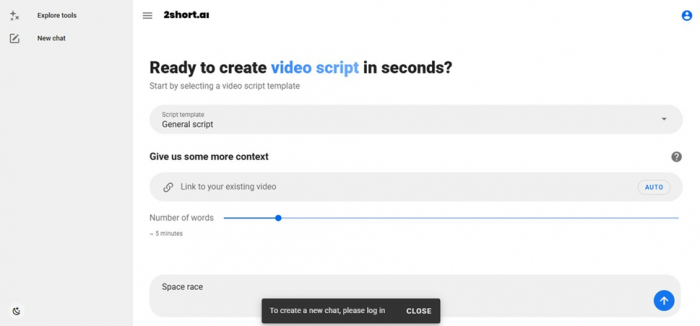
Typing a topic and pressing go produced a “please log in” banner before anything generated.
My observation And there is the gate. The moment I typed a topic (“Space race”) and hit go, a banner asked me to log in before it would create anything. That is a fair ask, most tools require an account to generate, but paired with the stalled clipper it meant I finished the session without producing a single clip or script on the free, signed-out path. |
Hits and Misses
The honest summary is mixed. The promise, the interface, and the surprisingly broad toolset all landed well, and the homepage history strip suggests plenty of people run clips here without trouble. But in my session the core clip maker hung and the script tool gated behind a login, so I could not judge the output quality first-hand on the free path.
I am weighting that as a reliability and onboarding caution, not a final word on the whole product. Independent user ratings are positive (more on that below), which tells me the extractor usually works. To fully evaluate it, plan on signing in and feeding it a public video that already has captions, rather than expecting the signed-out flow to deliver a finished clip.
The features that matter
Automatic highlight detection
The headline act: point it at a long video (YouTube link, public URL, or Google Drive import) and it finds the segments most likely to perform, then cuts them into shorts. It is tuned for spoken-word formats and depends on the source having captions.
Animated captions and face tracking
Clips come with auto-transcribed, customizable animated subtitles, and the AI keeps the speaker centered when reframing landscape footage to vertical 9:16, which matters for talking-head content.
Aspect ratios, brand presets, and exports
You get vertical, square, and horizontal outputs, plus brand presets for logos and colours. Paid plans export up to 1080p with no watermark; the editor itself is caption-focused rather than a full production suite.
Languages and the new script tools
It supports roughly two dozen languages, and the recently added idea generator and script writer extend it from pure clipping toward planning and writing, though, as I found, those require an account to run.
2short.ai pricing
There is a free tier and three paid plans. The plans differ mostly by how many hours of AI video analysis you get each month and how fast your exports are. Prices are in US dollars and can change; annual billing lowers the monthly rate.
| Plan | Price | AI analysis / month | Exports | Notable |
|---|---|---|---|---|
| Free (Starter) | $0 | 30 minutes | View and export generated clips | All features; ads |
| Lite | $9.90 / mo | 5 hours | 60 min fast server-side | Google Drive + URL import; no ads |
| Pro | $19.90 / mo | 15 hours | Unlimited fast exports | For regular creators |
| Premium | $49.90 / mo | 50 hours | Unlimited | Priority support, beta access |
No plan offers truly unlimited clip generation; every tier is capped by monthly analysis hours. Figures reflect the published USD rates at the time of writing and may differ by region or change over time.
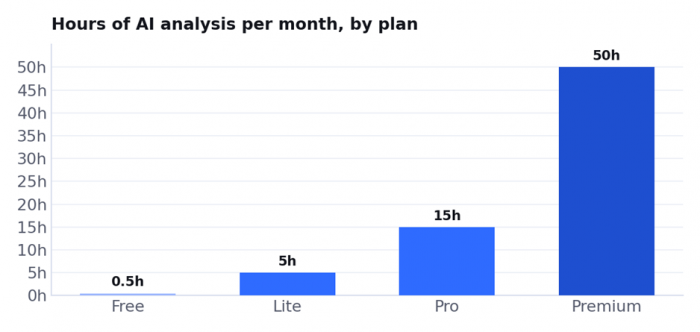
The jump from Free to Lite is the big one (half an hour to five hours). After that you are mostly buying more hours and faster exports.
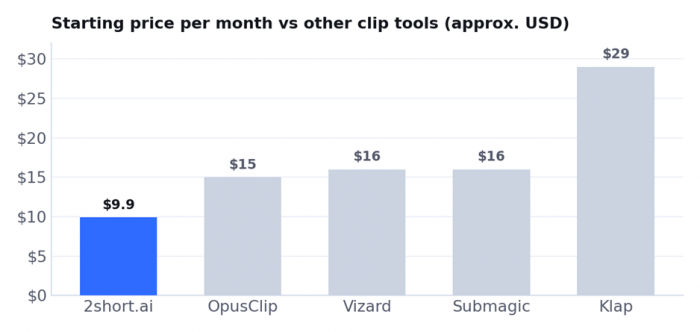
Approximate entry prices in US dollars; most are cheaper on annual billing. 2short.ai is one of the lower-cost ways into AI clipping. Always check current pricing before buying.
2short.ai pros and cons
What I liked
• Dead-simple start: paste a YouTube link or import from Google Drive and go
• Auto animated captions, face tracking, and multiple aspect ratios out of the box
• Cheap entry at $9.90/mo, with a free tier to test first
• More than a clipper now: idea and script tools are bundled in
• 1080p exports with no watermark on paid plans
• Handles roughly two dozen languages
What held it back
• In my test the clip maker hung past ten minutes and produced nothing
• Generating clips or scripts requires an account
• The AI can miss context and pick weak moments (per user reviews)
• The editor is caption-focused, not for real editing
• Every plan caps your monthly analysis hours; no unlimited tier
• Only works from existing footage; commercial use depends on source rights
What real users say
2short.ai has a small but positive footprint on review sites. On G2 it averages about 4.5 out of 5, though from only a handful of reviews, so treat it as directional rather than statistically solid. The themes are consistent: reviewers love how fast it is and that it removes the need for a separate editor, with one calling it “super fast when it comes to breaking down a video into shorts.” They also praise the easy setup, the captions and branding options, and responsive support.
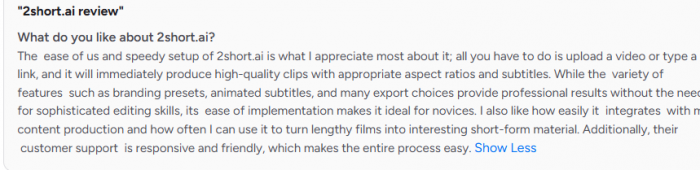
The criticisms line up with what you would expect, and with my own run. Several note the AI sometimes misjudges a video, with one saying it “sometimes just doesn't understand context of video and gives bad reels,” which then needs manual cleanup. Others mention that clip-to-clip transitions can feel abrupt and that every plan caps your hours, so there is no truly unlimited option. It is a small sample, but it squares with a tool that is quick and handy when it works, and occasionally needs a human to finish the job.

2short.ai vs the alternatives
2short.ai sits in a busy category. If its limits matter to you, here is where the main rivals differ, and where 2short.ai stays competitive on price.
| Tool | Best for | From (USD) | How it compares to 2short.ai |
|---|---|---|---|
| OpusClip | The market-leading AI clipper | free; ~$15/mo | More mature, with clip ranking and a bigger free quota; pricier |
| Vizard | Clipping with a generous free plan | free; ~$16/mo | Similar idea, often more free minutes; comparable editor |
| Submagic | Caption-first short-form polish | ~$16/mo | Stronger captions and B-roll; less about auto-finding clips |
| Klap | Hands-off YouTube to Shorts | ~$29/mo | Similar output; no free export and a higher price |
| Creatify / Pexo | Generating original video and ads | ~$9 to 19/mo | A different category: they create new video from a URL or script rather than clip existing footage |
Prices are approximate starting points and change often; several are cheaper on annual billing. Use this as a directional comparison.
Who 2short.ai is, and isn't, for
It is a strong fit for spoken-word creators sitting on long-form footage: podcasters, interviewers, educators, and commentary YouTubers who want cheap, fast clips with captions and don't want to learn an editor. At $9.90 a month, it is one of the lowest-risk ways to start repurposing.
It is a weak fit if you need original or generated video for ads and campaigns (look at Creatify or Pexo), heavier editing and production (CapCut, Filmora, or Veed), rock-solid reliability at volume or the polish of the category leader (OpusClip), or if you simply don't have long-form source video you own the rights to.
My verdict
2short.ai lands at 3.8 out of 5 for me. The concept is sound, the interface is friendly, the price is low, and the toolset is quietly widening from clipping into ideas and scripts. What pulls my score down is my own experience: a clip run that stalled past ten minutes and a login gate before anything would generate, on top of the usual repurposing limits (you need captioned footage you have the rights to). Independent users rate it higher, which suggests the extractor normally works, so I would frame this as “promising and cheap, but test it yourself before relying on it.”
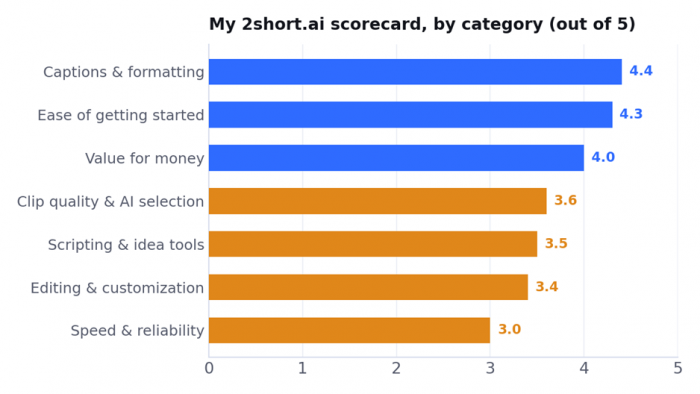
Captions, ease, and value carry the score; speed and reliability drag it down after my stalled session.
Pay for it if: you regularly turn long spoken-word videos into Shorts and want the cheapest capable option with captions and face tracking. Lite at $9.90/mo is a low-risk start.
Stay on free if: you just want to test the idea. The 30-minutes-a-month tier is enough to try it on a captioned, public video before paying.
Look elsewhere if: you need original generated video (Creatify, Pexo), the ranking and polish of the leader (OpusClip), or heavier editing (CapCut, Filmora, Veed).
Post Comments
Be the first to post comment!