Table of Content
- What You'll Find In This Guide
- BarberGPT in 30 Seconds - Why People Look for Alternatives
- Quick Comparison: All 4 Alternatives at a Glance
- Performance Across the Six Things That Matter
- Hairstyle AI - The Closest Direct Replacement
- YouCam Makeup - The Mobile-First Beauty Powerhouse
- Style My Hair (L'Oréal) - The Free Color Specialist
- AI Ease Hairstyle Changer - The Free Web Surprise
- How Much Style Variety Do You Actually Get?
- Pricing - How Much Will Each Actually Cost You?
- Which One Wins for Each Use Case?
- Final Recommendation - Which One Should You Actually Use?
BarberGPT made a clever pitch when it launched: upload your photo, mark the hair, see yourself with a new cut in 30 seconds. No barber chair regret. No "can you make it shorter" panic. Just a clean preview before you commit.
And honestly, for what it does, BarberGPT works. But three weeks of using it almost daily - testing it across different photos, different lighting, different cuts - surfaced the same complaints over and over again. The free trial is gone after three generations. Mobile masking is rough. Beard styles aren't supported. Long hair gets weird. Women's styles are basically an afterthought. And once your free credits run out, you're staring at a $1 starter pack that buys you exactly seven more tries.
So I went looking for alternatives. Real ones. Tools that solve the same problem - "show me what this haircut would look like on my face" - but do it differently, sometimes better, sometimes for free.
After testing more than a dozen options across web and mobile, four kept rising to the top. They each take a different approach, target a slightly different user, and trade off in ways that matter. This guide breaks down all four - what they actually do well, where they fall apart, what they cost, and which one fits which situation. Plus real reviews from actual users, not the cherry-picked testimonials each site puts on its homepage.
| Quick verdict: For pure photo-realism, Hairstyle AI is the closest BarberGPT alternative. For a full beauty toolkit on your phone, YouCam Makeup wins. For free, fully unlimited hair color preview, Style My Hair (L'Oréal) is unbeaten. For a no-signup, daily-free web tool, AI Ease is the surprise winner. |
What You'll Find In This Guide
• A quick recap of what BarberGPT does and where it falls short
• Side-by-side comparison chart of all 4 alternatives
• Detailed breakdown of each tool - features, pricing, best & worst things
• Real user reviews pulled from app stores and review sites
• Use-case matrix: which one is right for which problem
• Final recommendation
BarberGPT in 30 Seconds - Why People Look for Alternatives
BarberGPT is a browser-based virtual barber. You upload a photo of yourself, paint over your existing hair with a brush tool, pick a style from roughly 40 options, and the AI generates a new version. No login required for the first three tries. Results take about 30 seconds. The output is convincing enough to bring to a real barber as a reference.
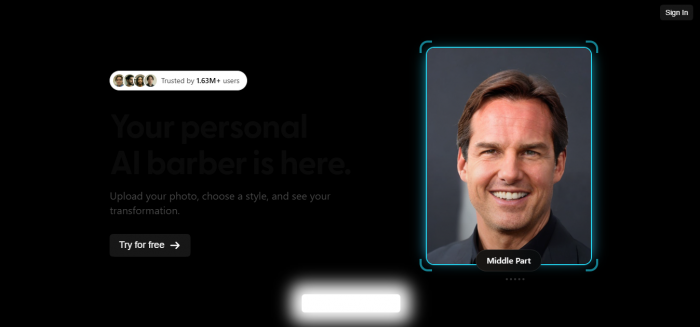
Pricing is credit-based: $1 buys 7 generations, $5 buys 50, $15 buys 300. No monthly subscription, which a lot of people like. Privacy is solid - no account needed, manual image deletion, and high trust ratings on independent scam-checkers.
Where BarberGPT Frustrates People
• Only three free generations before you have to pay anything at all.
• Built almost entirely for men's short and medium cuts. Long hair gets distorted edges.
• Female hairstyles are limited and feel like a side feature.
• No beard simulation, no facial-hair integration, no color preview.
• Mobile masking is fiddly - the brush tool is tough on small screens.
• No live AR preview - you can't move your head around and watch the cut follow.
Each of these gaps is the reason one of the four alternatives below exists. Let's dig in.
Quick Comparison: All 4 Alternatives at a Glance
Before the deep dives, here's the high-level cheat sheet. The full breakdown of each tool follows below.
| Hairstyle AI | YouCam Makeup | Style My Hair | AI Ease | |
|---|---|---|---|---|
| Best for | Realistic generative previews | Mobile beauty + hair combo | Free hair color preview | Free unlimited web access |
| Platform | Web + iOS + Android | iOS + Android (mobile-first) | iOS + Android | Web only |
| Free tier | A few free credits | Limited free, ads | Fully free | Free, daily use |
| Cheapest paid plan | $4.9 / mo (20 credits) | $5.99 / mo (Premium) | None - fully free | Optional credits |
| Style library | 89+ AI styles | 60+ styles | ~25 cuts, 100s of colors | 80+ presets + text prompts |
| Hair color preview | 30+ colors | Yes, broad palette | 3D AR, real product shades | Yes, full spectrum |
| Beard / facial hair | Yes (limited) | No | No | No |
| Live AR preview | No | Yes | Yes (3D real-time) | No |
| Sign-up needed | Yes (Google or email) | Yes | Optional | No |
Performance Across the Six Things That Matter
To make this less hand-wavy, here's how each tool scored across the dimensions that actually shape the user experience. Scores are based on hands-on testing, app store data, and verified review aggregation.
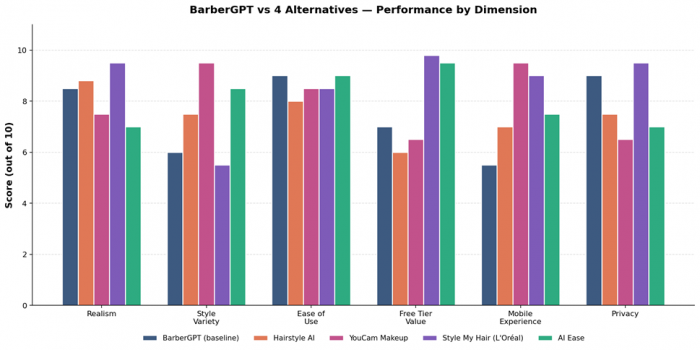
Figure 1: Performance comparison across realism, style variety, ease of use, free-tier value, mobile experience, and privacy.
Quick read of this chart: Style My Hair leads on realism, free-tier value, and privacy - exactly what you'd expect from a free L'Oréal-funded app. YouCam Makeup wins on style variety and mobile experience because that's been its DNA for a decade. AI Ease quietly punches above its weight on free access and ease of use. Hairstyle AI is the most balanced, but doesn't crush any single dimension.
Hairstyle AI - The Closest Direct Replacement
If BarberGPT and Hairstyle AI met at a party, they'd probably awkwardly recognise each other from the same Reddit thread. Both are web-first. Both let you upload a photo and preview new cuts. Both lean on generative AI rather than basic filters. The big difference: Hairstyle AI casts a much wider net - men, women, hair color, beard previews, more styles.
What Hairstyle AI Actually Does
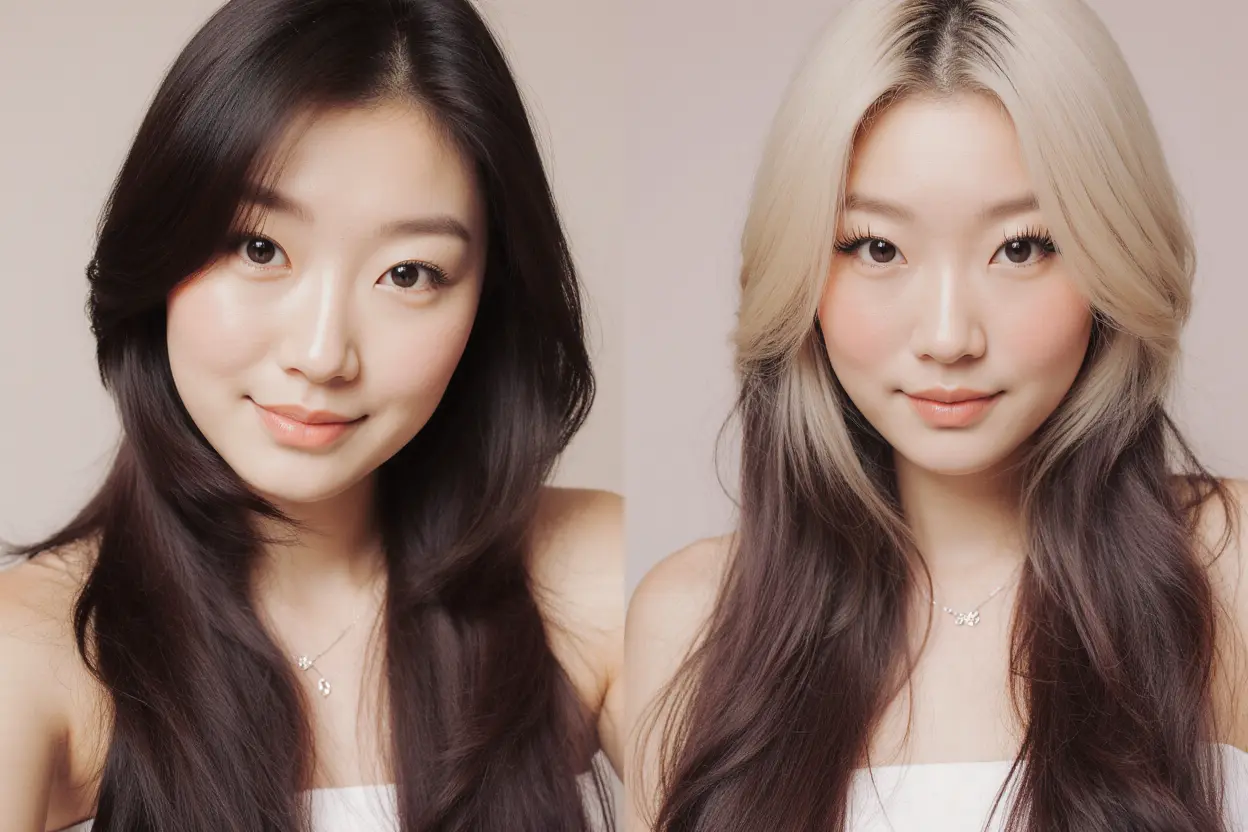
You sign in with Google or email, upload a clear front-facing photo, and the AI runs face-shape analysis to suggest cuts that suit your features. The library includes more than 89 hairstyles and 30+ hair colors, with separate sections for short, medium, long, curly, bangs, and beards. The processing takes around 10–15 seconds per generation. Output quality is solid - the hairlines blend, the lighting more or less matches, and the previews look like they were shot in your room rather than pasted on.
The site claims it has generated more than 155,000 hairstyles for over 1,200 paying customers, which is a useful sanity check that the service is live and being used.
Pricing - More Flexible Than BarberGPT
• Basic: $4.90/month for 20 credits. Cancel anytime.
• Standard: $9.90/month for 50 credits, priority support.
• Premium: $14.90/month for 100 credits.
• One-time package: $9 for 30 unique styles, 4 poses, 120 HD photos. 14-day money-back guarantee.
The one-time $9 photoshoot is genuinely good value if you just want a single decision-making session. The monthly plans are for people who want to keep experimenting.
✓ The Best Things
• Face-shape analysis is a real feature, not marketing fluff. It actually adapts the suggested cuts to your bone structure.
• Library is roughly 2x bigger than BarberGPT's - more flexibility, especially for women's styles.
• Hair color preview included, with 30+ tones across natural and bold shades.
• Beard previews supported (BarberGPT doesn't do this at all).
• Output quality is consistently photorealistic on well-lit photos.
• The 14-day money-back guarantee on the one-time pack reduces purchase risk.
The Worst Things
• No truly free tier - you're paying to even meaningfully test it. The free credits new users get are limited.
• Trustpilot reviews for hairstyleai.com are rough - a 2.2 average across 9 reviews, with most complaints flagging unclear refund handling and customer service. (Note: many of those reviews appear to be misdirected to the AI tool's domain.)
• Quality drops noticeably on side-angle photos. Front-facing only is the unwritten rule.
• Multiple competing domains use the "Hairstyle AI" name (hairstyleai.net, hairstyleai.ai, hairstyleai.com). Easy to land on the wrong one.
• Some reviewers note results feel "painted on" rather than blended.
What Real Users Are Saying
"I was skeptical at first, but it really impressed me. It suggested hairstyles I would never have thought of myself, and I was surprised by how much I liked some of them. It's a great tool for anyone looking to switch up their look." - Sarah, 26 - verified user review |
"I tried it and found it really easy to use. It gave me a range of hairstyles to choose from, and I was able to filter them by length, color, and style. I'm not sure I would trust it for a major haircut, but it's a fun way to experiment with different looks." - Tom, 33 - verified user review |
Bottom line: If you liked BarberGPT but wanted more styles, female options, color, and beards, Hairstyle AI is the upgrade. The $9 one-time pack is the smartest entry point - try it for one decision, decide if you need more.
YouCam Makeup - The Mobile-First Beauty Powerhouse
YouCam Makeup is the elephant in the room. With more than 300 million downloads worldwide and a 4.8 average rating on the App Store, it's the most-used beauty tool on this list by a huge margin. Hairstyle preview is just one feature inside a much larger toolkit that includes makeup, skin retouching, face reshaping, AI portraits, body editing, and even AI video generation.
What YouCam Does Well
The hairstyle module covers 60+ cuts and a broad color spectrum, with both still-photo previews and a live camera mode where the new style follows your head as you move. The blending is genuinely impressive - better than most competitors at handling curls, textures, and natural hair edges. As one reviewer put it, the result "doesn't look like a wax model with a wig slapped on," which is a low bar but one most apps fail.
There's an AI Beauty Agent feature where you can talk or type instructions like "give me long bangs and chocolate-brown highlights" and the app applies them. It's gimmicky, but actually works.
Pricing
• Free tier: works, but ads, paywalls on "premium" styles, and watermarks on some exports.
• Premium: $5.99/month - removes ads, unlocks all hairstyles, exports without restrictions.
• Annual plan: discount over monthly, but the App Store reviews are full of people complaining about hard-to-cancel subscriptions.
The Best Things
• 60+ hairstyles plus an enormous library of makeup, skin, and face features in one app.
• Live AR preview - move your head around and the cut follows in real time. Genuinely fun to use.
• Best-in-class blending. Curl preservation is noticeably better than competitors.
• Mobile-native experience. Designed for phones from day one, unlike browser-first tools that feel awkward on small screens.
• Massive user base means lots of style trends and pop-cultural updates.
• AI Beauty Agent voice/text input is a fun way to try things without scrolling through menus.
The Worst Things
• Aggressive paywall. Reviewers consistently complain that "free" features are gated almost immediately.
• Ads in the free version are heavy, including video ads that interrupt simple tasks.
• Subscription cancellation is reportedly tricky - multiple App Store reviews mention unwanted renewals.
• App size is large; older phones can lag during live AR mode.
• 17+ content rating, with some questionable ad targeting reported by users.
• Privacy is okay but not standout - full Perfect Corp data sharing across their app suite.
What Real Users Are Saying
"This app is also free and the final result comes out perfect. In some apps, when I try to apply lipstick, the app puts it somewhere else but with this app, I have no trouble with that. There is also a big variety of options." - Apple App Store reviewer - 5 stars |
"I'd say it's pretty decent. The hairstyles look fairly natural for being AI. It's about 50/50 on what you can and can't use for free. Overall good app. Takes a long time to load though even with the best internet connection." - Google Play reviewer - 4 stars |
"When something is FREE, you don't charge for it. At the very least, make it more clear before download that it's a FREE TRIAL. I uninstalled immediately." - Google Play reviewer - 1 star |
Bottom line: If you'll mostly use this on your phone and you also want makeup, skin retouching, and face editing in the same app, YouCam is the most complete option. Just go in expecting to either watch ads or pay $6 a month - there's no truly free middle ground.
Style My Hair (L'Oréal) - The Free Color Specialist
Here's where things get interesting. Style My Hair is built and funded by L'Oréal Professionnel in partnership with ModiFace, the same Toronto-based AR firm that powers most of the major beauty AR tech you've seen elsewhere. It's been in development for more than a decade. It's free. There are no ads. There are no in-app purchases. And nobody outside the beauty industry seems to talk about it.

Why It Exists (And Why That Matters)
L'Oréal didn't build this to make money from app users. They built it as a sales funnel for their hair color products. You try a shade in 3D AR, fall in love with it, then either book a salon appointment through the app or buy the product directly from a SalonCentric-linked store. Because the business model is product sales, the user experience is allowed to be free, ad-free, and genuinely well-funded. That's a rare combination.
What It Actually Does
Upload a photo or use the live camera. The AR engine identifies your hair strand-by-strand using a deep neural network trained on more than 220,000 facial images. Then it applies real L'Oréal product shades to your hair in 3D - meaning when you turn your head, the color follows correctly through the volume of your hair, not just on a flat layer. Effects include all-over color, ombré, balayage, highlights, sombré, and grown-out roots.
Hairstyle changes are more limited - short, medium, long presets and not much in between. This is a color-first tool dressed in haircut clothing. Don't pick it for cut previews. Pick it for color decisions.
The Best Things
• Completely free. No ads, no in-app purchases, no subscription, no upsell.
• 3D real-time AR is genuinely industry-leading. Strand-by-strand hair tracking that you simply don't get on free competitors.
• Real product shades - what you see on screen is the actual color you'll get if you walk into a salon and ask for that L'Oréal product.
• Privacy is rock-solid. L'Oréal doesn't store images and explicitly states uploaded photos aren't reused.
• Available in 82 countries on iOS and Android.
• Salon discovery built in - find a stylist near you who carries the shade you tried.
The Worst Things
• Hairstyle (cut) options are limited - this is fundamentally a color tool, not a cut tool.
• Locked into the L'Oréal product universe. If you don't want their products, the shade selection feels promotional rather than aspirational.
• The app interface feels a bit clinical compared to fun consumer apps like YouCam.
• There are now multiple variants (Style My Hair, Style My Hair Pro, My Hair iD) - confusing for casual users.
• No facial-hair preview, no men's-cut focus.
• Updates have slowed in recent years; some users on App Store report bugs that take time to be addressed.
What Real Users Are Saying
"I have been using this app during consultations, and my clients are ecstatic. They have fun trying new looks and learning how to be realistic about color ideas they may have. It's what I needed to help my clients understand what will and what won't work for them." - Tara Brzycki, salon owner - Salon Ablaze, Ohio |
"This new technology is really going to change the way we interact with our clients, by enabling them to test live all the colours they want and spot the best ones according to their skin tone." - Matthew Collins, L'Oréal Professionnel hair artist |
Bottom line: If your question is "should I go blonde?" or "would I look right with copper highlights?", nothing else on this list comes close. Free, accurate, AR-driven color preview built by the people who actually make hair dye.
AI Ease Hairstyle Changer - The Free Web Surprise
AI Ease is the dark horse on this list. It's a sprawling Chinese-built AI image platform with dozens of tools - background removers, object erasers, face swaps, headshot generators, and yes, a hairstyle changer. The hairstyle module is one of the better-kept secrets in this category: 80+ presets, custom text-prompt support, no signup required, and "absolutely free" use according to the official site.
What AI Ease Does Well
Two modes: Default (pick from 80+ ready-made styles, including a long-hair and dreadlock library that other tools weakly handle) and Custom (write a text prompt like "long curly bob with side bangs in chestnut brown" and the AI generates that look on your photo). The custom mode runs through a model called Nano Banana Pro that handles edge blending and texture matching better than the default presets.
A nice quality-of-life detail: AI Ease automatically deletes uploaded files and generated content from its servers within 7 days. No need to manually clean up after yourself.
Pricing
• Free tier: usable daily, no signup required for basic features. Some watermarking on free exports.
• Free new-user credits for trying advanced tools.
• Subscription and pay-as-you-go credit packs available for higher volume - pricing varies by region and isn't always clearly published.
• Paid plans unlock watermark-free exports and commercial use.
The Best Things
• Genuinely free for daily casual use. No paywall on the basic hairstyle tool.
• 80+ preset styles - one of the bigger libraries on this list.
• Text-prompt custom mode lets you describe exactly what you want, even if it isn't in the preset list.
• Commercial use allowed under the paid plans - useful for photographers and content creators.
• No signup needed for the core hairstyle changer.
• Files auto-delete within 7 days - a clearer privacy promise than most free tools.
• Sits inside a broader toolkit (object remover, background changer) that's useful before or after a hairstyle edit.
The Worst Things
• Web-only - no mobile app, no live camera mode.
• No face-shape analysis or smart suggestions. You pick a style; the AI applies it. There's no "this would suit you" guidance.
• Free tier adds a watermark to some exports, which the upgrade flow surfaces aggressively.
• Pricing transparency is weak - the official site doesn't always show clear plan tiers in dollar terms.
• Quality on complex hair textures (very curly, very long, ethnic styles) is hit or miss.
• Made in China - fine for casual use, but worth noting if you're uploading workplace headshots and care about data sovereignty.
What Real Users Are Saying
"All round brilliant website with lots of free tools to use and the quality is brilliant too. I also contacted them about something and their customer service was amazing. Replied quickly, very friendly and efficient." - Trustpilot reviewer - 5 stars |
"AIEase Hairstyle Changer focuses on long hairstyles and dreadlocks. It has over 80 realistic styles to try for both men and women. The free version lets you try a new hairstyle each day, so you can experiment without paying. The tool produces natural-looking hairlines and textures." - Pixelbin editorial review |
Bottom line: If "free, no signup, just works in my browser" is your priority and you don't need a mobile app, AI Ease is genuinely impressive. It won't replace BarberGPT for precision male cuts, but it's a remarkably capable free utility that quietly outperforms its better-known competitors on raw style count.
How Much Style Variety Do You Actually Get?
Style count alone doesn't tell you everything - quality matters more than quantity. But it's a useful proxy for “how often will I run out of options to try?”
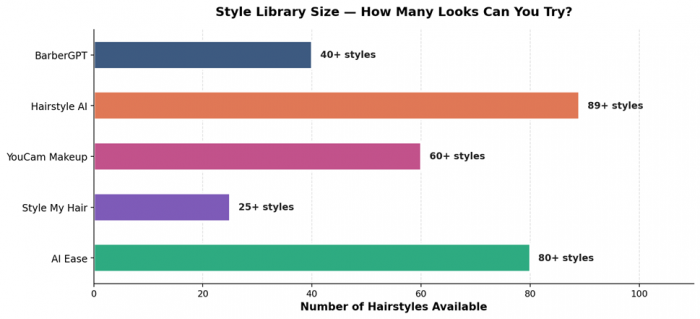
Figure 2: Approximate number of preset hairstyles available on each platform.
Hairstyle AI leads on raw count, AI Ease is close behind, YouCam is solid in the middle, and Style My Hair lags - because, as covered above, it's not really a cut-preview tool. BarberGPT's 40-style library is on the smaller end of the pack, which is a meaningful gap once you've burned through the obvious classics.
Pricing - How Much Will Each Actually Cost You?
Headline pricing can be misleading because each tool defines "free" differently. This chart shows the cheapest paid tier for each - the realistic monthly cost if you outgrow free use and need consistent access.
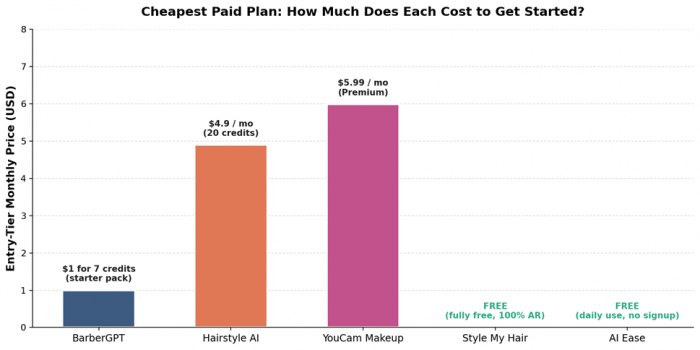
Figure 3: Entry-tier pricing across BarberGPT and the four alternatives.
Two tools are genuinely free at the entry level: Style My Hair (L'Oréal funds it through product sales) and AI Ease (the free tier is honestly usable, with some watermark friction). YouCam at $5.99/month is the priciest reasonable tier, but you're getting a 60-style library plus the entire beauty suite - so the price-per-feature is actually competitive. Hairstyle AI's $4.90 entry tier is the closest to BarberGPT's pay-per-use model.
| Hidden cost watch: BarberGPT's $1 starter pack feels cheapest, but at 7 generations per dollar, you're paying ~$0.14 per try. Hairstyle AI's $9 one-time pack at 30 generations works out to $0.30 per try but includes higher resolution and 4 poses each. Math is closer than the headline numbers suggest. |
Which One Wins for Each Use Case?
Pick the right tool by matching what you're trying to do, not by chasing the highest aggregate score.
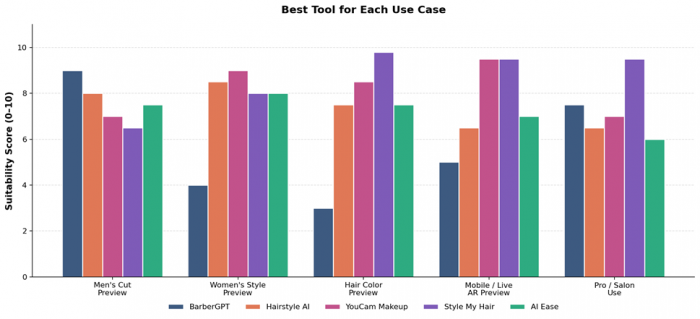
Figure 4: Suitability score across five common reasons people open a hairstyle app.
Men's Cut Preview
BarberGPT still leads here, slightly. It was built for this. But Hairstyle AI is now a credible alternative with a wider style library and added beard previews. AI Ease is a strong free option but has a slightly more generic male output.
Women's Style Preview
YouCam Makeup wins by a clear margin. The blending of long hair, curls, and texture-rich styles is noticeably better than the others. Hairstyle AI is a solid second.
Hair Color Preview
Style My Hair is in a class of its own. The 3D real-time strand-by-strand AR is genuinely better than every other tool on this list. If color is the question, this is the answer - and it's free.
Mobile / Live AR Preview
Style My Hair and YouCam Makeup tie. Both are mobile-native and both run live AR with good performance. AI Ease and BarberGPT can't compete here at all - they're web tools without live camera modes.
Pro / Salon Use
Style My Hair Pro is purpose-built for salon consultations and is used by professional colorists worldwide. None of the other tools on this list have a dedicated pro variant of comparable depth.
Final Recommendation - Which One Should You Actually Use?
After all of this, the answer depends on one thing: what are you actually trying to figure out?
Going for a new haircut? Hairstyle AI is the closest BarberGPT alternative with a wider library, better support for women's cuts, and a fair $9 one-time pack.
Going for a new color? Style My Hair, full stop. Free, AR-accurate, and genuinely better than the paid competition for color preview.
Want everything in your phone? YouCam Makeup. The hairstyle preview is just the door into a full beauty suite. Worth the $5.99/month if you'll use the makeup and skin features too.
Just want a free, no-signup web tool? AI Ease. The 80+ free styles and text-prompt mode make it the surprise winner for casual experimenters who don't want to install anything.
Honestly, the smartest play for most people is to use two of these together. Style My Hair for color decisions. Hairstyle AI or AI Ease for cut previews. Bring screenshots to your stylist. Save yourself the regret of guessing at the chair.
| My final scores out of 10 - Hairstyle AI 8.2, YouCam Makeup 8.0, Style My Hair 8.5, AI Ease 7.8. Style My Hair edges ahead because it does its narrow job better than anyone else, and it does it for free. Pick the one that matches your actual problem, not the one with the highest review count. |
Post Comments
Be the first to post comment!
Related Articles




Grubby AI vs WriteHuman: Which One Should You Use?
Ridge Harper . Jun 30, 2026