AutoDraft AI and Runway ML both promise to turn your ideas into visuals, but they sit at opposite ends of the AI creation world. One is a cheap, all-in-one cartoon studio. The other is a premium, cinematic video engine used by filmmakers. I tried to actually make something with each, starting from an aesthetic-anime idea, and both stopped me at the same place: a subscription wall. Here is what happened, what real reviewers say, and which one is worth your money.
AutoDraft AI is a budget all-in-one creator studio (autodraft.in, by ALLBOTS Technologies). Image generation, AI voiceover, story writing, and a basic video pipeline, aimed at YouTube story and kids channels. (Output: stylized images, audio, simple video)
Runway ML is a professional AI video platform (New York, backed by Google and Nvidia). Cinematic text- and image-to-video on the Gen-4.5 engine, plus the Aleph editor, built for filmmakers and studios. (Output: cinematic video, up to 4K)
The short answer
They are not really competitors. They are different tools for different jobs and budgets, so pick by what you are making and what you can spend. The one thing they share, in my test, is a paywall that lands the moment you click Generate.
AutoDraft AI. A cheap, friendly cartoon studio with a genuinely deep toolset and smart character consistency. But the free tier ran out before my first image, and paying users report slow, failed generations. Best for: budget cartoon and character drafts for YouTube. Runway ML. The benchmark for cinematic AI video, with Gen-4.5 ranked number one on the Video Arena leaderboard. But credits vanish fast, failed generations still cost money, and it is pricey. Best for: professional, photoreal video when quality is non-negotiable. |
Two tools, worlds apart
Both call themselves AI creation tools, but one is a budget all-rounder and the other a premium video specialist. They barely overlap in price, audience, or output. Here is the quick identity check before we get into the test.
AutoDraft AI Budget all-in-one studio
| Runway ML Pro AI video platform
|
The spec sheet
| AutoDraft AI | Runway ML | |
| Category | Budget all-in-one studio | Pro AI video platform |
| Primary output | Stylized images & audio | Cinematic video (4K) |
| Flagship | Custom-model character consistency | Gen-4.5, number one on Video Arena |
| Core strength | Breadth and low price | Cinematic quality and editing |
| Realism | Cartoon and stylized, not photoreal | Photoreal and cinematic |
| Free tier | ~20 to 30 credits, ran out fast | 125 credits, then a wall |
| Paid from | $10/mo | $12/mo (annual) |
| Learning curve | Beginner-friendly | Intermediate to advanced |
| Watch out for | Slow warm-ups, failed gens, email-only support | Credits vanish fast, no rollover, no refunds |
| Reviewer score | 3.4/5 hands-on test | 4.4/5 pro reviews (harsher with users) |
What each one is actually good at
Six dimensions, scored on my test and across aggregated reviews. They sit almost mirror-image apart: Runway wins on quality and cinematic video, AutoDraft wins on breadth, price, and beginner-friendliness. Notice the one place they agree, at the bottom.
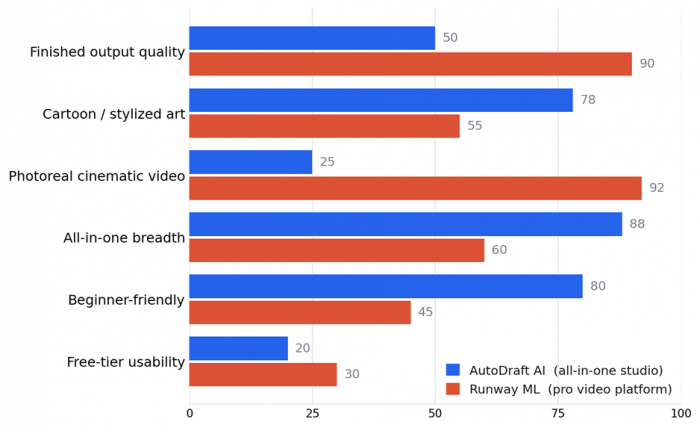
Relative scores (0 to 100), my read from this hands-on test combined with aggregated reviews. Not a lab benchmark, just a directional picture of where each tool's strength sits.
I put both to the test
Here is the setup: I started from one idea, an aesthetic anime scene, and tried to actually make it in each tool. AutoDraft is a broad studio, so I went into its image generation. Runway is a video engine, so I used its Multi-Shot Video feature with a full cinematic prompt. In both, I got further than expected, and then hit the same wall.
Round 1: AutoDraft AI, the all-in-one studio
I opened AutoDraft's Image Generation and landed on its AI Models gallery. The styles have strong, appealing sample art, and Aesthetic Anime is the one that caught my eye. The full step-by-step, from forced signup through onboarding, the dashboard, picking a model, and writing a prompt, is in my separate AutoDraft review. Every screen was polished, right up to the moment of payoff.
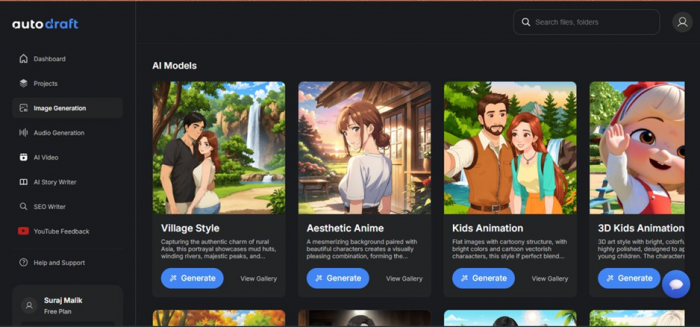
The AI Models gallery. Aesthetic Anime is the style I wanted to try, with Village Style, Kids Animation, and 3D Kids Animation alongside it.
Then, the very first time I clicked Generate, the credit meter read zero and this subscription wall appeared:
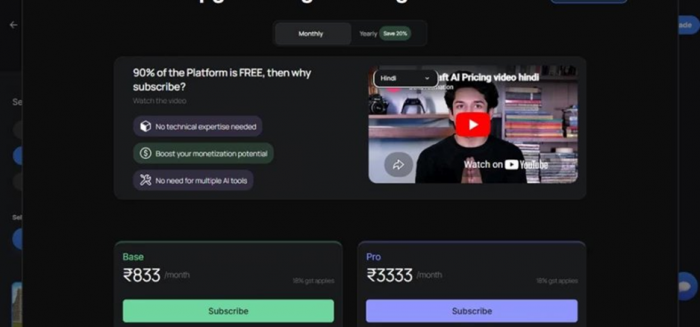
The AutoDraft paywall. “Ninety percent of the platform is free, then why subscribe?”, a Hindi explainer video, and Base and Pro plans priced in rupees plus GST (AutoDraft localizes pricing by region).
◆ My observation
AutoDraft makes you want to create. The dashboard is one of the cleanest I have used and the style gallery is genuinely exciting. But I did everything right and still could not generate a single image on the free tier.
To its credit, the pricing page is honest: ninety percent of the platform is free, it says, with a Hindi explainer and clear Base and Pro cards. But the wall lands at the exact moment you expect a result, not before. Stack on the steady complaints from paying creators about slow warm-ups, failed generations, and slow email-only support, and it is a lovely start with a frustrating finish.
Round 2: Runway ML, Multi-Shot Video
For Runway I logged in and opened Multi-Shot Video, which promises a full multi-shot clip from a single prompt. I set it to 16:9, 720p, 10 seconds, audio on, and wrote out a detailed cinematic anime scene with five shots.
Prompt · Runway Multi-Shot Video
Aesthetic anime girl walking alone on a rainy city street at night, neon lights reflecting on the wet road, soft cinematic lighting, dreamy atmosphere. Shot 1: Wide shot of the rainy neon city street with glowing signs and reflections. Shot 2: Close-up of raindrops falling on her umbrella and hair. Shot 3: Side view as she slowly walks past bright shop windows. Shot 4: Close-up of her calm face with neon colors reflecting in her eyes. Shot 5: Final wide shot as she stops under a streetlight, rain falling softly, peaceful cinematic ending.
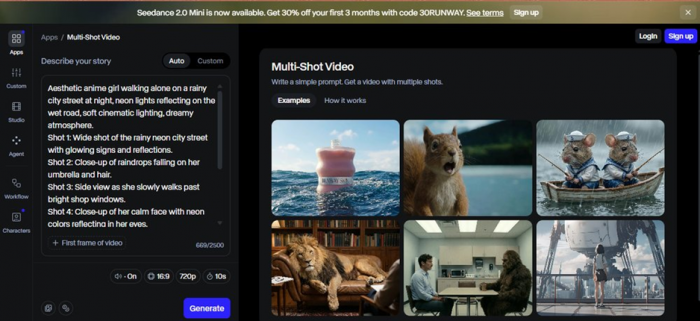
Runway's Multi-Shot Video. A single prompt, set to 16:9, 720p, 10 seconds, with example clips (a perfume bottle, a squirrel, sailor mice, a lion, an anime girl) showing the quality on offer.
Then the moment I clicked Generate, this appeared:
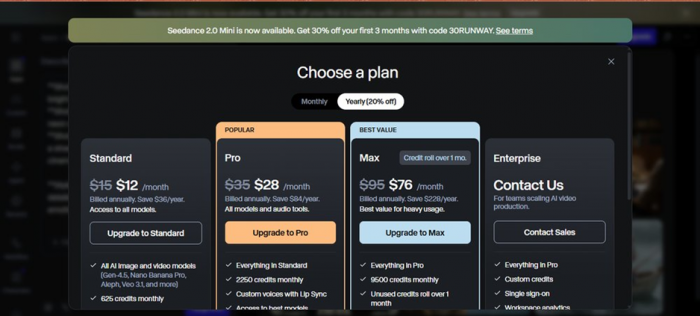
The Choose a plan wall. Standard, Pro, Max, and Enterprise, with Pro marked Popular and Max the Best Value, billed monthly or yearly.
◆ My observation
Exactly like AutoDraft, Runway stopped me at the finish line. I wrote a full cinematic prompt, clicked Generate, and instead of a video I got a subscription page. I could not complete a single free generation either.
The difference is the example clips here look genuinely cinematic, which is the whole reason people pay. But the credit math is brutal: many users report that even failed generations burn credits, with no refunds.
What the test actually proved
Two different studios, the same locked door.
Reading both rounds back, the pattern is impossible to miss. Two very different tools, a cheap cartoon studio and a premium film engine, and both spend your effort and then ask for your card at the exact moment of payoff. Neither one really lets you finish something for free.
So the honest question is not which one lets you in without paying, because neither does. It is what you are paying for. AutoDraft sells breadth and a low price for stylized, cartoon-style assets. Runway sells the best cinematic video quality on the market, at a premium, with a credit system you have to manage carefully. Pick the door that matches your project, then read the fine print on credits before you hand over a cent.
What real users say
My own test is one data point. Here is how each tool lands across hands-on reviews, AppSumo, G2, Product Hunt, and Trustpilot in 2026, the good and the gripes.
AutoDraft AI 3.4 / 5 AppCritica hands-on test + Clean, well-organized dashboard and a genuinely deep, all-in-one toolset + Cheap entry, commercial rights, and smart custom-model character consistency – Free tier runs out before your first image; the paywall lands at the worst moment – AppSumo buyers report 8 to 10 minute warm-ups and generation errors for days – Support is email-only and slow; custom prompts land well only about 70% of the time One verified buyer who trained a custom model called the output a keeper for fun and work, while others flagged slow, failing generations. Paraphrased, AppSumo, G2 and Product Hunt, 2026 | Runway ML 4.4 / 5 Pro reviews · Gen-4.5 number one on Video Arena + Benchmark cinematic quality and motion coherence that approaches pro VFX + Strong character consistency, plus the Aleph editor for prompt-based edits – Credits vanish fast (about 12 per second of Gen-4) and do not roll over on lower plans – Failed generations still consume credits, with users reporting refused refunds – Pricey, desktop-only, and aimed at intermediate to advanced creators A filmmaker called the motion coherence genuinely cinematic, not just good for AI, but Trustpilot reviewers describe the credit system as a costly trap. Paraphrased, G2, Trustpilot and 2026 pro reviews |
Reviewer scorecard
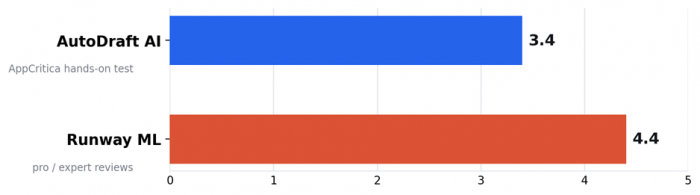
Heads-up: these scores measure different things. AutoDraft's 3.4 comes from a full hands-on test, while Runway's 4.4 reflects expert and pro reviews. Everyday-user reviews are harsher for both: AutoDraft buyers flag slow, failed generations, and Runway's Trustpilot is full of credit and refund complaints. The expert scores reward capability; the user scores punish the credit walls.
My verdict
Two studios, the same locked door, two very different keys.
After trying to make the same idea in both, my honest read is that AutoDraft AI and Runway ML are not really rivals. They are aimed at different people with different budgets, and asking which is better is like asking whether a sketchpad or a film camera is the better tool. For the specific thing I started with, an aesthetic anime scene, neither gave me a free result, and that shared paywall is the most frustrating thing about both.
Where each genuinely belongs, though, the choice is clear:
Reach for AutoDraft AI when… you want cheap, stylized assets You run a YouTube story or kids channel that needs consistent cartoon characters You want one cheap studio for images, voiceover, music, and basic video You are a beginner who wants a fast first draft, with tutorials and templates You are on a small budget and fine treating output as a starting point | Reach for Runway ML when… you want cinematic video You are a filmmaker, editor, or agency producing photoreal or cinematic video You need character consistency across shots and frame-level editing (Aleph) You integrate AI generation into a professional production pipeline Quality and creative control matter more than price, and you can manage credits |
For an aesthetic anime video specifically: Runway's Multi-Shot Video or Gen-4.5 will produce far higher-quality motion than AutoDraft's video pipeline, but at real cost. AutoDraft is cheaper and more beginner-friendly, but its strength is stylized stills and character consistency, not finished video. So my pick comes down to budget and how polished the result has to be.
AutoDraft 6.5 / 10 for its job: a cheap, deep cartoon studio, lovely start, paywalled finish.
Runway 8.0 / 10 for its job: benchmark cinematic video, held back by a brutal credit system.
Scored against what each tool is built to do. Neither was the right pick for a quick, free anime clip, which is what I actually set out to make.
Post Comments
Be the first to post comment!