AI has quietly taken over photo editing. The hard part in 2026 is not finding a tool that can wipe out a background or extend a sky. It is choosing one that is genuinely powerful, fair to the people in your photos, and right for the work you actually do.
This guide compares four of the best AI photo editors you can trust, roughly one for each kind of user, with a clear look at features, pricing, and where each one shines. No hype, and none of the shady tools that have given AI editing a bad name. Just what is worth your time and money.
| THE 60-SECOND VERDICT | |
| Adobe Photoshop | Best overall power and control, for people who edit professionally. |
| Canva Magic Studio | Easiest to use and the best pick for social and everyday content. |
| Luminar Neo | Best one-time purchase, ideal for photographers avoiding subscriptions. |
| Photoroom | Best for product and e-commerce photos at high volume. |
At a Glance: All Four, Side by Side
Here is the whole comparison in one view. Skim it now, then read the deep dives below for the why behind each pick.
| Adobe Photoshop | Canva Magic Studio | Luminar Neo | Photoroom | |
|---|---|---|---|---|
| Best for | Pros, retouchers, designers | Social, marketing, quick content | Enthusiast photographers | Online sellers, product shots |
| Where it runs | Desktop, web, iPad | Web, desktop, mobile | Desktop, mobile add-on | Web, iOS, Android, API |
| Standout AI | Generative Fill, Expand, Remove | Magic Edit, Eraser, Dream Lab | GenErase, GenSwap, Sky Swap | Background removal, AI scenes |
| Learning curve | Steep | Very easy | Easy to moderate | Very easy |
| Free tier | Trial only | Yes, limited | 7-day trial | Yes, watermarked |
| Starting price | ~$10.99/mo plan | $15/mo Pro, free tier | ~$119 one-time | $7.99/mo Pro, free tier |
| Commercial and safety | Licensed Firefly, Content Credentials | Commercial rights on Pro | Local processing, you own output | Commercial use, product focus |
| Batch and scale | Actions and scripts | Bulk create, Magic Resize | Batch edit, slower export | Built for high-volume batch |
| Choose it for | Maximum control | Speed and simplicity | No subscription | Fast product photos |
Prices reflect entry tiers verified in June 2026 and can change. Always confirm current details with each vendor.
How We Judged These Tools
Every editor here was weighed on the same six things, so the comparison stays fair across very different products:
• AI power: how strong and useful the generative and one-click tools really are.
• Ease of use: how quickly a normal person gets a good result.
• Precision and control: how far you can push detailed, manual edits.
• Batch and scale: how well it handles many images at once.
• Value: what you get for the price, including any free tier.
• Versatility: how many different jobs the one tool can cover.
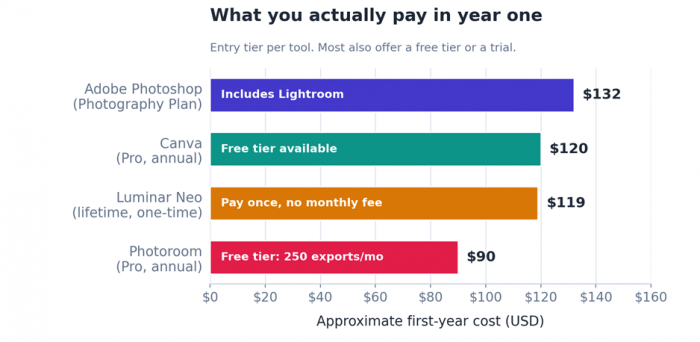
First-year cost by entry tier. Photoroom is the cheapest way in; Luminar Neo is a one-time payment rather than a recurring fee.
The Four Editors, In Depth
1. Adobe Photoshop
BEST FOR · Professionals and serious creatives
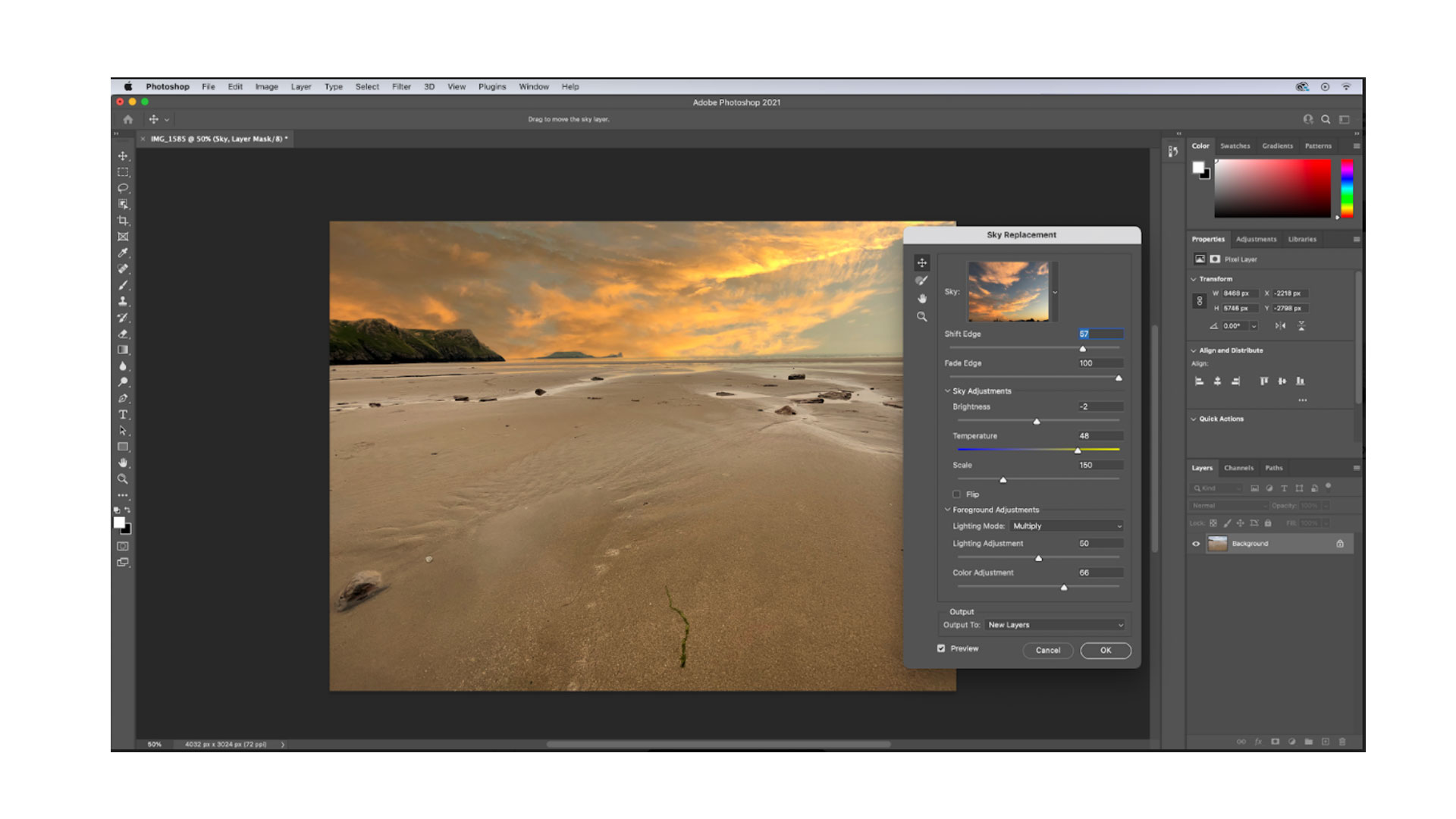
Photoshop is still the reference point every other editor is measured against, and in 2026 its Firefly AI sits right inside the familiar world of layers and masks. Generative Fill adds or removes elements from a text prompt, Generative Expand grows the canvas beyond the original frame, and the Remove tool clears distractions in a click. The Photography Plan also bundles Lightroom, so raw processing and a photo library come in the same subscription.
What sets it apart is control. Nothing else on this list matches its precision for compositing, retouching, and color work. Firefly is also trained on licensed content and tags edits with Content Credentials, which matters when you need to show where an image came from.
| What's great | Watch-outs |
✓ Deepest toolset and true pixel-level control ✓ Generative Fill, Expand, and Remove are excellent ✓ Commercially safe Firefly with provenance tags ✓ Bundles Lightroom for raw and library work | • Steep learning curve for newcomers • Subscription only, no one-time license • Generative credits can run out in busy months |
Pricing: the Photography Plan starts around $10.99/mo (20GB) and rises to about $21.99/mo (1TB), both including Photoshop and Lightroom. A single-app Photoshop plan runs about $23/mo, and Creative Cloud All Apps is $59.99/mo. Firefly features draw on a monthly pool of generative credits, with top-ups from roughly $4.99.
2. Canva Magic Studio
BEST FOR · Social media, marketing, and fast everyday content

Canva is the easiest way to get a polished result without learning a professional editor. Its AI lives under the Magic Studio banner: Magic Edit changes part of a photo from a prompt, Magic Eraser removes objects, Magic Grab lifts a subject out, and Magic Expand fills in beyond the edges. Dream Lab handles text-to-image, and Canva AI 2.0 lets you describe a whole layout in plain language and get editable pieces back.
The real win is that editing, writing, resizing, and publishing all happen in one place. It will not replace Photoshop for heavy retouching or multi-layer composites, but for social posts, thumbnails, and quick brand visuals it has no equal at the price.
| What's great | Watch-outs |
✓ Easiest to learn, runs in the browser ✓ All-in-one design, edit, resize, and publish ✓ Genuinely useful free tier ✓ Strong value at $15/mo for Pro | • Not built for serious retouching or compositing • AI credits are pooled and deplete quickly • Image quality trails dedicated generators |
Pricing: a free plan covers light use with limited monthly credits. Canva Pro is $15/mo (about $120/yr) with 500 pooled AI credits, and Teams starts near $10 per person per month on annual billing. Canva also made the Affinity suite free in 2026 for anyone who outgrows the basics.
3. Luminar Neo
BEST FOR · Photographers who would rather not pay a subscription

Luminar Neo is built for photographers who want strong results fast without a monthly bill. Its generative trio, GenErase, GenSwap, and GenExpand, removes objects, swaps elements, and extends scenes, while one-click tools cover sky replacement, relighting, denoise, sharpening, and portrait work. It runs as a standalone app or as a plugin for Lightroom and Photoshop.
The headline is the pricing model. A one-time lifetime license means no recurring fee for the core editor, which adds up against a yearly subscription. The trade-off is that it leans on your hardware, and the generative results can be less consistent than Adobe's.
| What's great | Watch-outs |
✓ Pay-once license, no forced subscription ✓ Fast, creative one-click edits ✓ Strong sky, portrait, and denoise tools ✓ Works offline for most editing | • Heavy on RAM and graphics card • Generative quality less consistent than Firefly • Frequent add-on and extension upsells • Slower when exporting large batches |
Pricing: a lifetime license starts around $119 and climbs toward $249 for cross-device and Max tiers. Generative tools are included for one year, after which an upgrade pass keeps them current. A subscription option also exists at roughly $99/yr.
4. Photoroom
BEST FOR · Online sellers and product photography
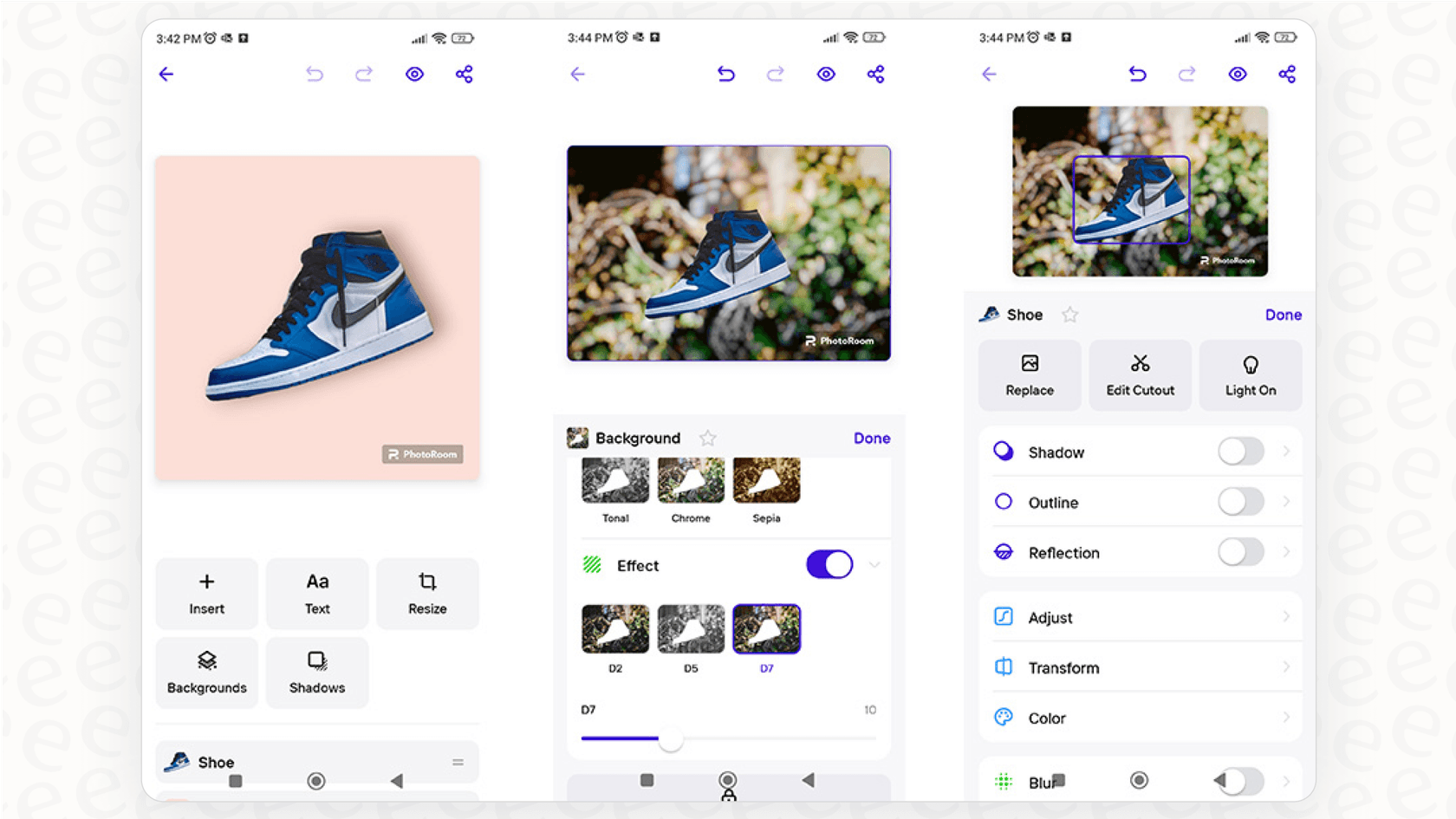
Photoroom is a focused AI studio for anyone who photographs things to sell. Its background removal is among the cleanest available, handling hair, glass, and fine edges that trip up other tools, and it can drop a product onto an instant studio background with realistic shadows. It is built for volume, with batch processing for hundreds of images and an API for automated workflows.
That focus is also its limit. Photoroom is not a general photo editor, and it is not the tool for portraits, landscapes, or heavy retouching. For a product catalog that needs to look consistent and professional, though, it is hard to beat on speed and price.
| What's great | Watch-outs |
✓ Best-in-class, very fast background removal ✓ Built for batch and high volume ✓ Cheap entry plus a real free tier ✓ Works on mobile, web, and via API | • Narrow product and e-commerce focus • On-model apparel needs a specialist tool • Free exports carry a watermark |
Pricing: a free plan gives 250 exports a month with a watermark and limited AI. Pro is $7.99/mo (about $7.50 on annual billing), Max is $26.99/mo, and Ultra starts at $99/mo. The API bills separately from about $0.02 per background removal and $0.10 per edit.
How the Four Stack Up
Scores below are editorial, drawn from 2026 hands-on reviews and testing. The map places each tool by ease and power, with bubble size showing value. The fingerprints under it then break the same six capabilities down one tool at a time: Photoshop stretches toward power and precision, Canva and Photoroom lean into ease and value, and Luminar Neo sits as the balanced photographer's pick.
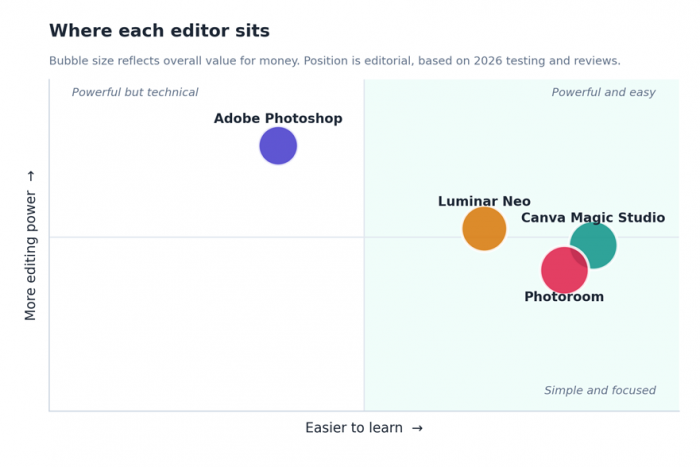
Ease of use against editing power, with bubble size showing overall value for money.
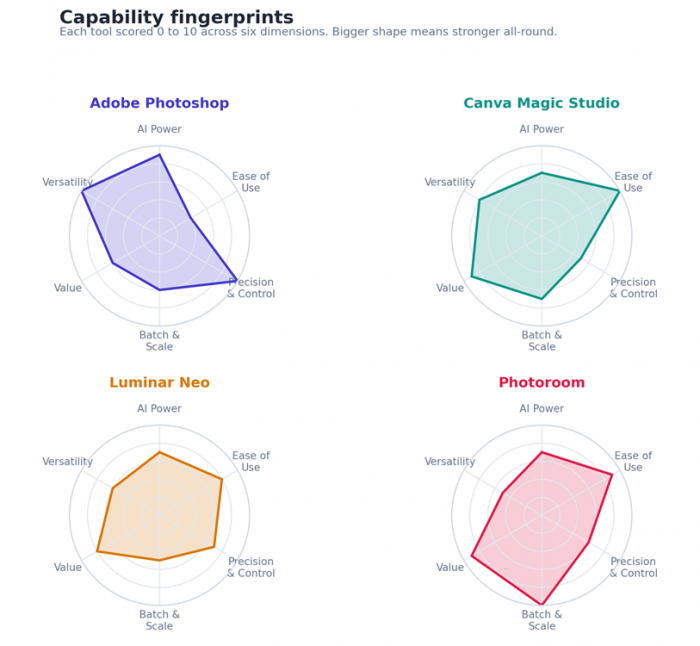
Capability fingerprints. A bigger, rounder shape means a stronger all-rounder; a spikier shape means a specialist.
Pick by Need
Still deciding? Find the row that sounds most like you.
| If you are... | Start with |
| Retouching, compositing, or designing for a living | Adobe Photoshop |
| Posting to social and want speed over depth | Canva Magic Studio |
| Shooting photos and dislike subscriptions | Luminar Neo |
| Selling products and editing in bulk | Photoroom |
| On a tight budget, or just starting out | Canva or Photoroom free tier |
| Needing to edit offline or keep files local | Luminar Neo |
| Required to disclose or prove AI edits | Adobe Photoshop |
What “Safe” Actually Means Here
Every tool in this guide is a mainstream, legitimate editor. Still, the word safe is worth unpacking, because the wider AI image space also contains tools built to cause harm. Three things separate a safe choice from a risky one.
• Consent and rights. Only edit images you own or have permission to use, and never use AI to place a real person, especially a minor, into an image they did not agree to.
• Provenance and disclosure. Editors like Photoshop attach Content Credentials that record when AI was used. Labeling AI-generated or heavily edited marketing imagery is increasingly expected, and sometimes required.
• Data handling. Check whether your uploads are stored or used to train models. Favor clear privacy terms, and when images are sensitive, prefer tools that process locally, such as Luminar Neo.
The simple rule If a tool's main selling point is removing clothing, faking nudity, or creating intimate images of real people, walk away. That is non-consensual content, it is harmful, and it is illegal in a growing number of places. None of the editors in this guide do that, and neither should the ones you choose next. |
The Bottom Line
There is no single best AI photo editor, only the best one for what you do. Reach for Photoshop when control matters most, Canva when speed and simplicity win, Luminar Neo when you want to pay once and edit offline, and Photoroom when you are turning product shots around in volume. All four are safe, capable, and built for real creative work, which is exactly the point.
Pick the one that matches your workflow, edit responsibly, and you are set for 2026.
Post Comments
Be the first to post comment!
Related Articles




Grubby AI vs WriteHuman: Which One Should You Use?
Ridge Harper . Jun 30, 2026