Generative AI moved from novelty to infrastructure for content work in about eighteen months. By 2026, most working creators no longer ask whether to use AI tools, but which combination of them actually saves time without flattening the output into something a reader can spot from a paragraph away.
This roundup focuses on the tools that earn their subscription cost across the workflow of a solo creator or small editorial team: text, visual, video, and audio. Each section explains where the tool fits, what it costs based on publicly listed plans verified in mid-2026, and where its limits show up. Brief alternatives are noted in passing where relevant.
Framework and Selection Criteria
What Counts as an AI Tool for Content Creators in 2026
The category has fractured. The term covers frontier chatbots, single-purpose script generators, video editors with text-based controls, voice cloning services, and SEO platforms with large language models bolted on top. For content creators specifically, the useful filter is narrower: which tools shorten the path from idea to published piece without producing output that looks identical to every competitor running the same prompt.
That filter rules out a lot of marketing-heavy "AI content suites" that produce passable but generic results. It leaves a smaller list of tools that perform one job well or anchor an entire workflow.
How Tools Were Selected for This Roundup
Three criteria drove the picks. First, the tool had to cross into mainstream adoption among professional creators rather than appear only on a feature list. Second, it had to perform measurably better than a free or built-in alternative for at least one common workflow. Third, the pricing had to remain sustainable for a working creator, not just a venture-funded marketing team.
Tools that met the first two criteria but sit at agency-only price points were noted briefly without full coverage. Tools that fit the third but produce visibly inferior output were left out.
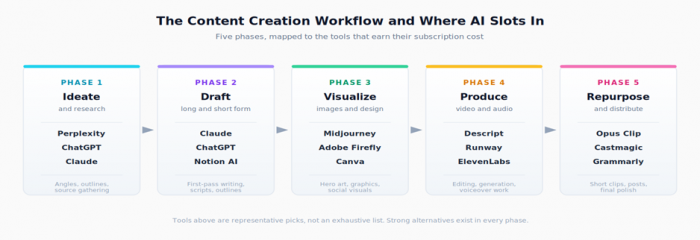
Tools Across the Content Workflow
Ideation and Research Tools: Before the First Word Is Written
The blank-page problem is where AI delivers its most reliable value. Two tools dominate this phase for written content.
ChatGPT remains the default for fast ideation. The Plus plan at $20 per month, according to OpenAI's published pricing, gives access to current frontier models with usage limits that hold up for most solo creators. It excels at quick angle generation, headline variations, and outlining longer pieces. Where it tends to weaken is in producing novel framings without explicit prompting. Left to defaults, it lands on the safe, common interpretation of a topic.
Claude Pro, also at $20 per month according to Anthropic, sits in the same price bracket but performs differently in practice. Its 200,000-token context window makes it the stronger choice when ideation needs to happen against a large reference document, a transcript, or several existing pieces. Independent writer surveys and tool reviews consistently flag Claude's output as reading with less of the recognizable ChatGPT pattern.
Perplexity belongs in this phase too, though it answers a different need. Where ChatGPT and Claude generate based on training data plus context, Perplexity searches the live web and cites sources inline. For research-driven content, fact verification, or any topic where information goes stale quickly, it removes a step that the chatbots cannot. A free tier covers casual use. Pro at $20 per month unlocks higher limits and access to a model selector.

A practical pattern has emerged: creators use Perplexity for the research pass, then move into Claude or ChatGPT for outlining and drafting. Stacking these tools is more useful than picking just one.
Drafting and Writing: The Layer That Replaces a Blank Page
Tool choice gets opinionated here.
For long-form writing, Claude has earned a reputation among professional writers for output that reads more naturally than alternatives. Sentence rhythm varies. Transitions are less formulaic. The same prompt that produces a recognizably mechanical paragraph in another tool often produces something more usable in Claude. That difference matters less for short copy and more as the piece gets longer.
ChatGPT holds the advantage for structured drafting where the output needs to follow specific frameworks: scripts with timing cues, listicles with consistent formatting, or marketing copy matched to a template. Its plugin ecosystem and image generation also matter for creators who want one subscription that covers more than text.
Jasper and Copy.ai sit in a different category. Both are marketing-focused writing platforms that wrap commercial language models with brand voice training, templates, and team features. Jasper starts at $39 per month for the Creator plan. Copy.ai begins around $36 per month. The case for either tool over a $20 frontier chatbot rests on workflow features such as brand voice memory and team collaboration, not raw writing quality. For solo creators producing without strict brand constraints, the ROI is hard to justify.
Notion AI is worth mentioning for creators already working inside Notion. The pricing add-on at $10 per member per month, according to Notion's published plans, brings AI directly into the documents where briefs, outlines, and drafts already sit. It is not best-in-class on output, but it removes the context-switching tax of copying back and forth from a separate chat window.
Editing and Polish: From Rough Draft to Publish-Ready
Once the draft exists, a different set of tools takes over.
Grammarly has become roughly universal among professional writers. The free tier handles most grammar and clarity work. The Premium plan at roughly $12 per month adds tone detection, conciseness suggestions, and generative AI rewrites. The honest answer on Grammarly Premium is that value depends entirely on writing volume. For someone publishing weekly, it pays for itself in saved revision time. For occasional posts, the free tier is enough.
ProWritingAid sits as the heavier alternative, with deeper style and structural analysis. It is the better pick for fiction writers, long-form journalists, and anyone publishing pieces over 2,000 words where consistency at the paragraph level matters. Pricing runs about $30 per month or $120 per year for the Premium tier.
For SEO-aware editing, two tools lead.
Surfer SEO anchors its workflow around content briefs and live optimization. As a draft gets written, Surfer scores it against ranking pages for the target keyword. Pricing starts at $89 per month, which puts it firmly in the professional-tool category. It earns the cost for creators publishing for organic traffic at meaningful volume. Below that volume, the cost-per-article gets uncomfortable.
Frase does similar work at a lower entry point, starting at $45 per month. It is the more reasonable choice for solo creators or small editorial teams testing whether SEO tooling pays back.
Visual Production: Where Solo Creators Now Match Studios
Image generation has matured faster than almost any other category in this list.
Midjourney continues to set the visual quality bar. Output looks composed, intentional, and stylistically consistent across generations. The Discord-only interface has loosened with the move to a native web app, though the workflow still has a learning curve. Pricing starts at $10 per month for the Basic plan and rises through Standard at $30 and Pro at $60. The Pro tier becomes worth considering for stealth mode, which keeps generations private, and faster generation queues.
DALL-E 3, accessible through ChatGPT Plus, removes the friction of a separate subscription for creators already paying for the chatbot. Output is competent but generally less stylized than Midjourney. For utility images such as blog headers, social posts, and simple illustrations, it is sufficient.
Adobe Firefly matters for one specific reason: commercial usage rights. Firefly is trained on Adobe Stock and licensed content, which makes its output safer for client work, paid campaigns, and any context where copyright exposure could become a real problem. It is included with most Creative Cloud subscriptions and available as a standalone plan starting at $4.99 per month according to Adobe's pricing page.
Canva Magic Studio brings AI directly into the design tool where many creators already produce social graphics. Canva Pro at $15 per month on monthly billing, or $120 per year on annual billing, bundles Magic Resize, Magic Write, Magic Eraser, and the broader template library. For creators whose visual work is primarily social posts, slide decks, and thumbnails, Canva Pro often replaces three or four standalone tools.
The honest pattern for visual work: Midjourney for hero images and brand-aligned visuals, Firefly for anything that needs commercial safety, Canva for everything in between.
Video and Audio: The Hardest Workflow to Crack
Video and audio are where AI tooling still requires the most patience. The category is improving fast, but no single tool yet replaces a competent human editor for polished long-form content.
Descript has become the default for podcast and video creators who edit primarily by working with text transcripts. Editing the transcript edits the audio or video. Filler-word removal, multi-track editing, and Overdub voice cloning all sit in the same interface. The pricing structure shifted in 2026: the Creator plan runs $24 per user per month on annual billing or $35 per user per month month-to-month. The Business tier sits at $50 to $65 per user per month. Recent user reviews on G2 and Trustpilot flag the new credit-based AI system as a source of unexpected mid-project limits, which is worth budgeting for.
Runway owns AI video generation for creators producing original visual content. Its Gen-4 and Gen-4.5 models handle text-to-video and image-to-video at quality levels that crossed the "usable" line in 2025 and have continued to improve. Standard pricing starts at $15 per month month-to-month or $12 per month billed annually. The Unlimited plan at roughly $76 to $95 per month opens up an Explore mode for unlimited slow-lane generation, which matters for creators who experiment heavily.
ElevenLabs dominates voice generation. The Creator plan at $22 per month unlocks Professional Voice Cloning, which produces voice models close enough to the original speaker to use for narration without listener pushback. The Starter plan at $5 per month is the entry point with commercial usage rights, important because the Free tier does not allow monetized content without ElevenLabs attribution.
Opus Clip sits in a narrower niche: turning long videos into short-form clips with captions, B-roll, and platform-optimized aspect ratios. For YouTubers repurposing long videos into Shorts, TikToks, and Reels, it removes hours of manual work. A free tier covers light experimentation. Paid plans start around $9 per month.
Repurposing One Asset Into Many Formats
The economics of content production shifted when AI repurposing tools matured. A single recorded podcast can now generate show notes, social posts, a blog summary, transcript pull-quotes, and short video clips with minimal manual work.
Castmagic focuses on podcast repurposing specifically: transcripts, show notes, timestamped chapters, email newsletter drafts, and social posts from a single audio upload. Pricing starts around $39 per month for solo creators.
Opus Clip handles the video side of repurposing, as noted above.
ChatGPT and Claude both work for general-purpose repurposing if given a transcript. The dedicated tools save time on formatting and platform-specific optimization. The chatbots do the same job more flexibly for creators willing to build their own prompts.
A practical note: repurposing tools work best when the source content has clear structure. Rambling, unstructured source material produces rambling, unstructured repurposed output. AI does not fix poor source quality. It only amplifies what is already there.
Cost, Configuration, and Stack Design
Pricing Snapshot: What the Stack Actually Costs
The table below pulls the headline pricing for the tools above. All figures reflect publicly listed plans verified in mid-2026 and may shift as providers continue to reprice.
| Tool | Category | Entry plan | Pro tier | Notes |
|---|---|---|---|---|
| ChatGPT Plus | Chatbot | $20 / month | $100 / month | Default for fast ideation and structured drafts |
| Claude Pro | Chatbot | $20 / month | $100 / month | Stronger long-form writing, 200k context window |
| Perplexity Pro | Research | $20 / month | Same | Live web search with inline citations |
| Grammarly | Editing | Free | $12 / month | Premium adds tone detection and AI rewrites |
| Surfer SEO | SEO | $89 / month | Custom | Earns its cost only at meaningful publish volume |
| Midjourney | Image gen | $10 / month | $60 / month | Highest visual quality bar in the category |
| Adobe Firefly | Image gen | $4.99 / month | Bundled in CC | Commercial-safe outputs for client work |
| Canva Pro | Design | $120 / year | $10 / seat (Teams) | Replaces three or four standalone tools for social |
| Descript | Video/audio | $24 / month annual | $50 / month | Text-based editing; watch the new AI credit caps |
| Runway | Video gen | $12 / month annual | $76 / month annual | Gen-4 and Gen-4.5 lead the category |
| ElevenLabs | Voice / TTS | $5 / month | $22 / month | Creator tier unlocks Professional Voice Cloning |
| Opus Clip | Repurpose | Free | $9 / month+ | Long video to short-form clips with captions |
A realistic monthly budget for a solo creator covering text, visual, and basic video work lands around $45 to $80 per month, assuming one frontier chatbot subscription, Canva Pro, Grammarly Premium, and either Descript or Runway. Creators producing video at volume push that to $120 to $180 per month with Runway Pro, Descript Creator, and ElevenLabs Creator added.
Workflow Recipes by Creator Type
The right stack varies by primary output format. Three common creator profiles illustrate the shape of a reasonable setup.
The Blog-First Creator Long-form articles, SEO-driven, occasional newsletter | |
RECOMMENDED STACK • Claude Pro: long-form drafting and rewrites • Perplexity Pro: research and source gathering • Grammarly Premium: editing and tone polish • Frase: SEO briefs without the Surfer premium • Canva Pro: headers and social repurposing | MONTHLY COST $57 to $77 per month, before SEO tooling overage |
The YouTube-First Creator Weekly long-form video plus Shorts, voiceover-heavy | |
RECOMMENDED STACK • ChatGPT Plus: script structure and thumbnail copy • Descript Creator: primary edit, captions, filler removal • ElevenLabs Creator: narration and B-roll voiceover • Runway Standard: AI inserts and visual experiments • Opus Clip: long video to Shorts pipeline | MONTHLY COST $80 to $115 per month, scales with Runway usage |
The Multi-Channel Creator Newsletter, podcast, social, occasional video work | |
RECOMMENDED STACK • Claude Pro: newsletter drafts and longform anchor • Castmagic: podcast to show notes plus social posts • Canva Pro: all social visuals across channels • Grammarly free: lightweight editing across surfaces • Midjourney Basic: premium hero art when needed | MONTHLY COST $59 to $74 per month, lowest cost-per-channel split |
Limitations and Final Recommendations
Where AI Still Falls Short for Content Work
Three limitations consistently show up across the tools above.
First, originality decays as more creators use the same prompts and the same defaults. AI outputs cluster toward common patterns. Pieces written entirely with AI defaults begin to read alike across publications, which makes the human editorial layer more important, not less.
Second, factual accuracy remains uneven. Chatbots will produce plausible-sounding but wrong statistics, attributions, and quotes. Perplexity helps by citing sources, but the citations themselves still need verification. Any piece touching policy, finance, health, or technical detail requires manual fact-checking before publication.
Third, voice consistency is hard to maintain. Brand voice features in tools like Jasper and Notion AI improve over basic prompting but rarely match the consistency a human editor maintains across a publication. For solo creators with a recognizable personal voice, AI is best used as a draft accelerator rather than a final-draft generator.
Choosing Wisely Without Overpaying
The most expensive content creation stack is not the one with the most subscriptions. It is the one assembled without thinking about workflow overlap.
A creator working entirely in text and basic social does not need Runway, Descript, or ElevenLabs. A YouTuber producing weekly long-form video does not need a $39 per month copywriting suite. The most common subscription mistake is paying for tools that do the same job as something already in the stack.
A reasonable starting point looks like this: one frontier chatbot subscription, Canva Pro, Grammarly free or Premium, and whichever specialized tool matches the primary output format. Tools should be added only when the existing stack hits a clear limit, and dropped when they have not been used in thirty days. The category is moving fast enough that the optimal stack twelve months from now will look different from the one assembled today.
Post Comments
Be the first to post comment!
Related Articles