Posting consistently across every platform is one of the most time-consuming parts of running a brand or a creator business, and it is exactly the kind of repetitive work AI is now good at removing. Marketers using AI tools in 2026 report saving roughly 10 to 15 hours a week, and the right AI social media scheduler is a big part of that. Instead of writing, resizing, and timing every post by hand, you plan once and let the tool handle captions, best posting times, and publishing across channels.
This guide rounds up the best AI tools for social media scheduling in 2026, with what each one does well, who it is for, and roughly what it costs. The list spans free options for solo creators all the way to premium platforms for agencies and enterprise teams, so you can match a tool to your actual needs rather than overpaying for features you will never touch.
Why Use an AI Tool for Social Media Scheduling?
A modern AI social media scheduler does far more than queue posts. It suggests content ideas based on trends and your past performance, helps write platform-specific captions, recommends the times your audience is most active, and in many cases generates images or short video and analyzes results with actionable recommendations. The payoff is consistency without the daily grind, and hours back for strategy instead of busywork.
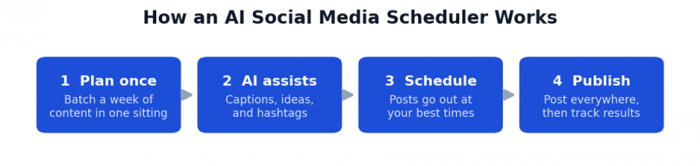
The typical AI scheduling workflow: plan once, then let the tool write, time, and publish.
One honest caveat: not every tool that advertises AI uses it meaningfully. A lot of products simply add a Generate with AI button on top of a text box, which is really just a ChatGPT shortcut. The tools worth paying for do something genuinely useful, like predicting your best posting times from your own audience data or turning a single idea into tailored posts for each network. The roundup below focuses on schedulers where the AI actually earns its place.
What to Look For in an AI Scheduling Tool
• Automation depth: posting, rescheduling, and content recycling that runs without daily input.
• Genuine AI features: caption writing, best-time predictions, hashtag suggestions, and content ideas based on your performance rather than generic averages.
• Platform coverage: support for every network you actually use, including newer ones.
• Analytics and reporting: clear metrics so you can double down on what works.
• Collaboration: approvals, roles, and workspaces if you work with a team or clients.
• Pricing model: per channel, per profile, or per user, since this changes the real cost as you grow.
The Best AI Social Media Scheduling Tools at a Glance
Here is a quick side-by-side before the detailed breakdowns:
| Tool | Best for | Standout AI feature | Free plan | Starting price |
|---|---|---|---|---|
| Buffer | Creators and small teams | AI Assistant adapts captions per platform | Yes | ~$6/channel/mo |
| Later | Instagram, TikTok, Pinterest | AI captions plus best-time-to-post | No (trial) | ~$25/mo |
| SocialBee | Evergreen content recycling | AI copilot drafts a full strategy | No (trial) | ~$29/mo |
| Publer | Best value, multi-brand | AI Assist plus AI image generation | Yes | ~$4/channel/mo |
| Metricool | Analytics on a budget | AI repurposing plus insights | Yes | ~$18/mo |
| Vista Social | Freelancers, small agencies | AI captions plus assisted replies | Yes | ~$39/mo |
| Hootsuite | Agencies, larger teams | OwlyWriter AI plus best-time AI | No (trial) | ~$99/user/mo |
| Sprout Social | Enterprise, data-driven teams | AI analytics plus sentiment analysis | No (trial) | ~$199/seat/mo |
Pricing is approximate as of 2026, often reflects annual billing, and changes regularly. Check each tool’s site for current rates.
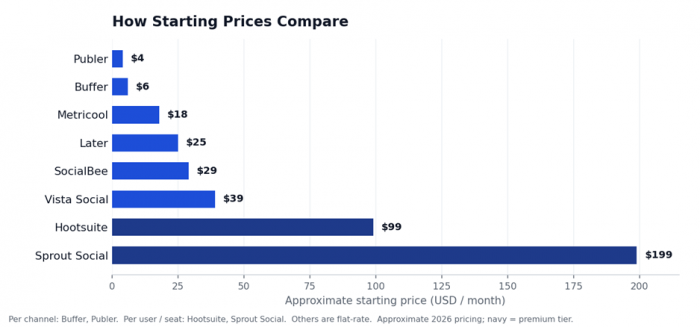
Starting prices range from a few dollars a month to premium per-seat plans.
The Best AI Tools for Social Media Scheduling in 2026
1. Buffer
Buffer is the tool most people should try first. It keeps scheduling simple and clean across every major network, and its AI Assistant detects which platform you are writing for and adapts the caption to match, while also generating fresh ideas and repurposing posts you have already written. You also get a free Start Page link-in-bio, basic analytics, and habit-building features like posting streaks to keep you consistent. The free plan is genuinely useful for solo creators, and paid plans stay affordable because you pay per channel rather than per team member.
Best for: Creators, solopreneurs, and small teams that value simplicity and flexibility.
Pricing: Free for up to 3 channels with unlimited AI; paid plans from about $6 per channel per month.
2. Later
Later is built around visuals first, which makes it a natural fit for Instagram, TikTok, and Pinterest. You plan content on a drag-and-drop calendar, preview exactly how your grid will look, and let its best-time-to-post feature pick the windows when your audience is most active. It now includes an AI writing assistant for captions and hashtag suggestions, plus a polished Link in Bio page to turn followers into clicks. One thing to know is that Later bundles profiles into social sets and caps how many posts you can schedule on lower tiers, and there is no permanent free plan.
Best for: Visual-first brands and creators focused on Instagram, TikTok, and Pinterest.
Pricing: 14-day trial only; Starter from about $25 per month, with higher tiers for teams.
3. SocialBee
SocialBee is a scheduler built around content categories and recycling, so your evergreen posts keep going back into rotation instead of being published once and forgotten. Its standout is an AI copilot that goes beyond writing single captions and can draft an entire content strategy for you, alongside an AI post generator and a built-in Canva integration for visuals. You organize posts into category-based queues, then let the tool fill your calendar automatically. It is a strong pick if consistency and getting more mileage from your best content are priorities.
Best for: Creators and small businesses that want category-based automation and evergreen recycling.
Pricing: 14-day trial; plans from about $29 per month.
4. Publer
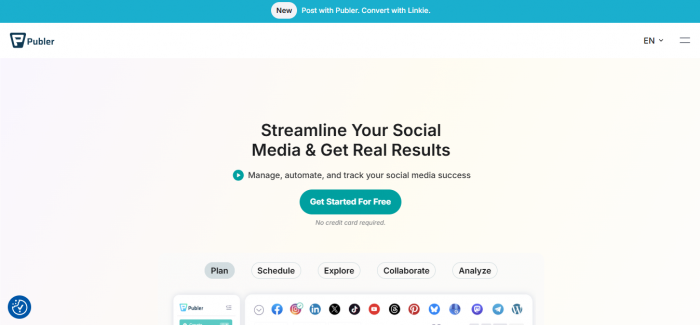
Publer punches well above its price. You can create and schedule posts individually or in bulk, organize everything on a drag-and-drop calendar, recycle your best-performing content, and lean on suggested best times to post. Its AI Assist helps write captions and hashtags and can generate images, and separate workspaces make it easy to keep multiple brands cleanly organized. It even connects to Zapier, so you can wire publishing into thousands of other apps. For the feature set, it is one of the best-value AI tools for social media scheduling available.
Best for: Budget-conscious users and anyone managing multiple brands or workspaces.
Pricing: Free plan for 3 accounts; paid plans from about $4 per channel per month.
5. Metricool
Metricool leads with analytics. It supports every major network and layers a real-time performance dashboard, competitor analysis, and a visual calendar on top of solid scheduling. Its AI features help repurpose and adapt posts, and it also handles ad management and a link-in-bio page, so a lot of your reporting and publishing lives in one place. The free tier is generous enough to test properly, and paid plans stay affordable, which makes it a favorite for data-minded creators and small teams who do not want to overpay.
Best for: Analytics-focused creators and small teams who want strong data on a budget.
Pricing: Free tier available; paid plans from about $18 per month.
6. Vista Social

Vista Social is an affordable all-in-one platform aimed at freelancers and small agencies. Alongside scheduling and a visual calendar, it bundles a unified inbox, review management, approval workflows, and social listening, with an AI Assistant that writes captions and can help draft replies. Because it prices by social profile rather than per user, teams can add seats without the bill exploding, and higher tiers add white-label reports for client work. There is a free plan for testing and a no-credit-card trial to explore the paid features.
Best for: Freelancers and small agencies wanting an affordable all-in-one with listening.
Pricing: Free plan for 3 profiles; paid plans from roughly $39 to $79 per month.
7. Hootsuite

Hootsuite is the established choice for agencies and larger teams that need structure. It handles bulk scheduling, multi-step approval workflows, deep analytics, and a unified inbox at scale, and its OwlyWriter AI generates captions and post ideas while AI suggests your best times to post. The trade-off is cost: there is no free plan anymore, pricing is per user so it climbs quickly as you add teammates, and small operators often pay for capabilities they do not use. For coordinated teams managing many accounts, though, the workflow tools earn their keep.
Best for: Agencies and larger teams that need approval workflows and bulk scheduling.
Pricing: No free plan; 30-day trial; Standard from about $99 per user per month on annual billing.
8. Sprout Social
Sprout Social sits at the premium end and is built for data-driven mid-market and enterprise teams. Its reporting and audience insights are among the best in the category, and its AI powers content suggestions, sentiment analysis, optimal send-time recommendations, and faster inbox replies. Everything is polished and collaboration-friendly, which is why larger marketing teams gravitate to it. The main consideration is price, since it is billed per seat and starts well above most competitors, so it makes the most sense when analytics and scale genuinely justify the spend.
Best for: Data-driven mid-market and enterprise teams that want premium analytics.
Pricing: No free plan; 30-day trial; from about $199 per seat per month.
Feature Comparison at a Glance
How the eight tools stack up on the capabilities that matter most for AI-assisted scheduling:
| Tool | AI captions | Best time | Analytics | Listening | Link in bio | Free plan |
|---|---|---|---|---|---|---|
| Buffer | ✓ | ✓ | ✓ | ✗ | ✓ | ✓ |
| Later | ✓ | ✓ | ✓ | ✗ | ✓ | ✗ |
| SocialBee | ✓ | ✓ | Some | ✗ | ✓ | ✗ |
| Publer | ✓ | ✓ | ✓ | ✗ | ✓ | ✓ |
| Metricool | ✓ | ✓ | ✓ | Some | ✓ | ✓ |
| Vista Social | ✓ | ✓ | ✓ | ✓ | ✓ | ✓ |
| Hootsuite | ✓ | ✓ | ✓ | ✓ | ✗ | ✗ |
| Sprout Social | ✓ | ✓ | ✓ | ✓ | ✗ | ✗ |
“Some” means partial or higher-tier-only support. Features change often, so confirm the current set on each tool’s site.
Other Tools Worth Considering
A few more tools are worth a look depending on your workflow. Agorapulse is known for one of the best social inboxes in the category, with AI writing on every plan and an unusually generous trial, which suits teams that treat social as a two-way conversation. SocialPilot and Sendible are both affordable, agency-friendly options with AI caption help, bulk scheduling, and client management. And if your bottleneck is content rather than timing, pair your scheduler with a dedicated AI content tool: Canva Magic Studio for fast visuals and short video, and an assistant like ChatGPT or Jasper for caption drafts and brand voice. The strongest setups often combine a reliable scheduler with one or two of these to cover the whole workflow from idea to published post.
Which AI Scheduling Tool Is Right for You?
If you would rather skip the comparison and get a quick steer, here is a simple guide by situation:
| Your situation | Best pick | Why |
|---|---|---|
| Solo creator on a tight budget | Buffer or Publer | Genuine free plans, simple setup, low per-channel pricing |
| Instagram, TikTok, or Pinterest focus | Later | Visual-first planning, grid preview, best-time-to-post |
| You care most about analytics | Metricool or Sprout Social | Strong dashboards and reporting at very different price points |
| Recycling evergreen content | SocialBee | Category-based queues and automatic recycling |
| Freelancer or small agency | Vista Social | Affordable all-in-one with listening and white-label options |
| Larger team needing approvals | Hootsuite or Sprout Social | Multi-step workflows, bulk scheduling, and team controls |
Final Thoughts
There is no single best AI tool for social media scheduling, only the one that fits your platforms, posting volume, budget, and team. If you are just starting, Buffer and Metricool both have free plans worth testing, visual creators tend to land on Later, and agencies usually weigh Vista Social against Hootsuite or Sprout Social. A useful rule from experienced marketers is to start lean, learn one tool well, and only add complexity when your workflow actually demands it.
One last note on pricing: the figures above are approximate, based on 2026 information, often reflect annual billing, and change regularly, so check each tool’s current pricing page before you commit. Most offer a free plan or trial, so the smartest move is to shortlist two or three from the table, run a week of your real content through each, and keep the one that genuinely saves you time.
Post Comments
Be the first to post comment!