| Why this guide exists: LensGo is great for cheap, fun video style transfer, but its traffic fell roughly 75% from its 2024 peak, and it lacks the community and documentation of bigger tools. If you want more power, better support, or stronger images, these four alternatives each beat it at a specific job. |
How we compared them
Instead of ranking tools head to head, this guide matches each alternative to a job. From a LensGo review perspective, that matters because LensGo really does three different things: it makes images, it makes short videos, and it restyles footage. Few tools are best at all three, so the smart move is to pick per task. Every score and price below was drawn from independent 2026 reviews and the tools’ own pages, then mapped onto five plain-English categories..
• Image quality: how clean and controllable still output is.
• Video motion: how natural and cinematic moving footage looks.
• Style transfer: restyling or applying a consistent look across frames.
• Ease of use: how fast a beginner gets a usable result.
• Value: quality and output volume for the money.
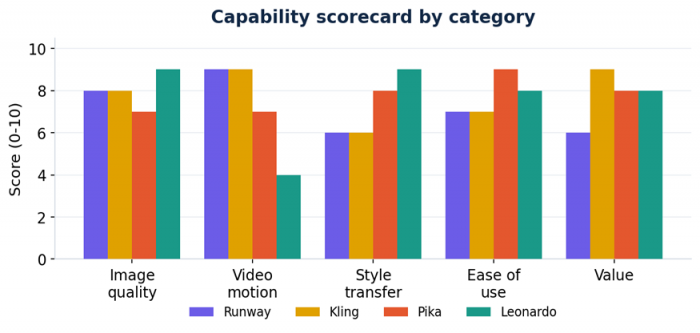
Figure 1. Self-scored capability map across the four alternatives (0 = weak, 10 = best in class).
Price snapshot
Price is where LensGo wins on paper: its launch special runs about 3 euros per month. The alternatives cost more but deliver more, whether that is cinematic video, higher image volume, or commercial rights. Here is the lowest paid entry point for each.
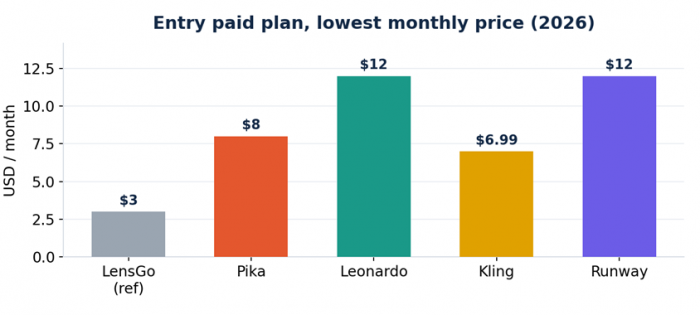
Figure 2. Entry paid plan, lowest advertised monthly price in 2026. Credit systems mean real cost varies by usage.
The four alternatives, ranked by job
Each card below follows the same layout so you can scan fast: what it is, key specs, strengths and trade-offs, and who it is for.
Runway Best all-rounder for serious video and editing |
Runway is the most established AI video platform, now built around its Gen-4.5 model. The 2026 twist is that a single subscription also unlocks third-party models like Google Veo and Kling 3.0 Pro inside Runway, so you get a multi-model studio rather than one engine. Its standout is character consistency across shots, plus a real editing suite (Aleph editing, Act-Two performance capture).
| Best for | Cinematic video, character consistency, full editing workflows |
| Free tier | 125 one-time credits (do not refresh), Gen-4 Turbo image-to-video only |
| Entry paid | Standard around $12 to $15 / month, 625 credits / month |
| Top tier | Unlimited up to ~$188 / month |
| Style transfer | Strong video-to-video, less preset-driven than LensGo |
| Strengths | Trade-offs |
|---|---|
+ Industry-leading character consistency across scenes + One plan, many models (Runway, Veo, Kling, Seedance) + Proper editing tools beyond generation | – Credit system gets expensive for heavy users – Gen-4.5 slipped on Elo as rivals raised the bar – Free tier is demo-only |
| Pick Runway if: You produce narrative or client video and want consistent characters plus editing in one place. |
Kling AI Best value for realistic, long-form video |
Kling, built by Kuaishou, leads 2026 benchmarks for photorealistic human motion and is among the top models on the Elo leaderboard after its 3.0 release. From a Kling review perspective, it pairs that with aggressive pricing and longer clips than most rivals, which makes it the value champion when motion realism matters.
| Best for | Realistic motion, longer clips, high output on a budget |
| Free tier | Around 66 credits/day, 720p, watermarked, no commercial use |
| Entry paid | Standard from about $6.99 / month |
| Clip length | Long-form, far beyond most competitors per generation |
| Style transfer | Capable via image and video conditioning, fewer one-tap presets |
| Strengths | Trade-offs |
|---|---|
+ Top-tier physics and human motion realism + Cheapest serious entry price of the four + Long clips and high duration-to-price ratio | – Credit math can drain fast with audio on – Long clips can show quality decay near the end – Fewer ready-made artistic style presets |
| Pick Kling if: Lifelike movement is your priority and you want the most video per dollar. |
Pika Best for fast, playful, style-driven short clips |
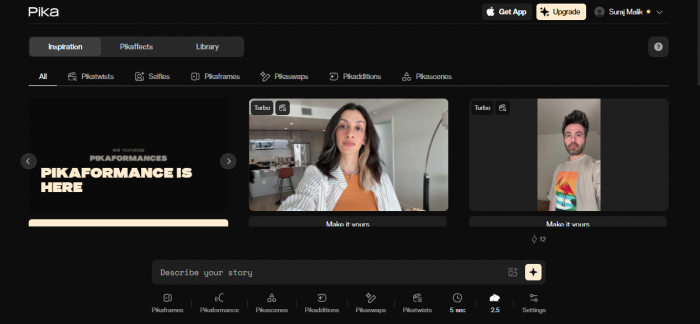
Pika is the closest spiritual match to LensGo’s fun, social-first energy. It is the speed leader, often returning clips in under two minutes, with the easiest learning curve of the group and signature creative effects (Pikaffects like Squish It and Melt It) built for viral short-form content.
| Best for | Quick social clips, creative effects, rapid iteration |
| Free tier | Around 80 credits / month, 480p only |
| Entry paid | From about $8 / month |
| Clip length | Short, roughly 3 to 10 seconds |
| Style transfer | Strong stylization and effects, very preset-friendly |
| Strengths | Trade-offs |
|---|---|
+ Fastest generation in the group + Easiest to learn, beginner-rated very high + Distinctive effects perfect for TikTok and Reels | – Short clip lengths only – Lower base resolution on the free tier – Occasional artifacts on complex scenes |
| Pick Pika if: You want LensGo’s playful, fast vibe with a bigger community and slicker effects. |
Leonardo AI Best for images, style consistency, and custom models |
If your real need is images and a repeatable look rather than video, Leonardo is the upgrade. Its Style Reference and custom model training lock a brand look across dozens of generations, something LensGo and even Midjourney struggle with. It also offers a short Motion feature for light animation, plus game-asset tools.
| Best for | High-quality images, brand style consistency, game assets |
| Free tier | 150 daily credits (reset every 24h), roughly 25 to 37 images/day |
| Entry paid | Artisan around $12 / month (8,500+ monthly tokens) |
| Style transfer | Excellent: Style References + trainable custom models |
| Video | Limited: ~4 second Motion clips only |
| Strengths | Trade-offs |
|---|---|
+ Style References solve brand consistency + Custom model + character training + Generous, genuinely usable free tier | – No real text-to-video engine – Advanced presets burn credits fast – Photoreal can distort complex poses |
| Pick Leonardo if: Your output is mostly images and you need the same look across many of them. |
Side-by-side at a glance
| Runway | Kling | Pika | Leonardo | |
|---|---|---|---|---|
| Primary job | Cinematic video | Realistic video | Fast social clips | Images + style |
| Entry price | ~$12/mo | $6.99/mo | $8/mo | $12/mo |
| Free tier | 125 one-time credits | 66/day, 720p | 80/mo, 480p | 150/day credits |
| Video length | Short-med | Long-form | 3-10s | ~4s only |
| Style transfer | Good | Capable | Strong | Excellent |
| Ease of use | Medium | Medium | Easiest | Easy |
| Stands out for | Consistency + editing | Motion + value | Speed + effects | Brand consistency |
Where each tool fits
This map plots the alternatives by how strong they are at images and style versus video and motion. LensGo sits in the middle as a jack-of-trades, which is exactly why a focused alternative beats it for any single job.
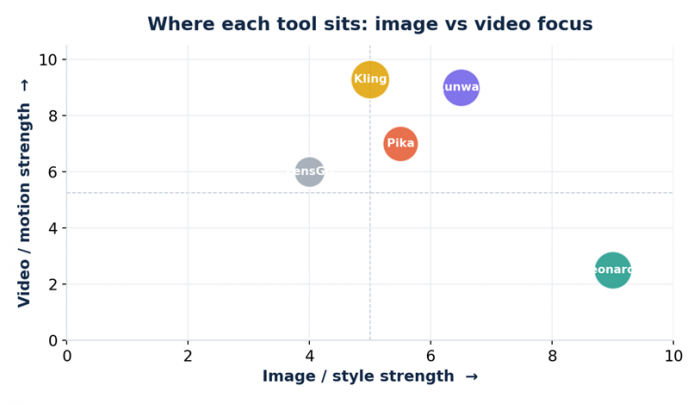
Figure 3. Image-or-style strength (x) versus video-or-motion strength (y). Bubble position shows focus, not overall quality.
Pick in 30 seconds
1. Mostly images and a consistent look? Go Leonardo AI.
2. Cinematic video with consistent characters? Go Runway.
3. Realistic motion and the most video per dollar? Go Kling.
4. Fast, fun, effect-driven short clips like LensGo? Go Pika.
A few honest caveats
AI tool pricing and rankings shift almost monthly, so treat every figure here as a mid-2026 snapshot and verify on each official site before paying. Most of these tools run on credit systems, which means the headline price rarely equals your real monthly cost; failed or repeated generations still burn credits. Finally, the best setup for serious creators is often a small stack rather than one tool: images from Leonardo, motion from Kling, polish in Runway, quick effects from Pika.
| Bottom line: No single tool replaces LensGo on every front. Match the tool to the task: Leonardo for images, Runway for cinematic video, Kling for realistic motion and value, Pika for fast, playful clips. |
Figures reflect publicly reported specs and pricing as of mid-2026 and are subject to change. Always verify on each tool’s official site.
Post Comments
Be the first to post comment!
Related Articles