Two names keep coming up when people want to put readable words into an AI image: Ideogram, the tool that built its whole reputation on text, and Dreamina, CapCut's creative suite that does a bit of everything. They get compared constantly, usually as if one has to lose. That framing misses the point. They were built for different jobs, and the better question is which job is yours. This comparison walks through five practical tests, scores both tools, and ends with a clear recommendation by use case.
THE 60-SECOND VERDICT • Pick Ideogram if your work depends on text inside the image. Logos, posters, ad headlines, and packaging come out cleaner, and its 4.0 model reads back at roughly 97% text accuracy. • Pick Dreamina if you want one place to make images, edit them, and turn them into short video. It costs less, runs fast, and exports straight into CapCut. • Use both if your pipeline is design then animate. Build the text-heavy key visual in Ideogram, then bring it into Dreamina for motion. |
Two tools built for two different jobs
Origins explain a lot here. Ideogram was founded in 2022 by former Google Brain researchers, several of whom worked on the Imagen model. They made one bet: image generators were terrible at text, and whoever fixed that would own a real slice of the market. Three model generations later, that bet has paid off. On June 3, 2026, the team shipped Ideogram 4.0, its first open-weight model, and it landed at the top of the open-weight design rankings.
Dreamina comes from the opposite direction. It is ByteDance's creative platform, formerly CapCut Dream Studio, and it was built for people who publish. Its image models are the Seedream line, now at version 5.0, and its video model is Seedance. The whole thing plugs into CapCut and the wider TikTok pipeline, so a still can become a finished clip without leaving the toolset.
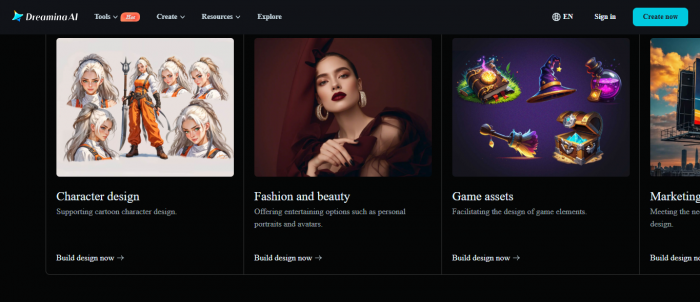
So one is a typography lab and the other is a content engine. That difference shapes every test below. Keep it in mind as the scores roll in.
| At a glance | Ideogram | Dreamina |
|---|---|---|
| Maker | Ideogram AI (Toronto) | ByteDance / CapCut |
| Latest model | Ideogram 4.0 (June 2026) | Seedream 5.0 images, Seedance video |
| Built around | Text and static design | All-in-one image plus video |
| Native resolution | 2K (2048 px) | 2K native, upscale to 4K |
| In-image text | About 97% accuracy | About 94% accuracy |
| Video generation | No | Yes |
| Free tier | Yes, watermark-free on paid plans | Yes, free outputs watermarked |
| Best for | Logos, posters, ads, packaging | Social content, video, fast formats |
TEST 01 · TEXT
Putting words inside the image
This is the headline of the whole comparison, so it goes first. Rendering legible text has been the classic failure mode of diffusion models since 2022, the place where you ask for a sign that says OPEN and get four scrambled letters. Ideogram exists because of that problem.
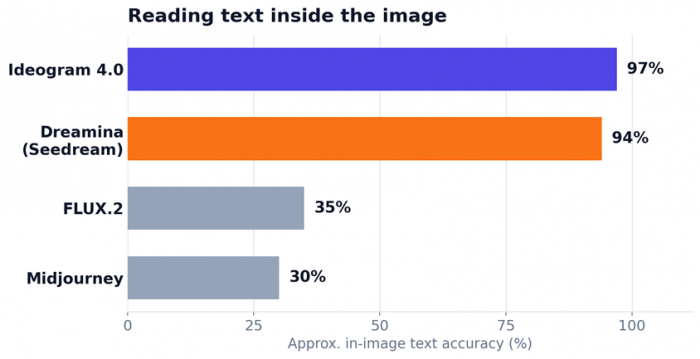
Approximate figures from vendor benchmarks and third-party testing, not a single controlled study. Read them as directional.
Ideogram reads back at about 97% English text accuracy on its own benchmark, and it holds up on the hard cases: long strings, multi-line blocks, and stylized lettering that other models turn to mush. Version 4.0 adds a structured layout system, so you can specify where text sits using bounding boxes rather than hoping the model places it well.
Dreamina sits close behind at roughly 94% through its Seedream models, and it handles both English and Chinese characters reliably. Short headlines and logo wordmarks come out clean. The newer Seedream versions improved multi-line layouts, which used to be a weak spot.
Where does the gap actually show up? For a short headline or a single wordmark, both are dependable and you will not notice much difference. Push into dense paragraph text, tiny captions, or exact spacing across a busy poster, and Ideogram pulls ahead with fewer wasted re-rolls.
Edge: Ideogram, clearly, on hard text. Closer than the marketing suggests on the easy stuff.
TEST 02 · DESIGN
From a prompt to a finished-looking design
Design is more than legible letters. It is composition, hierarchy, restrained color, and whether the result looks art-directed or merely assembled. This is where the two tools start to separate by intent.
Ideogram treats static design as home turf. Posters, logos, signage, book covers, and product mockups tend to come out composed rather than collaged. Style References let you upload up to three images to lock an aesthetic, output is native 2K, and 4.0 added transparent PNG export, which matters when a logo needs to drop onto any background.
Dreamina trades a little top-end polish for far more range. It moves comfortably between photoreal product shots, anime, 3D, and stylized looks, and its Dreamposter feature drops text into ready layouts for social graphics. It is the generalist that covers more ground, even if the very best static-design output still tilts toward Ideogram.
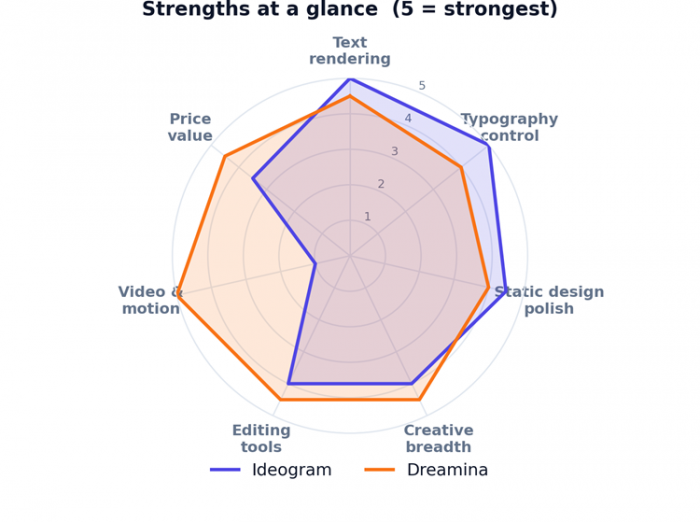
Capability scores are this writer's assessment based on documented features and hands-on reviews, on a 1 to 5 scale.
The radar makes the shape obvious. Ideogram spikes on text, typography control, and static polish. Dreamina spreads wider and owns the motion axis outright. Neither shape is wrong. They are built for different desks.
Edge: Ideogram for pure static-design polish. Dreamina for range across styles and formats.
TEST 03 · CONTROL
Editing, control, and second drafts
Generating the first version is the easy part. Fixing the last ten percent is where a tool either saves your afternoon or eats it.
Ideogram leans design-led: Canvas for layered editing, Magic Fill for selective inpainting, Remix for guided iteration, and batch generation from a CSV when you need volume. Version 4.0 introduced character consistency, so a mascot or face can recur across a set of images without drifting.
Dreamina packs a broader toolbox into one workspace: inpainting, object removal, retouch, style transfer, and creative upscaling to 4K, plus quick one-sentence edits. Talking avatars with lip-sync live here too, which no design-only tool offers.
In practice, Ideogram's edits feel precise and layout-aware, while Dreamina's feel broad and fast. If you value controlled, design-correct changes, Ideogram has the edge. If you value a bigger box of tools in one tab, Dreamina does.
Edge: roughly even. Ideogram for control, Dreamina for breadth.
TEST 04 · PRICE
Price and access
Compare pricing carefully, because the two models are not built the same way. Ideogram gates features by tier and meters credits. Dreamina runs on daily credits with regional pricing that ByteDance adjusts, so the figures below are approximate and worth checking before you pay.
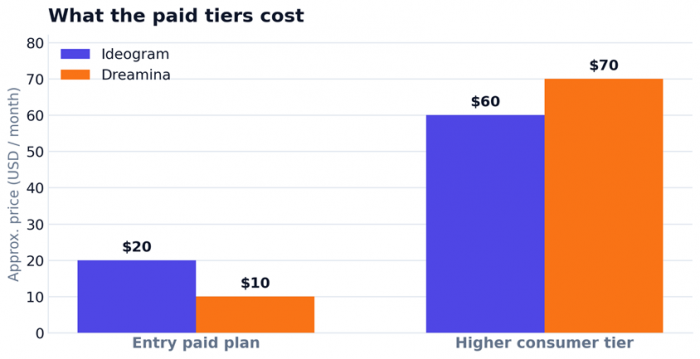
Approximate USD per month. Both keep a free tier. Prices vary by region and billing cycle.
| Plan | Ideogram | Dreamina |
|---|---|---|
| Free tier | Limited weekly credits, public outputs | Daily credits, outputs carry a watermark |
| Entry paid | Plus, about $20 / month | Basic, about $10 / month |
| Higher tier | Pro, about $60 / month | Advanced, about $70 / month |
| Developer / API | About $0.03 to $0.10 per image | Credit-based, varies by use |
Dreamina is the cheaper way in, and the better value if you also need video, since you would otherwise pay for a separate tool. Its free tier is a genuine on-ramp rather than a crippled trial, though daily credit allotments have tightened through 2026 and free outputs carry a watermark. Ideogram costs more, but the credits buy the strongest text engine in the category and clean, watermark-free output on any paid plan.
Edge: Dreamina on raw cost and value. Ideogram earns its premium if text is the job.
TEST 05 · THE EXTRAS
Speed and the wider toolbox
Speed is close. Seedream returns images in around three seconds, which feels instant, while Ideogram offers Turbo, Default, and Quality tiers so you can trade speed for sharper output when a final asset needs it.
The real divider is video. Ideogram does not generate video at all. Dreamina does both text-to-video and image-to-video through Seedance, adds avatars and audio, and exports into CapCut for editing. For anyone making Reels, Shorts, or TikToks, that single fact can settle the entire decision before the other tests even matter.
A few access notes round it out. Ideogram historically shipped without an Android app, while Dreamina runs on iOS, Android, desktop, and web. Dreamina's content filter is also stricter, particularly around faces, which can interrupt some workflows mid-project.
Edge: Dreamina, on the strength of video alone.
THE TALLY
The scorecard
Here is every category scored side by side, on a 1 to 5 scale.
| Category | Ideogram | Dreamina | Edge |
|---|---|---|---|
| Text rendering accuracy | 5.0 | 4.5 | Ideogram |
| Typography control | 5.0 | 4.0 | Ideogram |
| Static design polish | 4.5 | 4.0 | Ideogram |
| Creative breadth | 4.0 | 4.5 | Dreamina |
| Editing toolbox | 4.0 | 4.5 | Dreamina |
| Video and motion | 1.0 | 5.0 | Dreamina |
| Generation speed | 4.0 | 4.5 | Dreamina |
| Price value | 3.5 | 4.5 | Dreamina |
| Ease of use | 4.0 | 4.5 | Dreamina |
| Clean, ready-to-use output | 4.5 | 4.0 | Ideogram |
| Total (out of 50) | 39.5 | 44.0 | see note |
Add up the full toolbox and Dreamina comes out ahead, mostly because it simply does more, with video doing the heavy lifting. That total is honest, but it hides the real story. Narrow the question to the two things in this article's title, text and design, and the top of the table belongs to Ideogram. The categories you actually care about should decide your winner, not the sum at the bottom.
THE RECOMMENDATION
Pick your tool by what you make
Choose Ideogram if:
• Readable text inside the image is non-negotiable.
• You make logos, posters, ads, signage, or packaging.
• You want art-directed, watermark-free static design.
• You need layout control, or you want an open-weight model you can fine-tune.
Choose Dreamina if:
• You publish to TikTok, Reels, or Shorts and need video.
• You want image generation, editing, and motion in one place.
• Budget matters and you want strong value per dollar.
• You want a fast, beginner-friendly workflow tied to CapCut.
Use both if:
Your work is design first, then animate. Make the text-heavy hero image in Ideogram, bring it into Dreamina to add motion, and finish in CapCut. On that path the two tools complement each other far more than they compete.
THE FINAL READ Ideogram is the sharper instrument for words and static design. Dreamina is the more complete workshop for creators who also need motion and want to spend less. Neither choice is a mistake. Match the tool to the work, and the gap stops mattering. |
Post Comments
Be the first to post comment!
Related Articles




Grubby AI vs WriteHuman: Which One Should You Use?
Ridge Harper . Jun 30, 2026