Search for an AI video maker and these two names show up again and again, usually side by side, as if they do the same job. They do not. Fliki starts with your words and gives them a voice. InVideo starts with your idea and hands back a finished cut. That single difference shapes almost everything else, from the kind of videos each one is good at to the type of person who should be paying for it.
This piece is built to save you time. It opens with the verdict, walks through the choice by use case rather than by spec sheet, backs it up with data, and ends with the honest rough edges of each tool.
The verdict in 30 seconds
Short on time? This scorecard is the whole article in one box. Read the Edge column, find the rows that match your work, and you have your answer.
| What you care about | Fliki | InVideo | Edge |
|---|---|---|---|
| Turning a script into video | 4.5 / 5 | 3.5 / 5 | Fliki |
| Making a video from one prompt | 3 / 5 | 5 / 5 | InVideo |
| Voice quality and languages | 5 / 5 | 3.5 / 5 | Fliki |
| Stock footage and visuals | 3.5 / 5 | 5 / 5 | InVideo |
| Editing control | 4 / 5 | 4 / 5 | Tie |
| Speed to a finished video | 3.5 / 5 | 5 / 5 | InVideo |
| Faceless and narration content | 5 / 5 | 4 / 5 | Fliki |
The pattern is hard to miss. Fliki owns voice and narration. InVideo owns speed and footage. Most of the decision comes down to which of those two you value more.
The two tools at a glance
Before the detail, here is each one in profile.
In a sentence: A script and text to video tool with a huge bank of natural AI voices. Starts from: Your words. Paste a script, blog post, or idea and it narrates and builds it scene by scene. Known for: Voice quality, 75+ languages, voice cloning, and faceless content. Best fit: Creators who lead with narration and need many languages. | InVideo AI In a sentence: A prompt to video generator that writes the script and edits the whole clip for you. Starts from: One prompt. Describe the video and it produces a finished cut with footage, voice, and music. Known for: Fast idea to video, a large stock library, and command-based edits. Best fit: People who want a polished, footage-rich video without doing the legwork. |
Choose by what you are actually making
Specs matter less than the job in front of you. Find the line below that sounds like your work, and the pick is already made for you.
You already have a script or a blog post
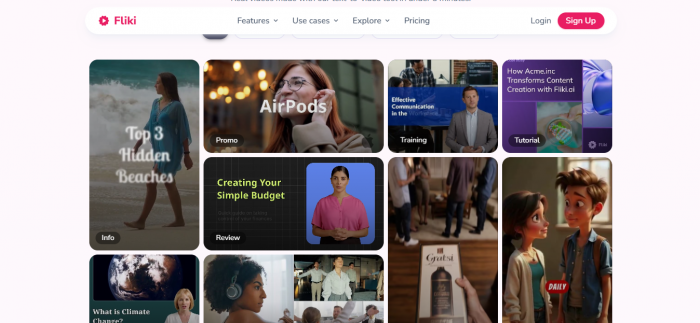
This is Fliki territory. Paste your text, pick a voice, and it breaks the script into scenes, narrates each one, and drops in matching visuals. You keep control of the words while the tool handles the voiceover and assembly. If your content starts as writing, nothing here feels smoother. Pick Fliki.
You only have an idea and want it done fast
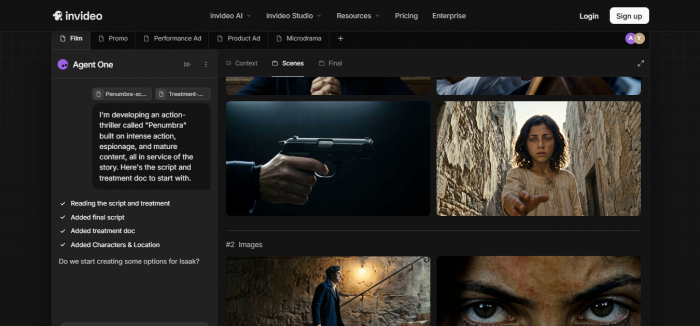
Type a sentence or two describing the video and InVideo writes the script, picks the footage, adds a voiceover and music, and stitches the whole thing together. You go from a blank page to a watchable draft in minutes. When you do not want to write or edit anything yourself, this is the stronger choice. Pick InVideo.
You need many languages or a very specific voice
Fliki was built around audio. It carries a far larger bank of voices, covers 75 plus languages and accents, and lets you clone a voice so your videos sound consistent. For multilingual channels or anyone fussy about how the narration sounds, the gap is wide. Pick Fliki.
You want footage-rich videos without sourcing clips
InVideo leans on a large stock library and pulls relevant footage into your video automatically. The result looks less like narrated slides and more like a properly edited clip. If visuals carry your story and you do not want to hunt for b-roll, it has the edge. Pick InVideo.
You publish faceless content on a regular schedule
Both can do this, but they suit different styles. Fliki is ideal for narration-led explainers, listicles, and anything where a strong voice carries the video. InVideo shines when each post needs fresh footage and a quick turnaround. If your faceless content is voice-first, lean Fliki. If it is footage-first, lean InVideo.
You want to fine-tune a generated video by typing
InVideo lets you refine a finished video with plain instructions, things like make it shorter, swap the third clip, or use a calmer voice. That command-based editing is a real strength when the first draft is close but not perfect. Pick InVideo.
By the numbers
Three views of the same story. The first shows where each tool sits, the second compares them point by point, and the third covers cost.
Plot them on two axes, how much the tool builds for you and how central voice is, and they land in clearly different spots.
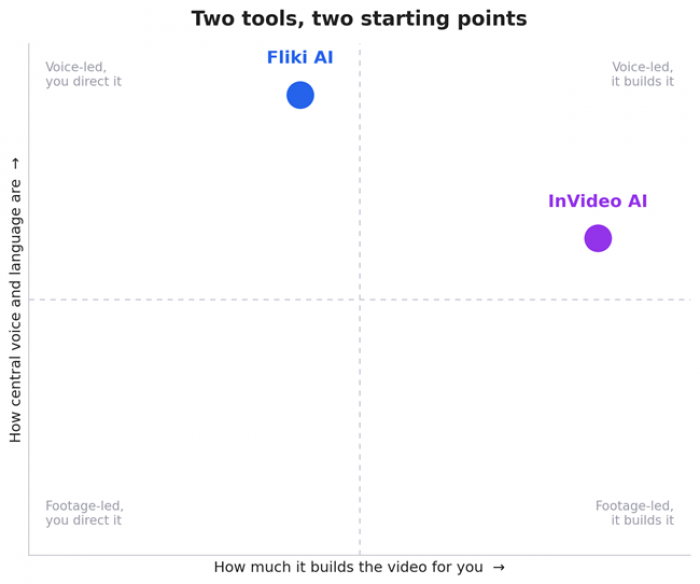
Figure 1. Fliki leads with voice and keeps you in the director's chair. InVideo automates more of the build.
Scored across the jobs people hire these tools for, the split sharpens. Each dot is a rating out of ten, and the connecting line shows how far apart they are.
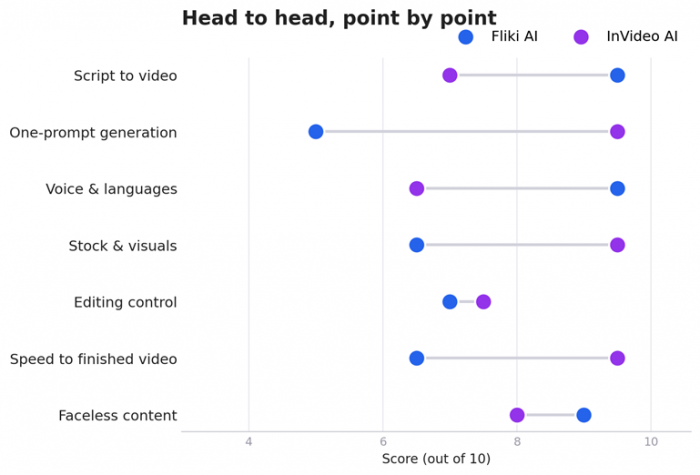
Figure 2. Where each tool pulls ahead. Longer lines mean a bigger gap.
On price, Fliki tends to come in lower at every tier, which fits its more focused feature set.
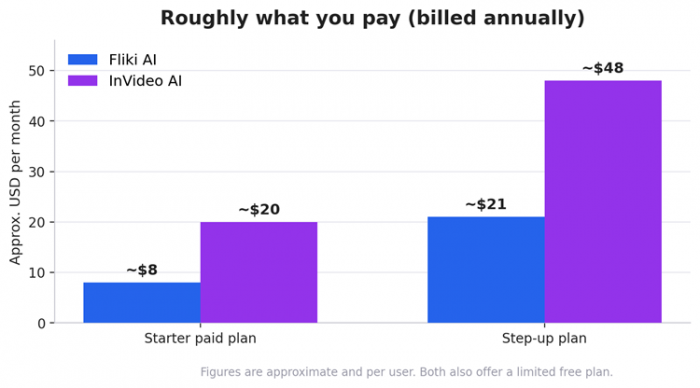
Figure 3. Approximate monthly pricing billed annually. Plans change often, so confirm on each site.
The full feature face-off
If you want every detail in one place, here it is.
| Feature | Fliki AI | InVideo AI |
|---|---|---|
| Core approach | Script and text to video | Prompt to full video |
| Full video from one prompt | Limited | Yes |
| Blog or article to video | Yes | Yes |
| AI voice selection | Very large (1000+) | Moderate |
| Languages supported | 75+ | 50+ |
| Voice cloning | Yes | Limited |
| Standalone audio (podcasts, TTS) | Yes | No |
| Stock footage library | Yes | Yes, large premium library |
| AI-generated images | Yes | Yes |
| Edit by typing commands | Limited | Yes |
| Scene and block editor | Yes | Yes |
| Templates | Some | Many |
| Auto subtitles | Yes | Yes |
| Free plan | Yes, with limits | Yes, with limits |
Where each one will frustrate you
No tool is all upside. These are the limits worth knowing before you commit, so neither one surprises you later.
Fliki's rough edges
• Visuals lean toward narrated scenes rather than cinematic, footage-driven edits.
• It is less hands-off than InVideo, since you still assemble and tune scenes yourself.
• The stock library is solid but not as deep as InVideo's premium footage.
• Heavy, frame-level video editing is limited compared with a full editor.
InVideo's rough edges
• Voice options and language coverage trail Fliki, and some voices sound less natural.
• A single prompt can produce a generic first draft that needs a few rounds of tweaking.
• The best stock footage and features sit on the higher-priced plans.
• It is not built for pure audio work like podcasts or standalone voiceovers.
The bottom line
Here is the rule to remember. Bring a script and care how it sounds, choose Fliki. Bring an idea and want a finished, footage-rich video fast, choose InVideo.
If your work spans both, you are not stuck picking one. A fair number of creators draft their narration-led videos in Fliki and spin up quick idea-to-video pieces in InVideo, using each for the half it does best. Whichever way you lean, both companies adjust their plans and features often, so check the current details on their own sites before you pay.
Post Comments
Be the first to post comment!