Table of Content
- What Unlucid AI Actually Provides Compared to Its Reputation
- Evaluating the Freemium Gem System Without the Marketing Gloss
- Key Features That Are Often Highlighted and How They Perform in Practice
- Pros and Cons of Using Unlucid AI
- Who Should Use Unlucid AI and Who Should Skip It
- Top Alternatives to Unlucid AI Worth Trying
- Final Verdict Without the Hype
- Conclusion
Quick Summary: Unlucid AI is a freemium image and video generator using a daily gem allocation. It offers fewer content restrictions than mainstream tools and is easy for beginners, but daily gem limits, inconsistent output quality, and occasional payment issues make it better suited for casual experimentation than professional work. Casual creators will likely find value; professionals should look at Topview AI, Vidu AI, or Midjourney instead.
Unlucid AI has gained attention among creators who want flexible image and video generation without heavy restrictions. Although the platform positions itself as a place for high freedom creativity, many users remain unsure about whether it offers meaningful value or if it is simply another short lived AI trend. A closer review of how the system works, how the pricing model affects usability, and what limitations users report reveals a more complex picture than the usual promotional claims found online.
This revised analysis examines what Unlucid AI can genuinely offer, where it falls short, and whether its features justify the growing interest around it.
What Unlucid AI Actually Provides Compared to Its Reputation
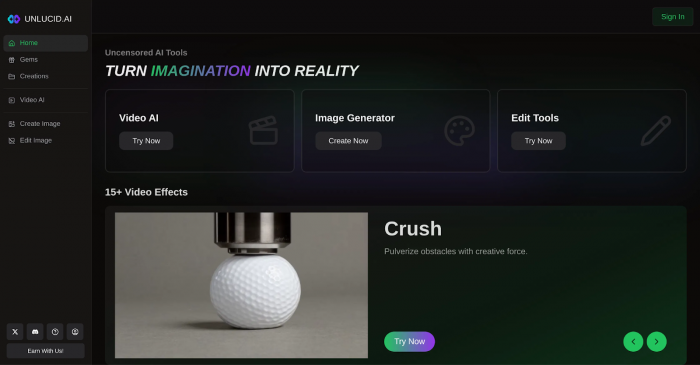
Unlucid AI operates on a gem based system that functions as both a free allocation method and a paid credit structure. This setup allows new users to test the platform without immediate cost, but it also creates limitations for anyone who needs multiple generations per day. The daily gems, which range from roughly ten to fifteen, allow light use but not ongoing creative work. Users who want more continuous output or higher resolution results will encounter gem walls very quickly.
Although the platform has become known for offering fewer restrictions compared to mainstream tools, that freedom does not guarantee consistent quality or reliability. It is important to separate genuine capability from reputation, since many descriptions online portray the platform as completely open or powerful without acknowledging its limitations.
Evaluating the Freemium Gem System Without the Marketing Gloss
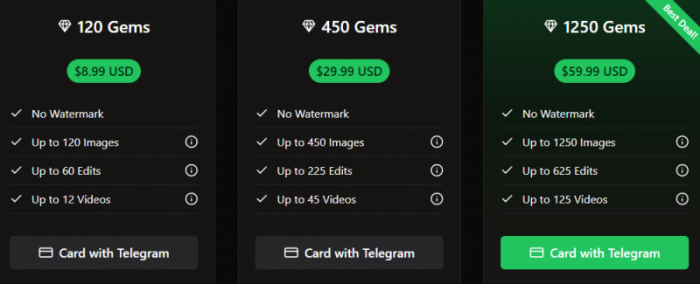
The gem model affects how long users can engage with the platform. Every action, including image generation, editing, or video creation, consumes gems. This structure allows affordable entry, but it also means that free users may find themselves unable to continue sessions once their daily allocation is exhausted.
Below is a simplified look at the paid bundles:
• 120 gems for 8.99 dollars
• 450 gems for 29.99 dollars
• 1250 gems for 59.99 dollars
For quick comparison, here is the effective cost per gem:
| Bundle | Price (USD) | Cost per gem |
|---|---|---|
| 120 gems | $8.99 | ~$0.075 |
| 450 gems | $29.99 | ~$0.067 |
| 1,250 gems | $59.99 | ~$0.048 |
On paper, these bundles offer reasonable cost per output. However, the real value depends on how many attempts a user needs before reaching acceptable results. If the generation quality varies significantly, users may consume far more gems than expected.
The system is therefore usable for experimentation but not ideal for long projects unless users commit to recurring purchases.
Key Features That Are Often Highlighted and How They Perform in Practice
Unlucid AI provides text to image generation, basic text to video animation, and a set of editing tools. These features allow users to experiment quickly, but that does not mean the results always match the platform’s public image.
Text to Image and Text to Video Capabilities
Simple prompts generally produce predictable images. More detailed or realistic requests can range from decent to poorly aligned depending on the complexity of the scene. The video generation feature is more of a novelty than a professional tool and tends to work best for short clips intended for casual social media use.
Image Editing Tools
The platform offers options for background changes, object removal, recoloring, and stylistic transformations. These tools help beginners who want small modifications without technical editing knowledge. The quality is inconsistent, and the results may not replace dedicated editing software.
Video Effects
Users can choose from a collection of short motion effects that animate static images. These effects create visually interesting clips but should be seen as lightweight creative tools rather than production level features.
The Real User Experience: Where the Platform Meets or Misses Expectations
Many users appreciate the simplicity of the interface and the low entry barrier, but reviews also mention several concerns that appear repeatedly.
Speed and Output Quality
Generation speed fluctuates depending on server activity. Quality can vary from acceptable to noticeably off model, especially with prompts that require realistic detail or accurate anatomy.
Usability for Beginners

The system is straightforward enough that even first time users can generate content without reading guides or tutorials. This ease of use, however, can create unrealistic expectations about what the tool can deliver consistently.
Payment Reliability Concerns
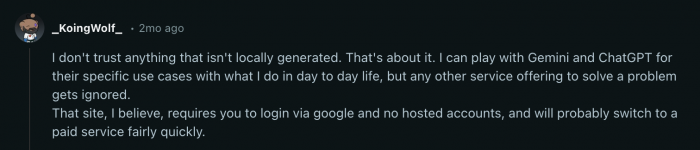
Some users report issues with Telegram purchases or card payments. These reports are not universal, but they highlight a need for more reliable transaction systems.
Pros and Cons of Using Unlucid AI
| Pros | Cons |
| Daily free gems provide low barrier entry | Watermarks appear on the free tier |
| Uncensored prompting supports bold and unrestricted creativity | Gem limits restrict heavy or long sessions |
| Beginner friendly interface | Occasional payment glitches reported by users |
| Multiple modes including text to image, editing, and video animation | Realism and accuracy vary depending on the prompt |
Who Should Use Unlucid AI and Who Should Skip It
| Good fit if you… | Look elsewhere if you… |
|---|---|
| Want a no-friction tool to test prompts and ideas | Need consistent, brand-safe output for client work |
| Make casual content for social media | Require photorealistic images or accurate anatomy |
| Prefer fewer prompt restrictions | Generate high volumes daily without paying |
| Are new to AI tools and want a low learning curve | Depend on rock-solid payment processing |
Top Alternatives to Unlucid AI Worth Trying
Topview AI

Topview AI is known for its video editing excellence. Users find that it provides cleaner motion, sharper enhancements, and more reliable results compared to Unlucid AI’s animation effects. It is ideal for creators who prioritize professional quality.
Vidu AI

Vidu AI offers fast and customizable video generation with a focus on workflow efficiency. Paid plans remove watermarks and provide more control over style and output. It is great for creators who want polished results without long wait times.
Midjourney

Midjourney remains one of the most respected text to image generators online. Known for artistic realism and high detail, it surpasses Unlucid AI in image quality but lacks built in video effects. Best for artists and designers seeking stunning visuals.
Other Competitor Tools from TopAI and AI Directories
Platforms listed on AI directories such as TopAI.tools and AI Directories offer a wide variety of tools ranging from image creators to video generators. These alternatives help users find highly specialized tools for specific needs like storytelling, animation, or ultra realistic imagery.Side-by-Side Comparison
| Tool | Best for | Strength | Trade-off |
|---|---|---|---|
| Unlucid AI | Casual experimentation | Few restrictions, easy to start | Variable quality, gem walls |
| Topview AI | Polished video work | Cleaner motion, sharper output | Less focus on raw image gen |
| Vidu AI | Fast video workflows | Speed and style control | Watermarks on free tier |
| Midjourney | High-quality still images | Artistic realism, detail | No built-in video effects |
Final Verdict Without the Hype
Unlucid AI offers a space for experimentation, quick idea testing, and playful animations. It is not the strongest choice for detailed professional work, and its gem system limits how deeply users can engage without payment. The platform’s freedom based branding may attract creatives who dislike rigid filters, but unrestricted prompting alone does not guarantee high quality images or videos.
For professional consistency, stronger realism, or predictable output, several alternatives surpass Unlucid AI. However, for casual creators who want a simple tool to explore ideas with minimal constraints, it remains a reasonable option.
Conclusion
Unlucid AI delivers an accessible environment for creative exploration. It fits beginners and hobbyists who want to experiment with prompts or produce quick visuals. The tool is less suitable for professional workloads that demand accuracy, stable output, or advanced controls. Whether it is worth using depends entirely on the user’s goals rather than the platform’s reputation.Key Takeaways
• Gem-based freemium model: light daily use is free; heavy use requires paid bundles starting at $8.99.
• Best for beginners and casual creators, not for production-grade or client-facing work.
• Output quality is inconsistent - expect to re-roll prompts, which consumes more gems than the bundle math suggests.
• Looser content filters are the main differentiator, but freedom alone does not improve image quality.
• Consider alternatives - Midjourney for image quality, Topview AI for video polish, Vidu AI for speed.
Frequently Asked Questions
Q1. Is Unlucid AI free to use?
1. Yes, users can access the platform for free using daily gem allocations.
Q2. Is Unlucid AI worth paying for?
2. The pricing structure is competitive, although value depends on how many attempts users need to produce satisfying results.
Q3. Can I use Unlucid AI output commercially?
3. Commercial use varies by feature, so users should review current policies carefully.
Q4. Why is Unlucid AI considered an “uncensored” AI tool?
4. The platform promotes creative freedom by keeping filters minimal, which appeals to users who want fewer restrictions.
Q5. How does Unlucid AI compare to other AI tools?
5. Alternatives tend to provide more reliable professional results.
Q6. Which AI tool is best for beginners?
6. Unlucid AI is beginner friendly, with Midjourney also being a strong option for image based beginners.
Post Comments
Be the first to post comment!
Related Articles




Grubby AI vs WriteHuman: Which One Should You Use?
Ridge Harper . Jun 30, 2026