NoteGPT.io markets itself as an all-in-one AI learning assistant that bundles image generation, video generation, text to speech, summarizing, and writing into a single dashboard. I spent a session putting the creative tools through real tasks, mostly on the free and signed-out experience, to see how fast they are, how good the output looks, and how quickly the product pushes you toward a paid plan. Here is exactly what I did, screen by screen, followed by my honest verdict.
NoteGPT.io at a glance Overall verdict: 3.5 out of 5, tested on the free plan. NoteGPT.io bundles AI image generation, video, text to speech, notes, and writing into one dashboard. On the free plan the image generator and the voice tools are genuinely usable and fast, with strong output quality, while video is gated behind a login and a credits paywall. Expect loud upgrade prompts throughout. Best for: quick AI images and natural sounding text to speech in one place. Free tier: real for images (two per day) and voice (100,000 character cap); video is effectively paywalled. Pricing (yearly): Pro $9, Unlimited $14.5, Max $49.5 per month, each shown with a recurring discount timer. Watch out for: aggressive upsells and free image previews that are lost unless downloaded immediately. |
What I tested Product: NoteGPT.io web app. Account: started signed out, then signed in only when forced. Tools: AI Image Generator, AI Video Generator, and Text to Speech. Goal: judge speed, output quality, and the free-to-paid experience. |
Testing methodology: the Real-Task Free-Plan Walkthrough Each tool was run against a concrete, real-world task rather than a synthetic benchmark, on the free or signed-out experience wherever the product allowed it, with every screen, usage limit, and prompt recorded as it appeared during the session. Pricing, credit costs, and caps reflect what the live interface displayed on the testing date and can change without notice. This review is independent: there is no sponsorship, affiliate arrangement, or vendor-supplied account behind it. |
The step-by-step testing
Step 1: Landing on the dashboard
The first thing you see is a dense left sidebar packed with tools: AI Notes, AI Voices, AI Images, AI Videos, AI Slides, AI Chat, and AI Writer. The center of the page leans hard on social proof, with a Chrome Store badge, an 80,000,000+ users figure, a 12,000+ schools and teams figure, and a row of university logos. A Save 50% countdown timer sits in the bottom corner and never seems to go away. Treat these big numbers as the company's own marketing claims.
_1782212107.webp)
Figure 1: The NoteGPT dashboard. Note the tool sidebar, the marketing claims, and the ever-present discount timer.
Step 2: Opening the AI Image Generator
From the Products menu I picked AI Image Generator out of a short list that also included an Image Editor, a Headshot Generator, and an Object Remover.
_1782212114.webp)
Figure 2: The Products menu. I started with the AI Image Generator.
Step 3: Writing the prompt
The image tool runs on a model labeled GPT Image 2, with controls for aspect ratio (I left it on 16:9), resolution, a Fast or Think mode, and reference images. The free tier allows two images per day. I typed a simple prompt, generate a indian girl girl in yellow suit in golden hour, and hit Generate.
_1782212122.webp)
Figure 3: The image prompt screen, showing the free daily limit and the prompt I used.
Step 4: The result, and the catch
The image came back quickly. The output was a 1672 by 941 photo with believable golden-hour lighting, detailed jewelry, and fine embroidery on the outfit. The quality was genuinely strong for a free, no-signup generation. The catch appeared right away in a banner that read, not signed in, image won't be saved, download now. In other words, the free preview is real, but you have to download each image by hand or it is gone. The panel also offered editing tools like Remove, Adjust Ratio, Upscale, and Translate.
_1782212130.webp)
Figure 4: The result panel. The warning makes clear the image is not saved unless you sign in.

Figure 5: The full output. Strong lighting and fine detail for a free generation.
Step 5: Trying AI Video
Encouraged by the image, I moved to the AI Video Generator, which runs on a model branded Gemini Omni. I set up a 6 second, 1080p clip with audio on and typed, generate the indian girl in yellow suit walking in rainy road. The interface shows that each video costs 40 credits. When I clicked Generate Video, it stopped me and pushed a login page.
_1782212144.webp)
Figure 6: The video generator. Clicking Generate forced a login wall before anything rendered.
Step 6: After login, the paywall
After signing in and trying again, the product threw a full-screen subscription window that said, this month's premium credits are not enough, buy more to continue now. Three yearly plans were on offer: Pro at $9 per month, Unlimited at $14.5 per month (badged as 80% of users buy), and Max at $49.5 per month. Every card carried the same Save 50% countdown, and a popup at the top announced that another user had just upgraded. The video tool, in short, is not really part of the free experience.
_1782212152.webp)
Figure 7: The subscription wall, complete with urgency timers and a live upgrade popup.
Step 7: Testing Text to Speech
I switched to AI Voices and pasted a short news paragraph about Amazon and its Trainium AI chips (688 characters). The free tier caps text at 100,000 characters. I left it on the default free voice, Lily Parker, an American English young adult female voice, and clicked Generate Speech.
_1782212158.webp)
Figure 8: The Text to Speech screen with my pasted paragraph and the default free voice.
Step 8: The speech result
This generated fast. Within seconds I had a 48 second audio clip in a clean player with play, scrub, and speed controls, plus Download, Share, Listen on Phone, and New buttons. The voice was natural and clear for a free option.
_1782212169.webp)
Figure 9: The finished audio. A 48 second clip produced in seconds.
Step 9: Download options
The Download menu was more flexible than I expected. You can export the audio as MP3 (44.1kHz, 256kbps) or WAV (44.1kHz), reach an Advanced menu, and also download the source text as Markdown or plain TXT.
_1782212176.webp)
Figure 10: The export menu, with audio formats plus text export options.
What NoteGPT says about itself
The homepage leans on big numbers and logos. It is worth treating these as marketing claims rather than independent data:
• Chrome Store rating shown as five stars.
• 80,000,000+ users.
• 12,000+ schools and teams.
• University and platform logos, including YouTube and several universities.
What real users are saying across review platforms

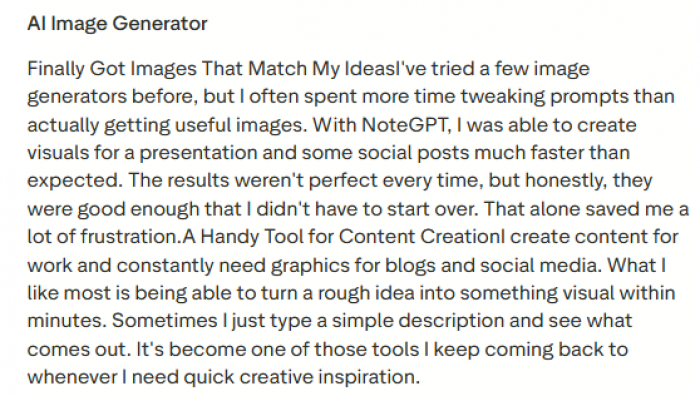
Public feedback on NoteGPT is divided. Positive users mostly praise the platform for quick summaries, transcript extraction, YouTube video summarization, note creation, and lightweight content generation. Some reviewers say it helps them understand long videos faster, manage study material, create quick visuals, and save time when working with articles, PDFs, or online content. One recent reviewer also described its image generator as useful for turning rough ideas into presentation or social media visuals quickly.
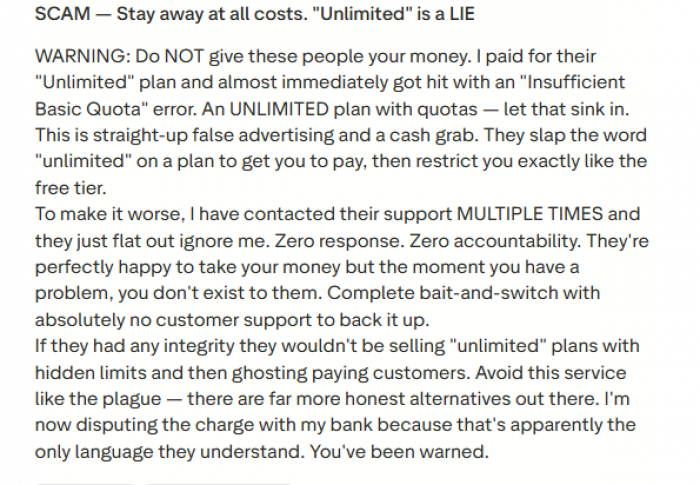
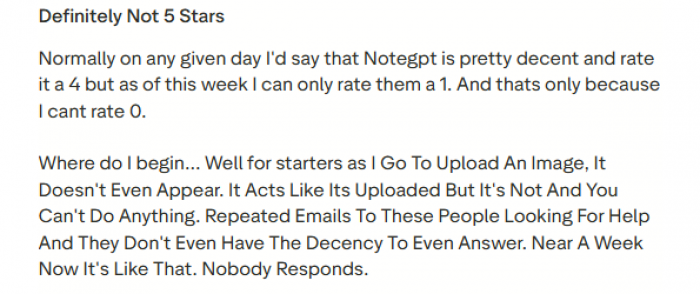
The negative reviews focus on reliability, support, and plan limits. Some users complain that paid or “unlimited” plans still come with quota restrictions, while others say support responses were slow or missing when features stopped working. One reviewer said image uploads appeared to complete but did not actually work, leaving them unable to continue the task.
Overall, NoteGPT seems useful for students, researchers, creators, and professionals who want a fast AI assistant for summarizing videos, extracting transcripts, creating notes, and generating simple learning material. However, the current review pattern suggests users should be careful with paid plans, especially around quota limits, support expectations, and feature reliability. It is best approached as a convenient learning and summarization tool rather than a fully polished all-in-one AI workspace
Quick reference
| Feature | Free experience | Notes |
|---|---|---|
| AI Image Generator | Works, strong quality | 2 images per day. Not saved unless you sign in and download. |
| AI Video Generator | Blocked on free | Login wall, then a credits paywall. 40 credits per clip. |
| Text to Speech | Works well | 100,000 character cap. MP3 and WAV, plus text export. |
| Pricing (yearly) | Pro $9, Unlimited $14.5, Max $49.5 per month | All shown with a Save 50% countdown timer. |
My verdict
After testing, here is where NoteGPT landed for me.
The good
• Image quality is strong. The free GPT Image 2 output looked polished, with realistic lighting and fine detail.
• Speed is excellent. Both the image and the voice clip generated in seconds.
• Text to speech is a highlight. The default free voice sounded natural, and the export options (MP3, WAV, plus text as Markdown or TXT) are generous.
• One dashboard, many tools. Having images, video, voice, notes, and writing in one place is convenient.
• A genuine free tier exists for images and voice, with no signup needed to try.
The bad
• Aggressive upsells. The constant Save 50% countdown, the 80% of users buy badge, and the someone just upgraded popups feel like pressure tactics.
• The free preview does not save your work. Unsigned image generations are lost unless you download them on the spot.
• Video is effectively paywalled. The video tool pushed a login, then a credits paywall, before producing anything.
• Credit math burns fast. At 40 credits per video, a free or low-tier allowance disappears quickly.
• Marketing-heavy homepage. The big user numbers and logos are the company's own claims, with no independent context on the page.
Who it is for
NoteGPT makes sense if you want quick, good-looking images and natural sounding voiceovers in one place, and you are comfortable downloading your results as you go. If your main interest is AI video, or you dislike high-pressure upgrade prompts, temper your expectations before signing up.
Bottom line
The core creative tools are fast, and the output quality is better than I expected from a free tool, especially for images and speech. The experience is undercut by heavy upselling and a video feature gated behind login and credits. Tried on the free plan, it is worth a look for images and voice. Just download as you go, and go in knowing the upgrade prompts will be loud.
Post Comments
Be the first to post comment!