Why I went looking for an all-in-one
Most people I know now pay for AI the way they once paid for streaming services. One subscription handles writing. Another does images. A couple more creep in because a friend swears the coding or research answers are sharper somewhere else. The bills stack up quietly, and the browser fills with tabs nobody closes.
So when Nova landed in front of me, promising access to more than thirty AI models behind a single login, the question almost asked itself. It is the one sitting in the title: can a single app stand in for the separate subscriptions people already pay for?
I went through the app to find out. This review follows that path in order. It opens with what Nova is and how it feels to use, then builds toward the part most readers care about, which is whether the price makes sense. I will flag the rough edges too, because a recommendation is worth nothing without them.
What Nova actually is
Nova is a hub. It does not train an AI of its own. Instead it passes your prompt to the big providers and brings their answers back inside one interface. The sign-in screen states the arrangement plainly: “Powered By OpenAI, Anthropic, Google,” with a line underneath that promises chat, intelligent web search, image generation, and document creation in one place.
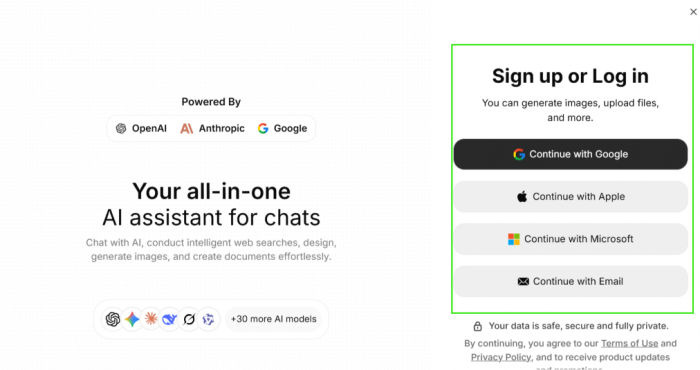
That framing matters for how you judge what follows. You are not buying a new kind of intelligence. You are buying reach and convenience, the ability to touch many tools without juggling many accounts. Keep that distinction in mind. It shapes how you read the model list in the next section and the value question waiting at the end.
Getting in: the first few minutes
Signing up took seconds.
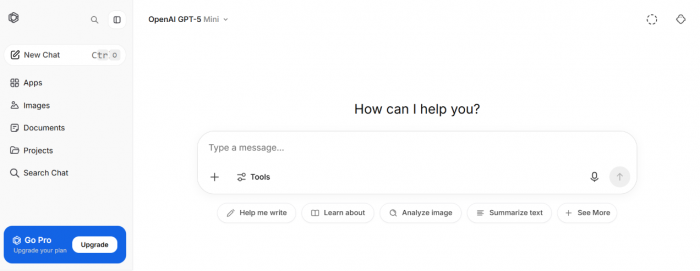
The app offers the familiar choices to continue with Google, Apple, Microsoft, or email, plus a note that your data stays private. Once I was inside, the layout felt instantly recognizable to anyone who has used a modern chatbot. A slim sidebar on the left holds new chats, apps, images, documents, and projects. The middle of the screen is mostly open space around a prompt box asking “How can I help you?”
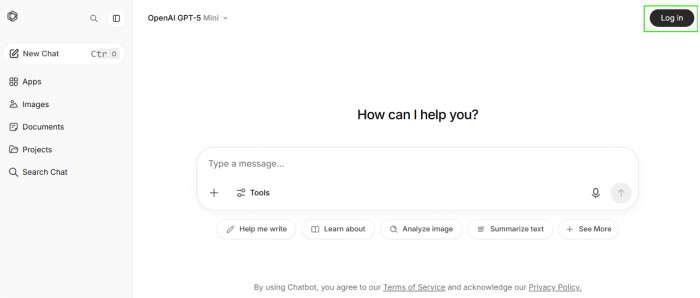
One detail caught my eye right away. The model chosen by default sits at the top of the screen, and in my case it read “OpenAI GPT-5 Mini.” Mini is the lighter, cheaper member of a model family, not the full-strength flagship. That is a reasonable default to hand a free user, and it is also the first quiet signal that the more capable models live behind the upgrade I will reach later. Worth holding onto for the pricing section.
Thirty-odd models, one dropdown
The headline feature is choice.
A dropdown at the top lets you change the model answering you without starting the conversation over. Across its screens the app names familiar systems: GPT-5 Mini and GPT-5.4 from OpenAI, Gemini 3.1 Pro from Google, alongside DeepSeek and Claude. Each carries its own habits and strengths. I tend to reach for one model when I want tighter writing and a different one for technical questions, so flipping between them inside a single window, rather than opening a separate app each time, is the practical reward of the hub idea I described two sections back.
This is the point where Nova starts earning its place for anyone who already knows their tools pull in different directions.
The trick no single app can copy
Switching models is handy. Comparing them is the real draw.
Nova’s most interesting capability puts the same question to several models at once and lays their answers next to each other. The value lands once you remember a known weakness of these systems: they can deliver wrong information with total confidence. Two answers side by side turn a lone guess into something you can sanity-check at a glance. If GPT and Claude agree, you relax. If they pull apart, you have learned something useful about how far to trust the reply.
No single-model app can show you that, which is why it is the first thing I point to when someone asks why a hub like this should exist at all. It also sits on the paid side of the line, a detail I will come back to once the money is on the table.
More than a chat box
A review of an app that calls itself all-in-one has to ask what else is in the box.
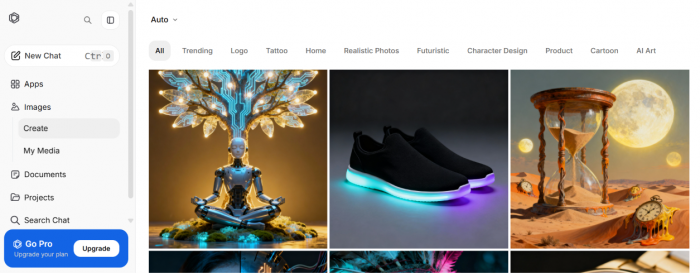
On the image side, Nova carries a style library sorted into categories: logos, tattoos, realistic photos, product shots, cartoon art, and more. Browsing it feels less like staring down an empty prompt and more like flipping through a catalog for ideas before generating your own.
The document side is where the app reaches toward becoming a small workspace. From the documents dashboard you can start a fresh document, ask questions about a PDF, work through code, or upload your own files to chat about them.
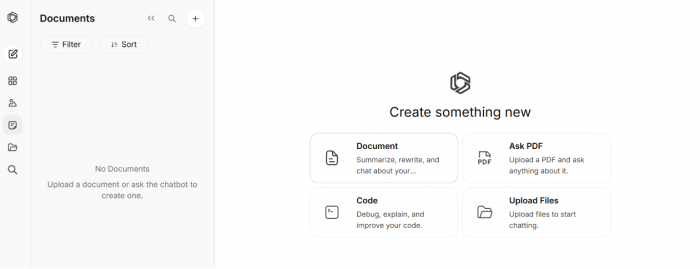
Put together, these features push Nova past being a chat window and toward a desk where several jobs happen in one spot, which loops straight back to the breadth it promised on that first sign-in screen. How much of this you can use without paying is the question waiting in the next section.
The numbers, and whether they add up
Here is the part I most wanted to pin down.
At checkout, Nova showed me two paid options. A weekly plan at $4.99, and an annual plan billed once at $39.99, which the app presents as roughly $3.33 a month. Pro is the tier that opens the things I praised above, including the full models, the side-by-side comparisons, image generation, advanced web search, and higher usage limits. The free tier mostly lets you sample the interface.
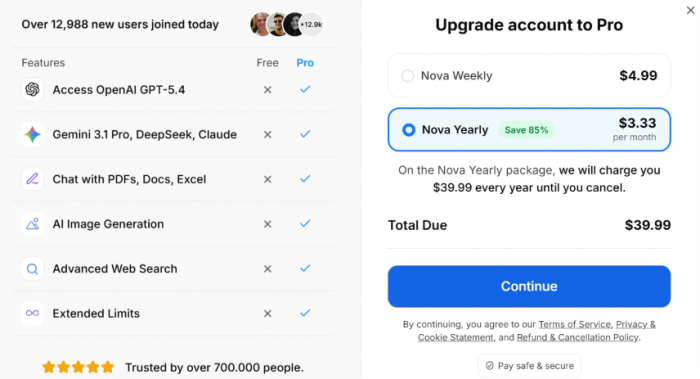
Now the comparison that gives the whole app its reason to exist. Paying for the leading AI subscriptions one by one adds up to real money. A rough monthly tally looks like this:
| Service | Typical monthly price |
| ChatGPT Plus | about $20 |
| Claude Pro | about $20 |
| Gemini Advanced | about $20 |
| A fourth tool, such as Perplexity or Grok | $20 to $30 |
| Combined | roughly $80 to $90 |
Set an annual plan that works out to a few dollars a month against an $80-to-$90 monthly habit, and the argument writes itself. Even the weekly option at $4.99 undercuts a single one of those subscriptions. The math is the strongest card Nova holds, and it is the clearest answer to the question in the title.
A warning belongs right next to that math. Prices for apps like this move around by region and platform, and by whatever promotion happens to be running the day you sign up. Treat the figures above as what I saw rather than a fixed quote, and check your own checkout screen before committing.
Where it comes up short
No review earns trust without the other column.
The biggest catch follows straight from the pricing I just laid out: the features that make Nova worth talking about are the ones you pay for. The comparison tool I called its best trick sits behind Pro. So does full-strength model access, and so does image generation. The free experience reads closer to a demo than a daily driver.
There is also a transparency wrinkle. The app shows slightly different model labels in different places, GPT-5 Mini in one corner and GPT-5.4 in another, which can leave you unsure which version is replying at any given moment. For a casual user this barely registers. For someone picking a model on purpose, clearer version labels would help.
Finally, breadth carries a quiet trade-off. Because your prompts travel through Nova on their way to each provider, you are handing a middle layer whatever you type. The app says your data stays private, and most people will be fine with that, but anyone working with sensitive material should weigh it before pasting it in.
So, should you switch?
Back to the question on the cover: can one app replace your other AI subscriptions? For a large share of people, yes.
If you use AI across many small jobs and would otherwise pay for two or more apps, the cost gap I walked through earlier is hard to argue with, and switching or comparing models inside one window is a real improvement to the daily routine. If you are a specialist who lives inside a single flagship model and needs its newest features the moment they ship, a hub will always trail the source by a step, and paying that provider directly may suit you better.
My rating settles at 4 out of 5. The deciding factor is the ratio of access to price: for the cost of one ordinary AI subscription paid annually, you reach a doorway onto most of the field, and that doorway is wide enough that the small frustrations around labels and the paywall read as fair trades rather than reasons to walk away.
Post Comments
Be the first to post comment!