Quick Verdict
Slidesgo in one minute
If your goal is a presentation that looks the part by the end of the day, few tools move faster than Slidesgo. A sentence becomes a themed, editable deck almost instantly, and you finish it wherever you like. Where it asks for patience is the actual content: the AI sketches an outline rather than writing a polished, accurate talk, and you carry that part across the line yourself.
Add a low price and the picture is a strong but uneven one. I landed at four out of five overall, with the marks split cleanly between the things it makes effortless and the things it leaves to you.
| Area | Score | In a sentence |
|---|---|---|
| Speed to first draft | 4.7/5 | A blank box becomes a themed deck in well under a minute |
| Template and theme range | 4.5/5 | Thousands of designs, and the match to your topic is sharp |
| Exporting your work | 4.6/5 | A clean handoff to PowerPoint or Google Slides, with no lock-in |
| Price for what you get | 4.4/5 | Premium is cheap, and the free tier is usable for light needs |
| Depth of AI writing | 3.3/5 | Outlines and placeholders, not finished or sourced copy |
| Brand and design control | 3.2/5 | Fine for general use, frustrating under strict brand rules |
| Billing and cancellation | 3.0/5 | Comfortably the most common source of complaints |
| Overall | 4.0/5 | A brilliant head start that you still have to finish yourself |
Is Slidesgo built for you?
Before the detail, a quick gut-check. Slidesgo rewards people who want a fast, affordable head start and are happy to do the finishing touches. It frustrates anyone who needs total design control or expects the AI to deliver final, on-brand copy.
| A strong fit if you are | A weaker fit if you are |
|---|---|
| A teacher building lessons or classroom slides | A design agency shipping client work |
| A student who needs a project to look good fast | A marketing team tied to a strict brand kit |
| A small team putting together quick internal decks | A founder polishing an investor pitch |
| Someone who wants a starting point, not a final deck | Someone who needs the AI to write deep, accurate copy |
The Run-through
Putting Slidesgo to work
Rather than poke around aimlessly, I gave Slidesgo a real assignment and watched where it carried the weight and where it handed the work back. I picked a deliberately odd topic, how a catapult might fling a spacecraft into orbit, to see whether the AI would cope or fall apart. Here is how the session unfolded, told in four stages, with the screenshots from my own run and a note on what each stage revealed.
Stage 1: From a blank box to a brief
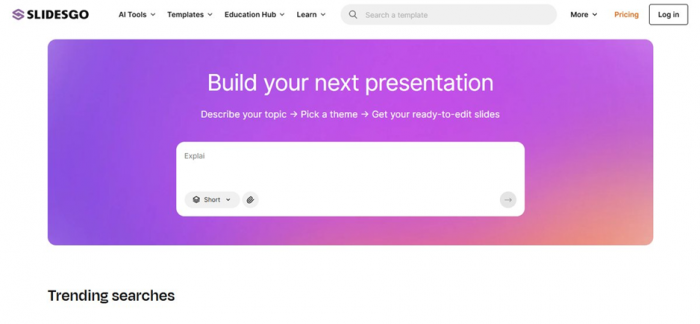
Slidesgo opens straight onto a prompt box, with a length picker and an attach button.
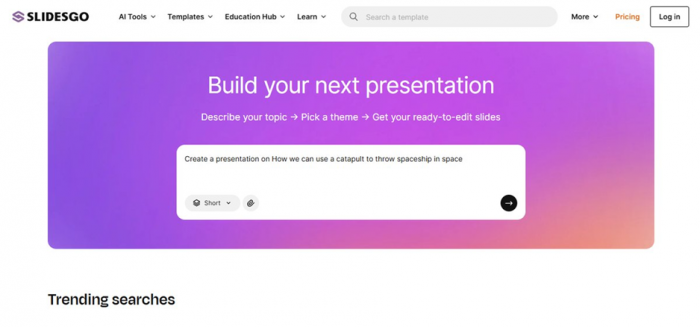
I typed an intentionally tricky brief; the send button only wakes up once there is text.
What I noticed Nothing stands between you and the prompt, you can start typing the instant the page loads, and that easy on-ramp is a big part of the appeal. The catch is that Slidesgo never asks a follow-up; it treats whatever you write as a topic seed and runs with it. Leaving the length on its default 'Short' quietly set me up for a very brief deck later, so that small dropdown matters more than it looks. |
Stage 2: Choosing a look, then the sign-in wall
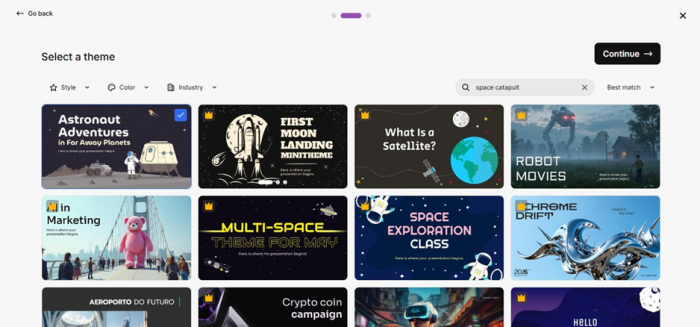
My prompt became a 'space catapult' search, and I chose a free theme from the matches.
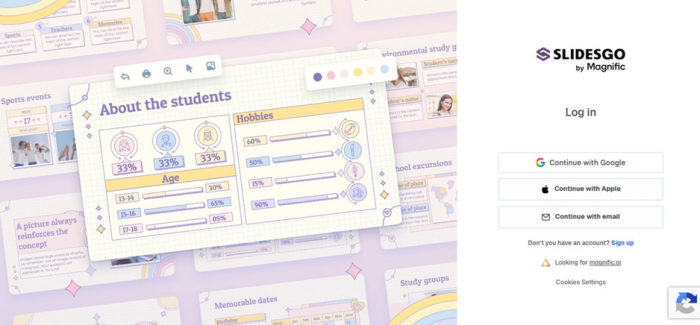
The deck stays hidden until you sign in. The footer reads 'Slidesgo by Magnific.'
What I noticed This is where the tool shows its real nature. It does not dream up a layout from scratch the way some AI apps do; it matches your topic to ready-made templates, so you are really picking a visual system. That keeps results dependable but less original. Then comes the sting: you cannot view the deck until you make an account, which is worth knowing before you invest any effort. The 'by Magnific' mark also confirms this is a Freepik-owned product these days. |
Stage 3: The deck it produced, and getting it out
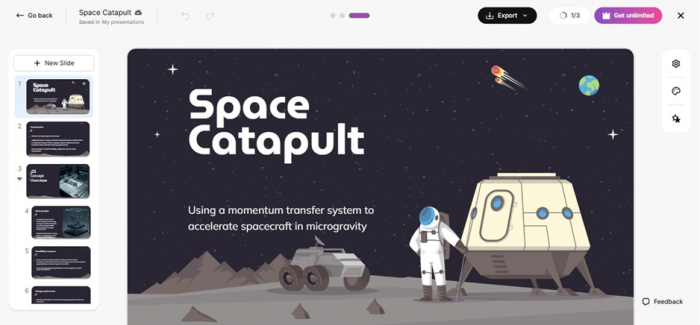
What came back: a sharp 'Space Catapult' opener with a credible subtitle, but just 3 slides.

Two ways out: download a PowerPoint file, or send it to Google Slides.
What I noticed The opening slide was genuinely good, and the subtitle even read like something an engineer might write, which is impressive from a half-serious prompt. But three slides is an outline, not a talk, and the body text quickly thinned into placeholders that would need real writing and a fact-check. Export is the opposite story, and a clear plus: you can drop the file into PowerPoint or push it to Google Slides and finish it in tools you already rely on. |
Stage 4: What it costs to go further
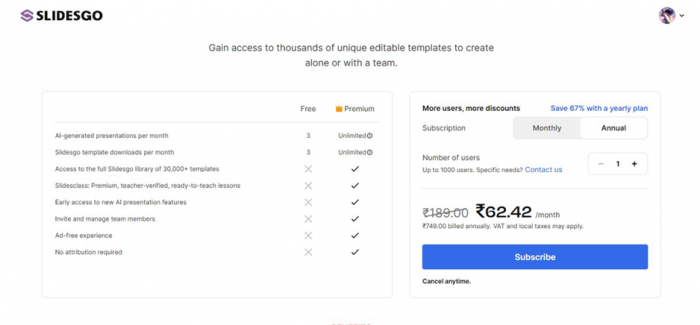
The free-versus-paid screen. My figures appeared in local currency; dollars are below.
What I noticed The free plan is generous enough to judge the tool but tight for steady use: three AI decks and three downloads a month, each carrying a Slidesgo credit. Premium sweeps all of that away. One thing to flag here, the price I was quoted depended on where I was, because Slidesgo adjusts its pricing by country, so I have converted everything into standard US dollars in the next section. |
What you actually get
Look past the homepage and Slidesgo is really four tools sharing one login.
The template library is the foundation. More than 30,000 designs (over 15,000 of them Premium) are sorted by topic, style, and color, and every deck carries the usual slide types, from title and section pages to charts, timelines, maps, and infographics. In my run, the way it matched a vague prompt to relevant, well-built designs was the standout.
The AI generator is the headline act. It spins a prompt into a themed draft in seconds and is at its best on first drafts, simple explainers, and student work. It is not the right engine for long, data-heavy, or tightly branded stories, where the writing stays at outline depth.
The browser editor covers the basics. You can adjust text, swap images, and add or remove slides online without installing anything. It will not replace full software, but it handles quick edits well.
A set of bonus AI tools rounds it out. There is a PDF-to-PPT converter plus a clutch of classroom helpers, including lesson plan, quiz, exit ticket, and icebreaker generators. For teachers in particular, these add quiet value on top of the slide maker.
What Slidesgo costs
There is a free plan and a single Premium tier that grows with the number of seats. The rates below are the standard US-dollar prices for one user. Slidesgo localizes pricing by region, so your own total may differ, and tax can be added at checkout.
| Plan | Cost (USD) | What it unlocks |
|---|---|---|
| Free | $0 | Three AI decks and three template downloads a month, with a Slidesgo credit on your slides |
| Premium (monthly) | $5.99 / month | Everything below, billed month to month |
| Premium (annual) | $35.99 / year | Unlimited use (150 a month cap), the full 30,000+ library, no attribution, ad-free, and team options; close to half the monthly price, near $3 a month |
Slidesgo caps that 'unlimited' label at 150 AI generations and 150 downloads a month, a soft limit set for security. Annual billing is the value play, landing near $3 a month, about half the monthly rate. Teams can add seats up to 1,000 users for steeper discounts, and large institutions can request a custom quote. Local taxes may apply.
A fair warning on billing Subscriptions renew on their own unless you cancel, and Slidesgo will not refund the remainder of a term you have already paid for. Since billing and cancellation draw the most complaints, the safe move is to start on a monthly plan, note your renewal date, and save any cancellation receipt. |
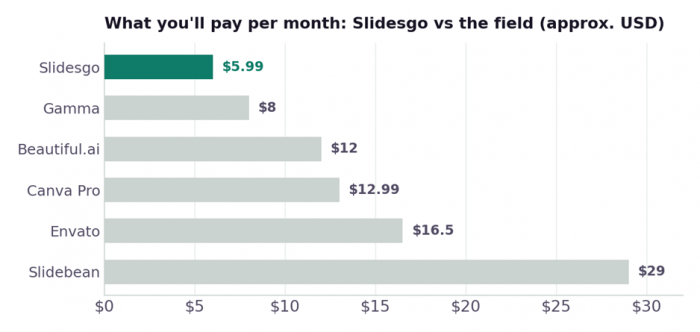
Rough starting prices per month in US dollars; several tools are cheaper paid yearly, and Slidesgo itself falls to about $3 a month on its annual plan. Always confirm current pricing before you buy.
Strengths and limitations at a glance
| Where it shines | Where it struggles |
|---|---|
| Start to draft in seconds, with no signup to begin | A sign-in wall appears once you are already invested |
| A huge library, and topics are matched well | Designs are widely reused, so decks can look familiar |
| A one-line prompt becomes a coherent draft | The AI writes outlines, not finished or sourced text |
| A clean export to PowerPoint and Google Slides | Limited control for strict brand systems |
| Cheap premium, from roughly $3 a month | Billing and cancellation are the top complaint |
| Useful extras like PDF-to-PPT and quiz tools | The default 'Short' length can leave too few slides |
The crowd's verdict: G2 and Trustpilot
Two of the biggest review hubs paint almost opposite pictures of Slidesgo, and reading them side by side is more revealing than either alone. Business users on G2 place it near the top of the scale. Trustpilot's smaller, louder crowd rates it far lower and is sharply divided. The figures below were accurate in mid-2026 and will move over time.
| Platform | Typical score | The short story |
|---|---|---|
| G2 | about 4.7 / 5 (around 19 verified) | Business reviewers single out the sheer range of templates and the hours they save |
| Trustpilot | about 2.4 / 5 (around 54 reviews) | A divided crowd: warm praise for the designs set against repeated billing and cancellation complaints |
| Other listings | generally positive | Software directories tend to echo the same speed-and-templates praise |
What wins people over

The upside is easy to sum up. Teachers are the loudest fans, often saying the themes refreshed their lesson materials and landed well with students. Students like that most designs are free and that a smart-looking deck takes minutes; one Trustpilot reviewer recalled earning a top grade simply because the slides looked great. People also flag the speed of the AI maker on rough prompts and the smooth fit with the tools they use, with one calling out “great designs, compatibility with Google Slides, PPT, and Canva.” Friendly, quick support comes up more than once too.
What sets people off

The downside is just as consistent, and it is almost entirely about money. Reviewers describe being charged after they thought they had cancelled, hunting for a cancel button that was hard to find, and slow or missing replies to refund requests; one bluntly warned that the company would “hide all possible ways to cancel your subscription.” Unexpected annual renewals come up repeatedly, and at least one teacher said a promised education discount never applied at checkout. A quieter gripe is the AI drifting off-topic on harder prompts. Keep some perspective, though: people rarely head to Trustpilot to report a smooth experience, which drags the average down.
How to square the two
Put together, the scores are not really in conflict; they are measuring different things. The product is well-made, which is why G2's business reviewers and returning teachers rate it so highly. The friction lives in billing, not in the slides. So the sensible plan is to lean on the free tier, and if you do upgrade, start monthly, set a reminder before the renewal date, and keep proof of any cancellation.
Slidesgo against the field
Slidesgo does one job well and leaves gaps elsewhere. If those gaps matter to you, these are the tools worth weighing, with a note on where each pulls ahead or falls behind.
| Tool | The one-line take | From (USD) | How it compares to Slidesgo |
|---|---|---|---|
| Gamma | AI that genuinely writes and designs the deck | about $8/mo | Deeper, more finished content; less template variety and a higher price |
| Canva | A full design suite, not just slides | about $12.99/mo | Stronger brand control and collaboration; broader, but less slide-focused |
| Beautiful.ai | Auto-formatted, on-brand business decks | about $12/mo | More consistency for teams; less creative freedom |
| Envato Elements | A vault of premium, less-recycled templates | about $16.50/mo | More original, commercially safe designs; but no AI generator |
| Slidebean | A pitch-deck and fundraising specialist | about $29/mo | Built for investor decks and financials; far more expensive |
Figures are rough starting prices and shift often; many are cheaper on annual plans. Treat this as a sense of the landscape, not a price list.
So, is Slidesgo worth it? My final call
Weighed up, Slidesgo lands at four out of five for me. Its core trick, taking you from a blank screen to a clean, themed, editable deck, is faster and cheaper than almost anything else, and because it exports straight to PowerPoint and Google Slides, it slots into the way most people already work. The point it loses is for the things it was never built to do: write deep, accurate, on-brand copy, and run a billing process you can fully trust. The public ratings mirror that split, sitting high on G2 and low on Trustpilot, with the gap explained almost entirely by billing rather than by the slides.
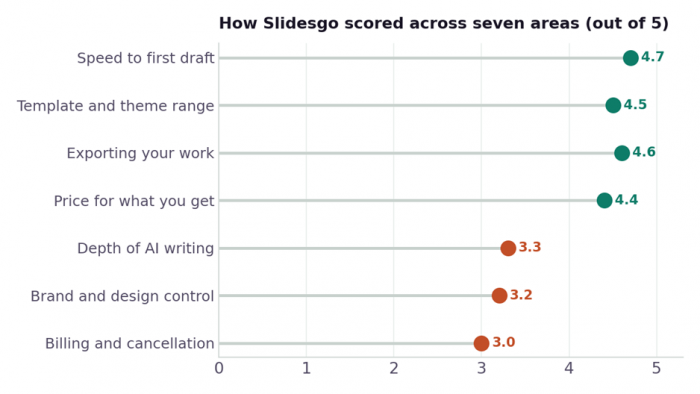
The pattern is clear: speed, templates, export, and price carry the score, while AI depth, brand control, and billing pull it down.
Go Premium when: you make a couple of decks a month, want the whole library without a credit slide, and you are content polishing in PowerPoint or Slides. At about $3 a month on the yearly plan, it pays back quickly.
The free plan is enough when: you only need the occasional deck and the three-a-month limit plus a small Slidesgo credit do not bother you.
Choose a rival when: you want the AI to do the real writing (Gamma), you live inside a strict brand system (Canva or Beautiful.ai), or you need original, commercially cleared designs (Envato).
Post Comments
Be the first to post comment!