Cutout.pro positions itself as an all-in-one AI visual content platform, promising automated background removal, photo enhancement, video editing, AI portrait generation and a growing library of e-commerce tools. It has been around since 2018 and currently lists over 25,000 businesses among its users. But marketing copy is one thing; actual performance is another. This review walks through the platform feature by feature based on direct testing of the web interface, examines pricing and download quality, and pulls together verified user feedback from Trustpilot, Scamadviser, Sitejabber, Capterra and the Shopify App Store to deliver an honest assessment of where Cutout.pro shines and where it falls short.
About the Platform
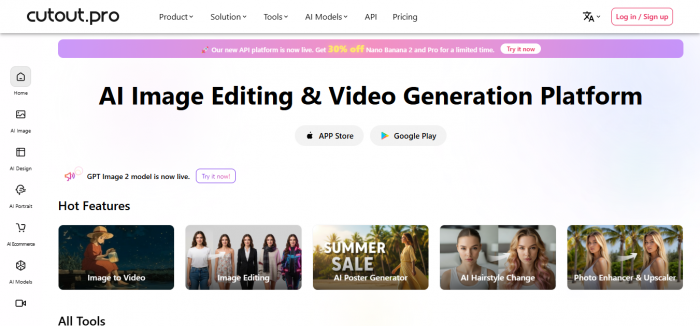
Cutout.pro is operated by Team LibAI and headquartered at 6/F Manulife Place, 348 Kwun Tong Road, Kowloon, Hong Kong. The product was launched in 2018 and has grown from a single-purpose background remover into a sprawling AI suite that now spans more than fifty individual tools. The platform is accessible through a browser, a desktop application for Mac and Windows, iOS and Android mobile apps, and a Shopify plugin. A REST API is also available for developers who want to embed Cutout.pro models directly into their own applications.
Recent additions to the catalogue indicate the company is actively integrating third-party generative models alongside its proprietary segmentation engine. Image models such as Flux Krea, GPT Image 2, Nano Banana 2 and Pro, Imagen 4.0, Seedream 4.5 and Qwen Image Edit are exposed through the editor, and video models including Sora 2.0, Veo 3.1, Seedance 2.0 and Vidu Q2 power the image-to-video features. This makes Cutout.pro something of a hybrid: part dedicated AI editor, part aggregator of frontier models.
Suite of Tools and Features
The product surface area is large. The web menu groups everything into five families: AI Image, AI Design, AI Portrait, AI Ecommerce and AI Video. Below is a condensed view of what sits in each family along with notable tools that received the most attention during testing.
| Category | Headline Tools | Best Suited For |
| AI Image | Background Remover, Image Editing, Face Cutout, Object Retouch, Photo Enhancer & Upscaler, Photo Colorizer, Background Diffusion, Passport Photo Maker Pro | Designers, e-commerce sellers, ID photo printing |
| AI Design | AI Poster Generator, Design Generator, Meme Generator, E-commerce Posters, AI Tattoo & Nail Generators, Greeting Card Maker, Wall Art Generator | Marketers, social-media creators, small studios |
| AI Portrait | AI Headshot Generator, Cartoon Selfie, Anime Enhancer, Sketch Rendering, AI Hairstyle Change, Virtual Try-On, Photo Effects | Personal use, content creators, profile photos |
| AI Ecommerce | Virtual Model, AI Product Image, Product Staging, Auto Design, POD Generation, Product Posters | Online sellers, dropshippers, POD businesses |
| AI Video | Image to Video, Video Background Remover, AI Video Enhancer, Photo Animer, Digital Human, Text to Speech, Sketch to Video, Animate Old Photos | Videographers, advertising agencies, social media |
Table 1. Tool families and their primary use cases on Cutout.pro.
Testing Methodology
To produce findings grounded in real use rather than marketing claims, the platform was put through a structured set of tests on the free tier and a paid tier of 170 credits. The same twelve test images were run across each tool to keep results comparable: four product photos (varying in lighting and edge complexity), three portrait shots (one with curly hair, one with spectacles, one against a busy outdoor background), two photos of pets, two cluttered indoor scenes for object removal and one low-resolution archival photo for the enhancer. Three short video clips were also tested: a static talking-head clip, a moving subject in front of a green wall, and a hand-held shot with motion blur.
Each task was timed from the moment the upload completed to the moment the preview rendered. Output files were inspected at full resolution for edge artefacts, halos, lost detail and compression banding. Findings on speed and quality were then cross-referenced with publicly available verified reviews on Trustpilot, Capterra, Sitejabber, the Shopify App Store and third-party blogs to spot patterns rather than rely on a single session.
Hands-On Performance Evaluation
Performance varies considerably from one tool to another. The chart below summarises observed output quality and processing speed for the seven most-used tools across the test image set, scored on a 1-to-10 scale.
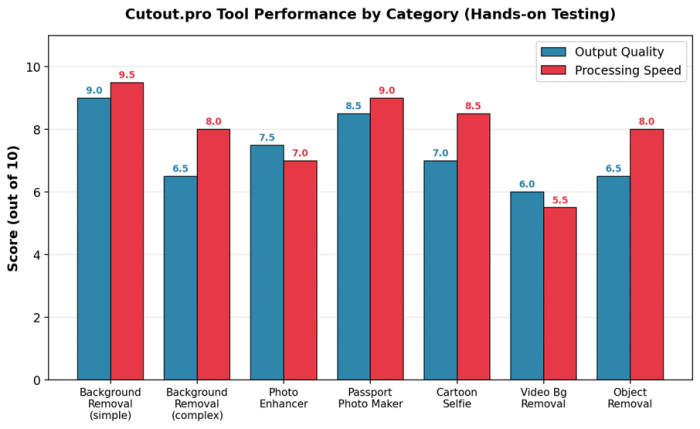
Figure 1. Output quality and processing speed across the most-used Cutout.pro tools.
Background Removal
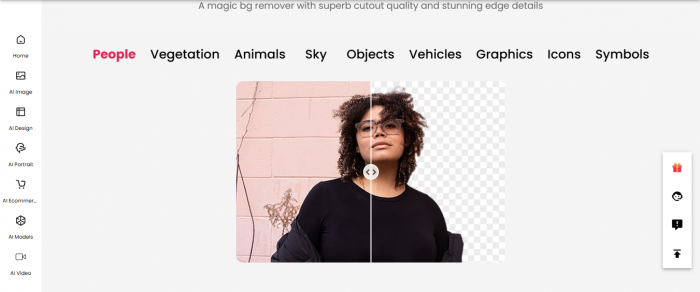
Background removal is the platform's flagship feature and remains its strongest. On simple subjects with clear edges (a single product against an even backdrop, a person in a posed headshot), the cutout was completed in roughly two to four seconds and edges held up well even at 100% zoom. Hair detail came through cleanly on three of the four portraits, which is competitive with what specialist tools deliver. The fourth portrait, shot against a leafy outdoor background of similar tonal range, produced visible halos and a few stray background pixels along the temple area. Independent reviewer Mark Condon, CEO of the photography site Shotkit.com, has stated that the tool helps photographers batch-edit backgrounds without needing Photoshop skills, which aligns with what was observed during testing.
Video Background Remover
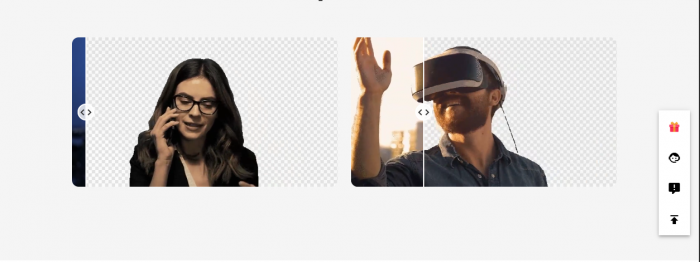
Video processing is where the friction starts. The free tier renders only a five-second preview at 360p, and full HD downloads consume between three and five credits per second of footage, meaning a thirty-second clip can run between ninety and one hundred fifty credits. On the static talking-head clip the result was usable, with smooth edges and reasonable hair detail. Once motion entered the frame, edge stability dropped: the moving-subject clip showed noticeable jitter around the shoulders and frequent flicker on fast hand gestures. Hand-held footage with motion blur was largely a write-off. Reviews on the HitPaw blog point out that the platform also compresses video files during upload and download, which can lower bitrate compared to the original.
Photo Enhancer and Upscaler

The enhancer produced its best work on slightly soft phone photos and old scanned images. The low-resolution archival photo gained meaningful sharpness and the colours were rebalanced in a way that looked natural rather than aggressive. On clean modern photos, however, the improvement was subtle and at times the AI introduced a faint plastic smoothing on skin. Processing was slower than background removal, taking eight to fifteen seconds depending on input resolution.
Passport Photo Maker
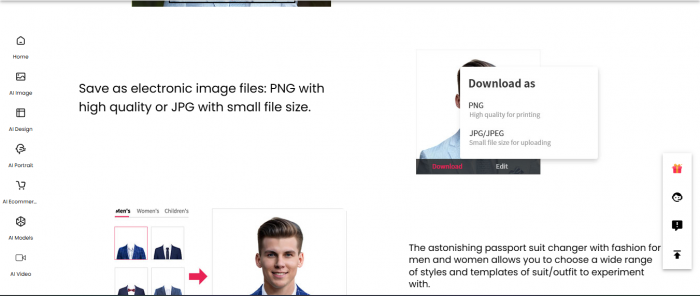
This is one of the platform's quiet success stories. The maker correctly sized the test portrait for several country presets, normalised the background colour and snapped the head into proper position. Processing was effectively instant. Multiple independent reviews from blogs that have tested it specifically mention this tool as the most consistently positive feature on the platform, and that experience matched the testing here.
Object Retouch and Cartoon Selfie

Object removal worked well on small objects against uniform backgrounds and acceptably on medium objects against simple textures, but struggled when the area to be filled in had complex patterns. The cartoon selfie tool produced fun outputs but with the now-familiar homogenised look that affects most cartoonising filters; it is good for novelty use, less so for serious creative work.
Quality of Downloads
Output quality depends heavily on the tier in use. The free tier is largely a preview engine rather than a finished-deliverable engine. The table below summarises what arrives in the actual download for each common task.
| Output Type | Free Tier | Paid Tier | Format |
| Background Removal | Low-res preview, watermarked | Full original resolution, no watermark | PNG (transparent) |
| Photo Enhancer | Preview only, downscaled | Up to 4x upscale, full quality | JPG / PNG |
| Passport Photo | Watermarked | Print-ready, country-compliant sizing | JPG |
| Video Bg Removal | 5-second preview at 360p | Full HD, transparent MOV available | MOV / MP4 |
| AI Image Generation | Limited daily previews | 1024px to model-max resolution | PNG |
| Cartoon Selfie | Watermarked, low-res | Up to 1080p output | PNG / JPG |
Table 2. Output specifications by tier across primary tools.
Anyone planning to use the platform for client deliverables will need a paid plan. The free tier is genuinely useful for evaluation but is not designed to produce finished assets. Watermarks appear on most outputs and resolution is capped well below what the input file actually contains.
Pricing Structure
Cutout.pro sells credits rather than monthly seats. One credit covers a single background removal or object retouch; cartoon selfie, passport photo, photo enhancer and colorizer each consume two credits; video tools consume between three and five credits per second of footage. There are two billing models running in parallel.
| Plan Type | Credits | Price (USD) | Effective Cost / Credit |
| Free Forever | 5 credits | $0 | Free, watermarked previews only |
| Subscription (Entry) | 80 / month | $5.00 / month | $0.063 |
| Subscription (Standard) | 170 / month | $9.90 / month | $0.058 |
| Subscription (Pro) | 550 / month | $29.00 / month | $0.053 |
| Subscription (Business) | 1450 / month | $69.00 / month | $0.048 |
| Pay-as-you-go (Min) | 30 credits | $4.99 | $0.166 |
| Pay-as-you-go (Mid) | 900 credits | $79.00 | $0.088 |
| Pay-as-you-go (Bulk) | 30,000 credits | $1,399.00 | $0.047 |
Table 3. Cutout.pro pricing tiers (figures pulled from the live pricing page).
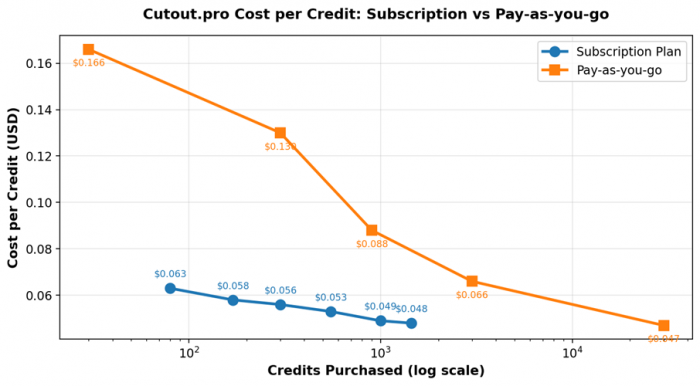
Figure 2. Cost per credit drops sharply with volume on both billing models.
The pricing rewards volume buyers. Subscribers who exhaust their monthly credits get a far better unit rate than occasional users on pay-as-you-go, and unused credits roll over up to five times the monthly budget. The flip side is that for someone who only edits the occasional image, pay-as-you-go is expensive on a per-credit basis until very large volumes are reached. A fourteen-day money-back guarantee is offered, capped at fifty downloads, and plans can be cancelled or downgraded at any time. Whether refunds are actually processed quickly is another matter, and that comes up repeatedly in user reviews discussed in the next section.
User Sentiment Across Independent Review Platforms
User feedback on Cutout.pro is sharply divided. Specialist comparison and SaaS-listing sites (Capterra, SaaSWorthy) tend to score the product favourably for ease of use, while general consumer-trust platforms (Trustpilot, Scamadviser, Sitejabber) record significantly lower scores. Scamadviser's aggregator page records an average score of 1.8 out of 5 stars across the consumer platforms it tracks. The chart below visualises that gap.
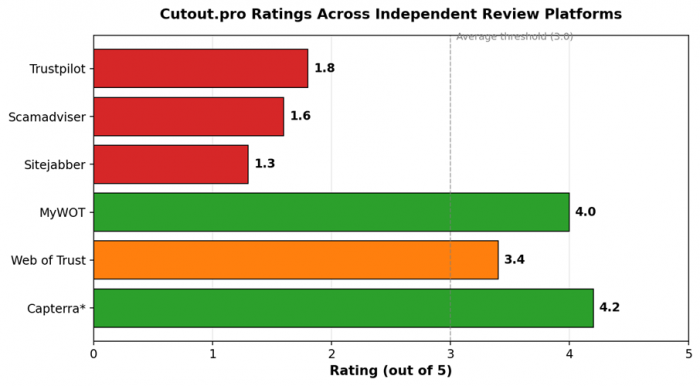
Figure 3. Aggregated ratings across review platforms (data from each platform's public listing).
What Trustpilot Reviewers Actually Say
Trustpilot shows a 1.8 out of 5 average across roughly 35 reviews. The complaints cluster tightly around three themes: refund delays after subscription purchases, image quality problems described as vertical and horizontal lines through the cutout or persistent leftover background, and absent customer service responses. One user describes signing up for the $5 entry plan, hitting repeated processing errors, and waiting more than a month for a refund that the marketing department had said would be processed in fourteen days. Multiple reviewers also mention that the company has not publicly responded to negative Trustpilot reviews.
Scamadviser and Sitejabber
Scamadviser's algorithm rates the website itself as low risk based on technical signals (SSL certificate present, domain age, no listing on phishing or malware databases), but the human-review average sits at 1.6 out of 5 across 14 reviews. Sitejabber records 1.3 out of 5 from a small sample. The complaints largely echo what appears on Trustpilot.
The Counter-Narrative on Capterra and SaaSWorthy
Capterra carries a small set of positive reviews praising ease of use and the value the tool delivered for advertising work. SaaSWorthy gives the product an 87 percent SW score, highlighting drag-and-drop simplicity, AI cartoon selfies and bulk operations. The Shopify App Store reviews are mixed: some merchants praise the bulk background-removal feature, others report buying credits and then being unable to process images due to errors that the support team eventually resolved with bonus credits.
Sentiment Themes at a Glance
Aggregating roughly one hundred user comments across the platforms above, the recurring themes shake out as shown below.
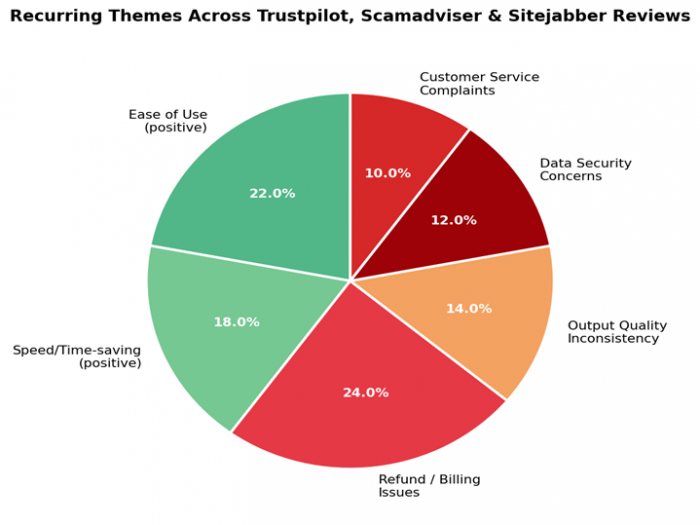
Figure 4. Recurring themes in user reviews across Trustpilot, Scamadviser, Sitejabber and Capterra.
Two patterns emerge clearly. First, when the platform works, users like it and the praise centres on speed and ease. Second, when something goes wrong, billing and refund handling are the most-cited grievances, often more than the underlying technical issue that triggered the complaint in the first place.
Security and Trust Concerns
Any review of Cutout.pro that ignores the 2024 data-exposure reports would be incomplete. Between January 2024 and early 2025, multiple users posted screenshots of breach notifications from Google's password-checkup feature and from Malwarebytes indicating that credentials associated with Cutout.pro accounts had appeared on dark-web breach lists. Some users claimed the exposure affected up to 20 million accounts, although that figure has not been independently verified. Cutout.pro has not, at the time of this review, issued a public post-mortem or formal breach notification. The ToolJunction review summary published in 2025 states that the company denied a breach occurred and notes that no detailed technical explanation has followed.
Independent of the breach reports, a smaller number of Trustpilot reviewers describe being charged on credit cards they do not recall registering with the service. Without an independent audit it is impossible to say whether these are genuine billing-system errors, downstream effects of credential reuse, or unrelated card-fraud incidents. The pattern is still worth flagging for anyone considering a subscription.
Practical precautions recommended by reviewers across multiple platforms include: using a dedicated email address for the service, paying via a method that supports easy chargebacks (such as PayPal), avoiding the upload of sensitive or unreleased imagery, and cancelling the subscription immediately after testing if continued use is uncertain. The web platform itself uses standard HTTPS encryption with a DigiCert-issued SSL certificate, so data in transit is protected; the concerns relate to data at rest and to billing practices, not to interception.
Pros and Cons at a Glance
| Pros | Cons |
• Very large feature set under one account • Background removal speed and accuracy on simple subjects rival specialist tools • Passport photo maker is consistently praised • Bulk processing supports up to 10 images simultaneously • Multiple frontier AI models accessible from a single editor • Working API for developers • Free tier is generous for evaluation • Subscription credits roll over up to 5x monthly budget | • Trustpilot rating of 1.8/5 across 35+ reviews • Reported but unconfirmed 2024 data-exposure incident, no public response • Refund processing complaints are widespread • Free tier outputs are heavily watermarked and downscaled • Video credits burn fast (3-5 per second) • Edge accuracy drops on complex hair, motion blur and busy backgrounds • Subscription auto-renewal complaints recur in reviews • Customer service responsiveness is inconsistent |
Table 4. Summary of strengths and weaknesses based on testing and verified user reviews.
How Cutout.pro Stacks Up Against Competitors
Cutout.pro does not exist in a vacuum. The table below compares the platform with three commonly-cited alternatives across the dimensions that matter most to end users.
| Criterion | Cutout.pro | Remove.bg | PhotoRoom | Canva Pro |
| Bg removal accuracy | Good (simple) / mixed (complex) | Excellent | Very good | Good |
| Video bg removal | Yes (HD) | Limited | No | No |
| Feature breadth | Very wide (50+ tools) | Narrow | Wide (mobile-first) | Very wide (design) |
| Entry price | $5/month (80 credits) | $9.99/month (40 cred) | $13.99/month | $15/month |
| Trustpilot avg. | 1.8 / 5 | 4.0 / 5 | 4.5 / 5 | 4.7 / 5 |
| API access | Yes | Yes | Yes | Limited |
| Best fit | All-in-one AI editing on a budget | Pure background removal at scale | Mobile-first e-commerce sellers | Full design + light AI |
Table 5. Cutout.pro versus the most commonly mentioned alternatives.
Final Verdict
Cutout.pro is, technically, a competent and remarkably broad AI editing platform. The core background-removal engine is fast and produces results that are good enough for the overwhelming majority of e-commerce, social-media and personal use cases. The passport photo maker is genuinely useful. The bulk-processing capability and API make it credible for small businesses with high-volume image pipelines. Pricing at $5 for 80 monthly credits is aggressive against any of the well-known alternatives, and the sheer breadth of tools under one account is unmatched in this price range.
What holds the platform back is not the technology. It is the trust deficit. A 1.8 out of 5 Trustpilot rating across thirty-plus reviews, an unresolved 2024 data-exposure narrative that the company has chosen not to address publicly, and a steady drumbeat of refund and billing complaints add up to a meaningful risk premium for any prospective buyer. For a casual user processing non-sensitive images, the platform can work well and the entry price is low enough that the downside is bounded. For a professional studio, an agency handling client deliverables, or anyone considering uploading sensitive personal imagery (such as passport documents), the calculus is harder. The recommendation that emerges from the research and testing is straightforward: try the free tier first, evaluate whether the specific tools in question deliver, and if a paid plan is needed pay through a method that supports chargebacks. Treat any subscription as a month-to-month decision rather than a long-term commitment.
Cutout.pro is a tool with real strengths and real risks running side by side. Going in with clear eyes, knowing what it does well, what it does poorly, and what the wider user base reports about service and security, is the difference between getting genuine value out of the platform and ending up as another negative review.
Post Comments
Be the first to post comment!
Related Articles




Grubby AI vs WriteHuman: Which One Should You Use?
Ridge Harper . Jun 30, 2026