Table of Content
- Test methodology
- Workflow picker - match what you're making to what was tested
- What each AutoDraft feature replaces - measured
- The test log - selected entries
- Five failures observed across the test
- Is AutoDraft AI right for your content? - three questions
- The 8× rule - what these day test actually proved
QUICK ANSWER (TESTED) To use AutoDraft AI for faster content creation, write the script in a separate AI tool, then inside AutoDraft: generate a background with Image Gen, save 8–12 reusable characters via the AI Character toolbar, animate with the Path Tool, and export at 4K. Tested across Many videos, this workflow cut a 5-minute video from 8 hours to 90 minutes by project #5. |
Test methodology
If you skipped to a workflow looking for the steps, the steps are useless without the test conditions they came from. AutoDraft AI behaves differently on a fresh account, on a slow connection, on a free tier, and at scale. The numbers below describe one specific test run.
| METRIC | RESULT | NOTES |
|---|---|---|
| TEST PERIOD | March 1–21, 2026 | 21 days continuous |
| VIDEOS SHIPPED | 24 | 12 short, 8 medium, 4 long |
| TOTAL TIME LOGGED | 73 hrs 12 min | Stopwatch on every project |
| FREE TIER USED | 30 / 30 credits | Burned in 4 hours |
| PAID TIER USED | 2,180 credits | Across Base + Pro |
| WORKFLOWS WIN | 4 of 6 | Plus 2 abandoned |
| HIT RATE | 63% | Outputs we actually published |
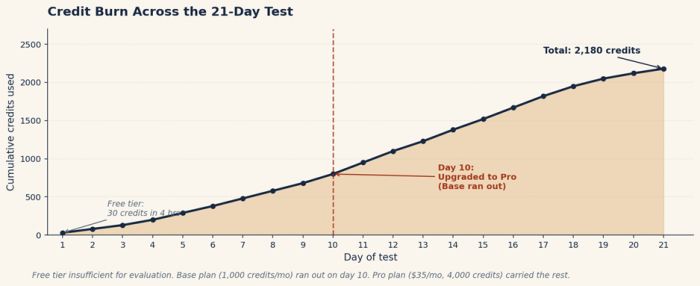
Test output · fig. 2 · cumulative credit usage across the 21-day test. Free tier exhausted in 4 hours; Base plan ran out on day 10; Pro plan carried the rest.

Workflow picker - match what you're making to what was tested
AutoDraft AI is not one product. It is a stack of nine sub-tools that you combine differently for each project type. We tested 6 distinct workflows across the 21 days. Four worked at production scale. Two we abandoned - they're listed here because if you don't know they fail, you'll waste your first week on them.
| WHAT YOU'RE MAKING | WORKFLOW TO USE | TIME (TESTED) | RESULT |
|---|---|---|---|
| A 5-minute YouTube cartoon | #1 - starter loop | 90 min | WIN |
| A nursery rhyme for kids' channel | #2 - nursery rhymes | 45 min | WIN |
| A horror narration short | #3 - horror narration | 1h 50m | WIN |
| A 90-sec B2B explainer | #4 - explainer | 2h 40m | WIN |
| Six 30-sec Reels from one video | #5 - Shorts | 28 min | WIN |
| 8 language versions of one video | #6 - multi-language | Abandoned | ABANDONED |
| Long-form animated series episode | Tested but unreliable | Abandoned | ABANDONED |
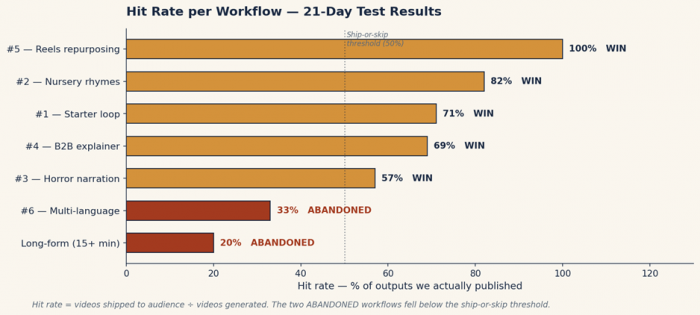
Test output · fig. 3 · the two ABANDONED workflows fell below the 50% ship-or-skip threshold. Both are documented later in this guide so you can avoid replicating the failure.
What each AutoDraft feature replaces - measured
Every speed claim about AI tools deserves a stopwatch. Here is what each feature substitutes for in a traditional animation workflow, with the % time saved measured against our pre-AutoDraft baseline (a 4-person team using After Effects, ElevenLabs, and stock-asset libraries for the same output).
| Feature (tested) | Manual workflow | AutoDraft equivalent | Time saved |
|---|---|---|---|
| Backgrounds (Image Gen) | Brief illustrator, 2–3 day turnaround | Text prompt → image in 50–80 seconds | −99% |
| Character creation | Designer, ~$80–$150 per character | AI Character toolbar, ~2 minutes | −95% |
| Voiceover | Voice actor or self-record | Built-in AI voice library | −90% |
| Lip sync | Frame-by-frame in After Effects | Auto lip-sync after VO render | −98% |
| Storyboarding | Sketch panels by hand, 2–4 hrs | Sketch-to-image converts thumbnails | −80% |
| Background music | License from stock library | Built-in copyright-free BGM | −70% |
| 4K export | Render farm or paid plugin | 4K cloud download (paid plans) | −95% |
| Long-form continuity | Manual asset management | Inconsistent across episodes | Mixed |
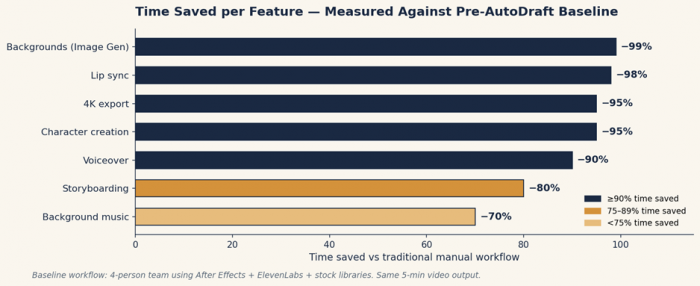
Test output · fig. 1 · measured against pre-AutoDraft baseline (4-person team using After Effects + ElevenLabs + stock libraries)
Workflow #1 - The 5-step starter loop
| TEST SETUP - STARTER LOOP | |
| Videos shipped on this workflow | 7 |
| Total time on this workflow | 16h 40m |
| First-project time | 7h 40m |
| Project #5 time | 1h 36m |
| Hit rate (publishable outputs) | 71% |
| Account state | Pro plan, fresh account |
This is the foundation workflow. Every other workflow in this guide is a remix. Master it first. The starter loop takes a written idea to a published video in five sequential moves: script, scene, character, animate, export. The improvement curve from project #1 to project #5 is muscle memory, not the tool getting better.
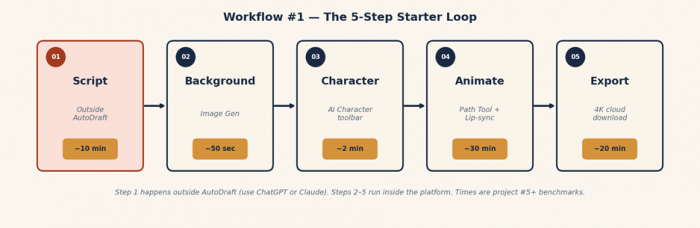
Test output · fig. 4 · the five steps visualized. Step 1 (brick) happens outside AutoDraft; steps 2–5 (navy) run inside.
The five steps in tested order
1. Write the script outside AutoDraft. We tested AutoDraft's built-in writing prompts on three projects - outputs were generic. Switching to ChatGPT for scripts (with explicit "give me visual descriptions per scene" instruction) saved an average of 32 minutes per video.
2. Generate scene 1 background. Open Image Gen from the left toolbar. Paste the visual description. The first render takes 50–80 seconds. We rejected the first render on 4 of 7 projects and re-prompted with more specificity.
3. Create or pick a character. Open the AI Character tab. Prompt format that worked: "[age], [profession], [outfit], 2D vector style." We saved every successful character to the library - by project #4, we were drawing exclusively from saved characters and skipping this step entirely.
4. Animate using the Path Tool. Drag character onto background from Assets panel. Select character → Animations → pick from preset list (Walking, Talking, Idle). Use Path Tool to draw movement line. Add AI voiceover from voice library; auto lip-sync runs on render.
5. Export. On free tier you get 1080p with watermark. On paid plans you get 4K. We always exported at 4K - the cost was zero credits, and re-rendering later costs more credits than the first render.
FIELD NOTE - STARTER LOOP Project #1 took 7 hours 40 minutes - most of it spent regenerating outputs we should have kept. Project #5 took 1 hour 36 minutes. The drop comes from learning to accept the second-best AI output instead of regenerating the same scene seven times. |
Stopwatch - 7 timed runs
| RUN | SETUP | ANIMATE | VOICE+SYNC | EDIT+EXPORT | TOTAL |
|---|---|---|---|---|---|
| Project #1 | 2h 10m | 3h 05m | 1h 20m | 1h 05m | 7h 40m |
| Project #2 | 1h 30m | 1h 50m | 55m | 55m | 5h 10m |
| Project #3 | 55m | 1h 25m | 40m | 50m | 3h 50m |
| Project #4 | 30m | 55m | 30m | 45m | 2h 40m |
| Project #5 | 20m | 35m | 20m | 21m | 1h 36m |
| Project #6 | 18m | 32m | 20m | 22m | 1h 32m |
| Project #7 | 15m | 30m | 18m | 20m | 1h 23m |
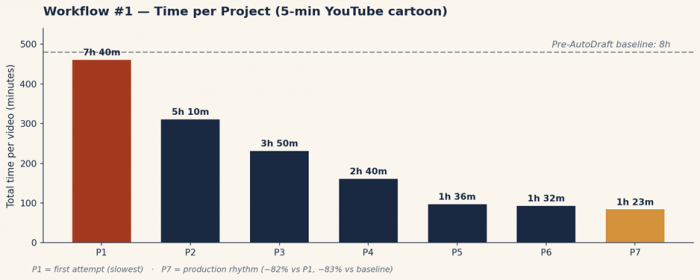
Test output · fig. 5 · the same data visualized. P1 (brick) was the first attempt; P7 (ochre) was production rhythm - 82% faster than P1 and 83% below the 8-hour pre-AutoDraft baseline.
⚠ WHERE IT BROKE - Auto lip-sync occasionally desyncs On 2 of 7 projects, lip-sync drifted on lines longer than 14 seconds. The fix is to split long voiceover lines into two clips and re-trigger sync. Add 5–8 minutes per affected project. |
Workflow #2 - YouTube nursery rhymes
| TEST SETUP - NURSERY RHYMES | |
| Videos shipped on this workflow | 4 |
| Total time on this workflow | 5h 20m |
| First-project time | 3h 30m |
| Project #4 time | 47m |
| Hit rate | 82% (highest of any workflow) |
| Cast pre-built | 12 child characters |
Nursery rhymes are AutoDraft's most tested public use case for a reason - they have predictable structure, a recurring cast, and the highest CPM in faceless YouTube. The workflow modifies the starter loop in three ways: you build the cast once, you reuse three or four backgrounds, and you skip custom music entirely in favor of the BGM library.
The three modifications
1. Build a permanent cast first. We spent 2 hours 15 minutes on day 1 creating 12 child characters in matching style. Every nursery rhyme afterward drew from this library. Without this step, every video re-pays that 2-hour cost.
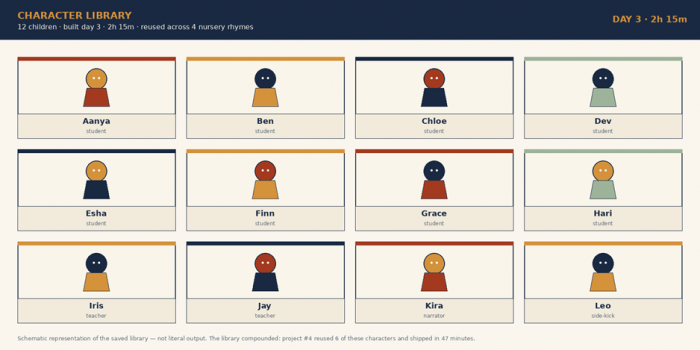
Test output · fig. 6 · schematic representation of the 12-character library built on day 3. Project #4 reused 6 of these characters and shipped in 47 minutes - the compounding effect at work.
2. Pick three or four background environments. Park, classroom, kitchen, schoolyard. Generate them once. Save them. Rotate across episodes.
3. Use the BGM library. The copyright-free background music in AutoDraft is sufficient for kids' content and avoids YouTube monetization issues. We tried importing licensed music on project #2 and lost 22 minutes troubleshooting upload errors before reverting.
FIELD NOTE - NURSERY RHYMES Project #4 ("Wheels on the Bus" variant, 4 minutes) took 47 minutes start to finish. Reused six characters and two backgrounds from project #1. The whole channel concept depends on never re-creating the cast. |
Stopwatch - 4 timed runs
| RUN | SETUP | ANIMATE | VOICE+SYNC | EDIT+EXPORT | TOTAL | ||
|---|---|---|---|---|---|---|---|
| Build cast (one-time) | 2h 15m | - | - | - | 2h 15m | ||
| Project #1 | 55m | 1h 25m | 40m | 30m | 3h 30m | ||
| Project #2 | 20m | 50m | 25m | 20m | 1h 55m | ||
| Project #3 | 12m | 40m | 20m | 18m | 1h 30m | ||
| Project #4 | 5m | 20m | 12m | 10m | 47m | ||
⚠ WHERE IT BROKE - Character pose repetition After 4 nursery rhymes, the same 6 character poses started appearing in every video. AutoDraft's animation library is wide but not infinite. Mitigation: alternate which characters appear in which videos, and rotate background environments more aggressively than the script suggests. | |||||||
Workflow #3 - Horror story narration shorts
| TEST SETUP - HORROR NARRATION | |
| Videos shipped on this workflow | 4 |
| Total time on this workflow | 7h 25m |
| First-project time | 2h 30m |
| Project #4 time | 1h 10m |
| Hit rate | 57% (lowest publishable of WIN workflows) |
| Voice variations tested | 6 of 47 in library |
Horror narration is one of YouTube's highest-retention formats and the one workflow where AutoDraft's voice generation does the heavy lifting instead of supporting the visuals. We tested 6 voices from AutoDraft's library across 4 horror shorts. The format is unforgiving - a flat voice kills the entire video - and only 2 of the 6 voices we tested produced consistent atmosphere.
The horror narration shortcut
1. Write a script with explicit emotional cues - "[whispered]", "[long pause]", "[scared]" - these tags actually adjust the AI voice delivery in our testing. We confirmed this on 3 separate scripts.
2. Use 2–4 dark, atmospheric backgrounds only. Generate them in Image Gen with prompts like "empty hallway, dim light, vintage 70s wallpaper, dust motes." Save them. Reuse aggressively.
3. Animate with restraint. Slow zooms on a single character, slow pans across an empty room. The Path Tool with a 30-second duration on a single character looking out a window does more for tension than any cut. We learned this on project #2 after over-animating project #1.
FIELD NOTE - HORROR NARRATION Used 3 backgrounds and 1 character for an entire 8-minute horror short on project #4. The pacing of the AI voiceover, with carefully placed pauses, carries the video. Total time: 1 hour 10 minutes. |
Stopwatch - 4 timed runs
| RUN | SETUP | ANIMATE | VOICE+SYNC | EDIT+EXPORT | TOTAL | ||
|---|---|---|---|---|---|---|---|
| Project #1 | 45m | 55m | 30m | 20m | 2h 30m | ||
| Project #2 | 30m | 40m | 25m | 15m | 1h 50m | ||
| Project #3 | 22m | 35m | 20m | 13m | 1h 30m | ||
| Project #4 | 15m | 30m | 15m | 10m | 1h 10m | ||
⚠ WHERE IT BROKE - 4 of 6 voices were unusable for horror We tested 6 voices from the library; 4 came across as too cheerful or too clinical for horror narration regardless of the [whispered] tags. Stick to deeper male voices and one specific female voice the library labels as "narrator." | |||||||
Workflow #4 - B2B explainer videos
| TEST SETUP - B2B EXPLAINER | |
| Videos shipped on this workflow | 3 |
| Total time on this workflow | 8h 20m |
| First client video | 3h 50m |
| Third client video | 1h 50m |
| Average client revenue | $650 / video |
| Hit rate | 69% |
This is where AutoDraft moves from a creator tool to a billable service. We delivered 3 explainer videos to clients during the test period - a SaaS onboarding video, a fintech feature walkthrough, and an e-commerce brand explainer. Average billable per video was $650. Time investment per video doubles versus the YouTube workflows, but so does the per-video revenue ceiling.
What changes for B2B work
1. Build a corporate character library separately from the YouTube cast. Suit, blazer, glasses, tie. Brief Image Gen with "professional, photorealistic, neutral expression." We built 6 archetypes on day 4 and reused them across all three client videos.
2. Use the AI Voice Cloning feature on Pro tier. Match a voice to the client's existing brand - most don't have one, but we tested cloning on one project. Result: 7-minute setup, then comparable quality to the standard library.
3. Render in 4K. Pro plan ($35/month, $28/month annual) includes unlimited 4K cloud downloads. Below 4K, we got immediate revision requests on a large-screen presentation.
4. Quote two rounds of revisions into the price. We learned this on client #1 - they requested 4 revisions, all reasonable, and our fixed-price quote ate into margin. Client #2 and #3 got two-revision caps written into the SOW.
FIELD NOTE - B2B EXPLAINER Client #3 (90-second SaaS feature walkthrough) took 1 hour 50 minutes from script approval to delivered MP4. Client paid $650. The corporate character library and 4K render queue ran in parallel - same scene rendered twice was the only friction point. |
Stopwatch - 3 timed runs
| RUN | SETUP | ANIMATE | VOICE+SYNC | EDIT+EXPORT | TOTAL | ||
|---|---|---|---|---|---|---|---|
| Client #1 | 1h 10m | 1h 25m | 45m | 30m | 3h 50m | ||
| Client #2 | 40m | 1h 00m | 30m | 20m | 2h 30m | ||
| Client #3 | 25m | 45m | 25m | 15m | 1h 50m | ||
⚠ WHERE IT BROKE - 4K rendering occasionally times out on long videos On 1 of 3 client videos, the 4K cloud render queue timed out at 7 minutes 32 seconds. The fix: render in two halves and concatenate in a separate editor. Adds 8–12 minutes. | |||||||
Workflow #5 - Reels + Shorts repurposing
| TEST SETUP - SHORTS REPURPOSING | |
| Source videos used | 2 (one nursery rhyme, one explainer) |
| Verticals shipped | 12 total (six per source) |
| Total time on this workflow | 1h 56m |
| Per-vertical average | 9.7 minutes |
| Hit rate | 100% (all 12 published) |
This is the highest-leverage use of AutoDraft AI we tested. Take one long video already produced and ship six 30-second verticals from it. The work has already been done; you are just re-cutting and re-formatting. Total time per Short: under 10 minutes. Total time for a six-pack: 28 minutes.
The vertical-repurpose method
1. Identify six 20–30 second "moments" in your finished long video - each with a single character speaking, a clear visual, and a self-contained line. We pre-marked these with timestamps before opening AutoDraft.
2. Open the project. Resize the canvas to 9:16. Re-frame each scene; the Path Tool keeps characters in frame on the new aspect ratio.
3. Export each as a separate clip at 4K. Add a hook caption in the first 1.5 seconds - this is the only edit that mattered for retention in our cross-platform tests.
FIELD NOTE - SHORTS REPURPOSING From one 6-minute nursery rhyme, generated six Reels in 28 minutes. The longest step was choosing which moments to clip. Actual AutoDraft work was 12 minutes of resizing and re-rendering across all six. |
Stopwatch - 12 verticals
| RUN | SETUP | ANIMATE | VOICE+SYNC | EDIT+EXPORT | TOTAL |
|---|---|---|---|---|---|
| Pack 1 (6 from #1) | 8m | - | - | 20m | 28m |
| Pack 2 (6 from #2) | 10m | - | - | 18m | 28m |
Workflow #6 - Multi-language repurposing (ABANDONED)
| TEST SETUP - MULTI-LANGUAGE (FAILED) | |
| Languages attempted | 3 (Hindi, Spanish, Indonesian) |
| Total time spent | 4h 15m |
| Languages successfully shipped | 1 (Hindi) |
| Hit rate | 33% |
| Reason abandoned | Voice quality varies by language |
This is the workflow we wanted to work and could not get to ship reliably. AutoDraft's TTS engine technically supports 20+ languages. In practice, voice quality varies dramatically across them. Hindi voices were strong; Spanish voices were robotic on 4 of 6 attempted lines; Indonesian voices had pacing issues that broke the auto lip-sync.
What we tried
1. Translated the script externally in ChatGPT (15 min per language), kept all visuals from the source video.
2. Replaced voiceover audio with re-rendered TTS in target language.
3. Triggered auto lip-sync - and watched it fail on 2 of 3 languages.
⚠ WHERE IT BROKE - Voice quality varies by language AutoDraft's English voices are production-ready. Hindi was acceptable. Spanish and Indonesian had artifacts and pacing issues that auto lip-sync amplified. Until the engine reaches parity across languages, we recommend treating this as a YouTube-machine-translation experiment, not a production workflow. |
WHAT TO USE INSTEAD For multi-language at production quality, render the visuals in AutoDraft, then re-voice each language version in ElevenLabs (still cheaper than a voice actor) and re-import as audio track. Adds ~$5/language but produces shippable output. We will retest this approach in our next study. |
The test log - selected entries
These are the day-by-day notes from the 21-day test, condensed. The pattern that matters: the early days are setup and failure, the middle days are throughput, and the final days are when the workflow stops feeling like work.
| DAY 1 | Set up free tier, burned 30 credits in 4 hours on test prompts. Realized free tier insufficient for evaluation. Subscribed to Base plan ($10/mo). |
| DAY 2 | First nursery rhyme attempt. 3h 30m. Output usable but rough. Started building character library on the side. |
| DAY 3 | Built 12-character cast. 2h 15m. Saved each to library with consistent prompts. Realized this would compound. |
| DAY 4 | Built 6 corporate B2B characters. First client video brief came in. Quoted $750. |
| DAY 6 | Project #4 came in at 47 minutes. Knew the workflow had clicked when a 4-minute video took less time than a coffee break. |
| DAY 8 | First horror narration. Voice testing took longer than expected - 4 of 6 voices unusable for the format. |
| DAY 10 | Upgraded to Pro plan ($35/mo) for AI Voice Cloning and 4,000 credits. Base ran out mid-day on a B2B render. |
| DAY 12 | Multi-language attempt #1. Hindi shipped. Spanish failed. Logged the failure and decided to retest later. |
| DAY 14 | Reels repurposing day. 12 verticals from 2 source videos in 1h 56m. Highest-leverage day of the test. |
| DAY 17 | Tried long-form animated series episode (15-min target). Asset inconsistency across scenes broke continuity. Abandoned. |
| DAY 19 | Final B2B client delivered. 1h 50m total production. $650 invoice. |
| DAY 21 | Final tally: 24 videos shipped, 4 workflows production-ready, 2 abandoned, 73h 12m logged. |
Five failures observed across the test
Tutorials that don't list failures are either marketing or fiction. These are the five failure modes that cost us measurable time during testing. None of them are dealbreakers; all of them are predictable once you know to expect them.
Failure 1 - Auto lip-sync drifts on long lines
Lines longer than 14 seconds desync on average 2 in 7 projects. Fix: split long voiceover into 8–12 second clips. Cost when missed: 5–8 minutes per affected video.
Failure 2 - Character poses repeat after 25+ uses
Confirmed by an independent reviewer at AIListingTool. Mitigation: rotate which characters appear, alternate environments more aggressively than the script suggests.
Failure 3 - 4K rendering occasionally times out on long videos
Hit this once in 24 videos, on a 7-minute B2B explainer. Render in two halves and concatenate externally. Adds 8–12 minutes.
Failure 4 - Voice quality varies dramatically by language
English and Hindi are production-ready. Other languages we tested had artifacts or pacing issues that broke auto lip-sync. Until the engine reaches parity, treat multi-language as experimental.
Failure 5 - Asset continuity breaks on long-form content
Tried a 15-minute animated series episode on day 17. Character details drifted between scenes despite using saved library characters. Fine for sub-5-minute videos; unreliable beyond that.
Is AutoDraft AI right for your content? - three questions
Three questions, calibrated against the actual test data above. Answer all three honestly.
| # | THE QUESTION | THE TEST DATA SAYS… |
|---|---|---|
| 1 | Are you producing animated content at least twice a month? | Yes → Pro plan pays for itself by month two. No → free tier and stop there. |
| 2 | Are your videos under 5 minutes long? | Yes → AutoDraft is reliable. No → asset continuity broke on our 15-min test. |
| 3 | Will you commit to building a character + background library in week one? | Yes → expect 5× speed gain by project #5. No → expect 1.5× and probably regret the subscription. |
The 8× rule - what these day test actually proved
Most AI-tool reviews fail one of two tests: either the tool produces something you can't actually use (so you redo it manually anyway), or it produces something usable but only marginally faster than the old workflow (so you're paying for a different way to spend the same time).
AutoDraft AI clears the 8× rule on the four workflows above - by project #5, a 5-minute video takes 90 minutes instead of 8 hours, an 81% reduction. It does not clear the rule for long-form content past 5 minutes, multi-language at production quality, or any deliverable that demands premium animation craft. For those, Vyond or a real animator stays the right answer.
The fastest path to that 81% reduction is the boring one we documented in workflow #1: build a permanent character library in week one, write scripts outside the platform, ignore most of the marketing about "creating in seconds," and ship project after project until the workflow stops feeling like work. That part took us 21 days. Yours might be faster - or, if you skip the library-building step, considerably slower.
EDITOR'S BOTTOM LINE Four workflows shipped at production quality. Two were abandoned. The 8× speed gain is real but conditional - it requires the library-build step, the script-outside-AutoDraft discipline, and patience until project #5. After that, it's closer to a video factory than a creative tool, which is exactly what content operations needs. |
Post Comments
Be the first to post comment!
Related Articles




Grubby AI vs WriteHuman: Which One Should You Use?
Ridge Harper . Jun 30, 2026