Table of Content
- 1. Zapier (AI‑Assisted SaaS Automation)
- 2. Make (Visual Scenario‑Based Automation)
- 3. Microsoft Power Automate (Cloud + Desktop + Copilot)
- 4. UiPath (Enterprise‑Grade RPA + AI)
- 5. HubSpot with AI (Revenue Operations Automation)
- 6. Notion AI (Internal Knowledge and Ops Automation)
- 7. Jasper (AI‑Driven Marketing Content Engine)
- Verdict
AI automation has quietly become the “second team” most businesses rely on but never add to the payroll. It qualifies leads, routes emails, syncs data across tools, prepares reports and even drafts customer communication, while humans focus on strategy, sales and product. Instead of one magic platform, the most effective setups use a stack of AI‑powered tools that each handle a specific layer of work: connecting apps, automating legacy systems, driving revenue operations, running internal knowledge, and scaling content.
Below is a look at seven of the best AI tools for business automation right now with deeper and real‑world explanations.
1. Zapier (AI‑Assisted SaaS Automation)
Zapier is often the first automation tool businesses adopt because it solves a very concrete problem: all your SaaS apps hold data, but none of them talk to each other by default. Zapier sits in the middle and watches for triggers (a new lead, a form submission, a payment, a calendar event), then pushes data and actions into other tools automatically.
With its AI features, Zapier is moving beyond simple “if this then that” recipes. You can describe a workflow in plain language and have Zapier propose a draft automation. For example, “When someone books a call, add them to the CRM, send them a personalized confirmation email, and notify the sales channel in Slack.” AI steps can also summarize long text fields, classify incoming requests by category, or clean up messy data before it lands in your CRM or spreadsheet.
In a typical small or mid‑size business, Zapier ends up running dozens of invisible processes: sending leads from web forms into HubSpot, logging payments into accounting tools, adding clients to onboarding boards, or alerting support when a high‑value customer submits a ticket. Once configured and tested, these workflows can run for months with minimal manual handling.
| Pros | Cons |
| Lets non‑technical teams connect thousands of apps and automate workflows without writing code. | Task‑based pricing means costs can rise quickly as automation volume grows. |
| AI‑assisted setup can translate natural‑language instructions into draft workflows, reducing setup time. | Complex, multi‑step automations still demand careful testing to avoid silent data errors. |
| Rich ecosystem of templates and community examples makes it easier to copy proven patterns. | Less effective with legacy/on‑prem systems that don’t expose APIs or webhooks. |
Best for: Cloud‑first businesses that use multiple SaaS tools and want a flexible “automation layer” to move data and trigger actions between them.
2. Make (Visual Scenario‑Based Automation)
Make (formerly Integromat) occupies a similar space to Zapier but targets users who need more intricate, data‑heavy workflows. Instead of a simple list of steps, Make gives you a visual canvas where you can build “scenarios”: multi‑branch flows with routers, filters, loops and complex data transformations.
Say you run an e‑commerce operation. A Make scenario can take each new order, check stock levels in multiple warehouses, choose the optimal fulfillment center based on region and shipping method, create or update records in a database, send webhooks to logistics partners, and update your customer dashboard. Along the way, AI blocks can enrich data, categorize orders, or generate templated messages.
Because you see everything on a single canvas, it’s easier to understand how information travels through multiple systems. That visibility is especially useful in operations‑heavy businesses where one mistake in automation can cascade across inventory, finance and customer communication.
| Pros | Cons |
| Visual canvas is excellent for designing, understanding and debugging complex workflows. | The flexibility and feature depth can overwhelm beginners who only need simple automations. |
| Strong support for advanced logic, loops, branching and detailed data manipulation. | Requires more technical thinking; non‑technical users may need training or templates to get value. |
| Good for power users and operations teams who want granular control over how systems talk. | As with any powerful tool, poorly designed scenarios can become hard to maintain at scale. |
Best for: Teams with some technical comfort that need sophisticated, multi‑system workflows and want full visibility of how data flows between tools.
3. Microsoft Power Automate (Cloud + Desktop + Copilot)
Power Automate is Microsoft’s automation engine for organizations built on Microsoft 365 and Dynamics. It doesn’t just automate cloud apps; it also handles desktop automation (RPA) and process mining, making it suitable for enterprises with a mix of modern SaaS and stubborn legacy software.
Imagine an accounts payable process in a mid‑size company. Power Automate can monitor a shared inbox in Outlook, use AI to extract invoice data, check it against purchase orders in Dynamics or another ERP, route it via Teams to the right manager for approval, and then update the finance system when approved. For older Windows‑only apps without APIs, Power Automate’s desktop flows can mimic clicks and keystrokes like a human operator.
Copilot inside Power Automate reduces the barrier for business users. Instead of building flows from scratch, they can describe a process in natural language: “When a new vendor form is submitted, validate key details, send it to finance for review, and log the status in SharePoint,” and Copilot will scaffold the automation. IT can then refine, secure and govern it.
| Pros | Cons |
| Deep integration with Outlook, Teams, SharePoint, Dynamics and other Microsoft tools. | Value drops significantly if your core stack isn’t Microsoft‑centric. |
| Supports both API‑based flows and desktop RPA for legacy Windows applications. | Interface and concepts can feel complex; citizen developers may need training and guardrails. |
| Copilot accelerates flow creation by turning natural‑language process descriptions into draft automations. | Enterprise features and high‑volume usage often require premium licenses, increasing overall cost. |
Best for: Mid‑market and enterprise organizations invested in Microsoft 365/Dynamics that need automation across both modern cloud apps and older on‑premise systems.
4. UiPath (Enterprise‑Grade RPA + AI)
UiPath is built for organizations with heavy, repetitive processes in finance, operations, logistics, healthcare and government. Instead of waiting for every vendor to provide APIs, UiPath robots interact with existing software the way humans do: opening windows, clicking buttons, copying data, and navigating forms. On top of that, it layers AI to handle unstructured content and process intelligence.
Take a large insurer processing claims. UiPath can ingest email attachments, use AI to classify document types, extract key data fields from scanned PDFs, validate them against rules, flag exceptions, and then push approved items into a claims management system. Process mining and task mining can watch how human employees actually do this across different systems and highlight which steps are ripe for automation.
UiPath projects are more like operational overhauls than casual tool setups. They involve mapping processes, designing robots, testing them under supervision, and gradually scaling them. When done well, they free teams from hours of manual screen work and dramatically reduce error rates in mission‑critical processes.
| Pros | Cons |
| Excellent for automating repetitive work in legacy systems where APIs either don’t exist or are too limited. | Implementation is complex; projects usually require dedicated specialists and strong change management. |
| Combines RPA with AI document understanding and process mining to target the most impactful tasks. | Licensing, infrastructure and consulting costs can be substantial compared to lighter‑weight SaaS tools. |
| Designed with governance, security and orchestration in mind for regulated industries. | Overkill for small businesses or simple SaaS‑only environments with modest automation needs. |
Best for: Large organizations in regulated or operations‑heavy sectors where back‑office processes and legacy software dominate daily work.
5. HubSpot with AI (Revenue Operations Automation)
HubSpot goes beyond being a CRM by embedding automation and AI into marketing, sales and service workflows. Instead of sales reps manually updating contact properties and marketers manually sending every campaign, HubSpot watches what contacts do and responds with pre‑built flows.
For example, when a prospect downloads a whitepaper, HubSpot can enroll them in a nurture sequence, adjust their lead score, notify a rep if they meet certain criteria, create a deal in the pipeline, and log all touches automatically. AI helps by generating email copy, suggesting subject lines, proposing segments, and flagging deals that seem at risk based on historical behavior.
This creates a feedback loop: the more data flows through HubSpot, the smarter and more effective your automated journeys become. Sales teams log notes, marketing tracks campaigns, support logs tickets, and AI‑powered workflows orchestrate timely, relevant touchpoints across the entire customer lifecycle.
| Pros | Cons |
| Centralizes marketing, sales and service data, enabling coherent, end‑to‑end customer journeys. | Subscription costs can become significant as your contact database and feature usage grow. |
| Visual workflow builder makes it straightforward to design nurture sequences, hand‑offs and internal alerts. | Primarily focused on customer‑facing processes; not suitable as a general back‑office automation tool. |
| AI assists with email drafting, segmentation, scoring and forecasting, improving rep productivity. | More advanced AI and automation capabilities are locked behind higher‑tier plans. |
Best for: B2B and B2C companies that want their CRM to drive automated engagement and sales actions instead of acting as a passive database.
6. Notion AI (Internal Knowledge and Ops Automation)
Notion AI lives inside Notion, which many startups and digital businesses already use as their internal operating system. While it doesn’t trigger events in external apps, it automates a huge amount of manual cognitive work around documentation, planning and knowledge.
Consider how most teams handle meeting notes and SOPs: someone scribbles notes, then never cleans them up, and standard operating procedures slowly go out of date. With Notion AI, you can turn raw notes into structured action lists, rewrite complex internal docs into clearer language, summarize long research pages, and generate first drafts for recurring document types such as onboarding checklists or project briefs.
When your projects, tasks and databases live in Notion, AI can help keep everything aligned. A content team might store an editorial calendar in a database and use AI to auto‑generate outlines and social snippets from each brief. Product teams can maintain PRDs and ask AI to summarize them for stakeholders. Ops teams can merge fragmented notes into consistent playbooks.
| Pros | Cons |
| Great at reducing the manual effort of writing, summarizing and maintaining internal documentation. | Limited as a cross‑app automation engine; it doesn’t natively move data between external tools. |
| Embedded where teams already plan, document and reflect, so AI naturally fits into daily workflows. | Benefits are muted if an organization hasn’t adopted Notion as a central workspace. |
| Helps standardize SOPs, meeting notes and knowledge bases into clear, actionable formats. | Not a replacement for dedicated RPA or integration platforms when you need system‑to‑system automation. |
Best for: Teams that treat Notion as their internal HQ and want AI to quietly keep documents, notes and knowledge clean, consistent and usable.
7. Jasper (AI‑Driven Marketing Content Engine)
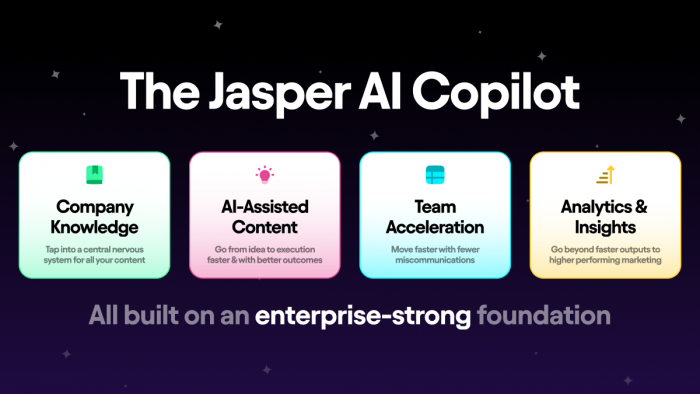
Jasper is built for marketing and content teams that need to produce large volumes of on‑brand messaging without scaling headcount at the same rate. Rather than writing everything from scratch, marketers define brand voice, tone, and positioning once, then use Jasper to generate emails, ad copy, landing page text, blog drafts and social content.
The automation angle appears when you systematize this. For example, every new product launch can follow a playbook: once key details are entered, Jasper can draft a full campaign set — landing page, email series, social tiles, and ad variations. Humans review and refine, but the “blank page” phase is dramatically shortened.
Jasper also supports collaborative workflows, where teams share templates and campaigns across brands or clients. Over time, it becomes less of a novelty text generator and more of a content production line, with AI handling the repetitive parts and marketers focusing on strategy, performance and creative direction.
| Pros | Cons |
| Dramatically accelerates creation of on‑brand content across multiple channels and formats. | Very focused on marketing and content; offers little for operational or back‑office automation. |
| Brand voice features and templates help maintain consistency as teams and campaigns scale. | Without strong human editorial control, there’s a risk of generic or repetitive messaging. |
| Integrates into existing marketing workflows, reducing time from brief to publishable assets. | Can generate more content than teams can effectively test or maintain if not governed well. |
Best for: Marketing‑heavy businesses and agencies that need to scale content output while preserving brand consistency and human strategic oversight.
Verdict
AI automation isn’t about finding a single miracle app; it’s about assembling a cohesive stack where each tool quietly does its part. In practice, that means using integration engines like Zapier or Make to move data, enterprise platforms such as Power Automate and UiPath to handle complex and legacy processes, CRM‑native automation in HubSpot to drive revenue, and workspace tools like Notion AI and Jasper to keep internal operations and marketing content running at speed. Together, these platforms can turn your business into a system that reacts faster than humans alone ever could, while still leaving strategy, creativity and key decisions firmly in human hands.
Post Comments
Be the first to post comment!