Table of Content
- Core Positioning: What Each Tool Is Really For
- Features: Recording, Editing, AI, Collaboration
- Pricing and Value: 2026 Plans
- User Experience: Interface, Learning Curve, Reliability
- Workflow: End-to-End Content Pipeline
- Performance : Speed, Reliability, Heavy Loads
- Output Quality: Audio, Video, Clips, and Polish
- Best Use Cases: Who Should Choose What
- User Ratings on G2, Capterra, Trustpilot & Overall Sentiment
- Final verdict: which one to choose?
Descript and Riverside solve different parts of the content pipeline: Descript is a text-based editing powerhouse, while Riverside is a studio-grade recorder that now adds just enough editing and AI to get you published fast. The best choice depends less on “features list” and more on where you care about performance: recording stability vs. editing speed vs. final polish.
Core Positioning: What Each Tool Is Really For
Descript is built as an editor-first platform: you can record, but its real strength is turning long-form audio/video into polished content via transcript-based editing, AI cleanup, and multi-track timelines.
Riverside was born as a studio-first tool: it optimizes local recordings, remote guests, and live sessions, then lets you do essential edits and clipping without leaving the browser.
Descript fits teams that already have footage or use Zoom/SquadCast/Riverside and want to transform that raw material into podcasts, YouTube videos, and social clips. Riverside fits creators who want one place to schedule guests, record studio-quality conversations, optionally stream live, and ship decent edits without touching a “traditional” NLE.
High-level snapshot
| Dimension | Descript | Riverside |
| Core identity | Text-based AI editor & post-production hub | Remote recording & live studio with built-in editing |
| Strength | Deep editing, transcription, AI cleanup, collaboration | Rock-solid local recording, multitrack, live streaming |
| Weakness | No native live streaming; can feel busy/cluttered | Editor less powerful for complex projects |
| Best for | Post-production teams, narrative shows, YouTube explainers | Podcasters, interview shows, live creators, marketers |
Features: Recording, Editing, AI, Collaboration
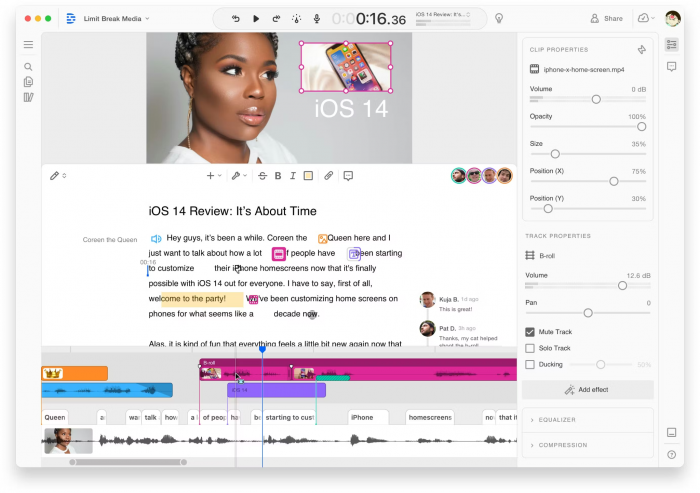
Descript offers in-app recording, multitrack editing, ultra-fast transcription, AI filler word removal, Studio Sound, Overdub voice cloning, and an increasingly capable timeline view for more traditional cuts. It also emphasizes collaboration: comments, shared projects, and Google-Docs-style teamwork at scale.
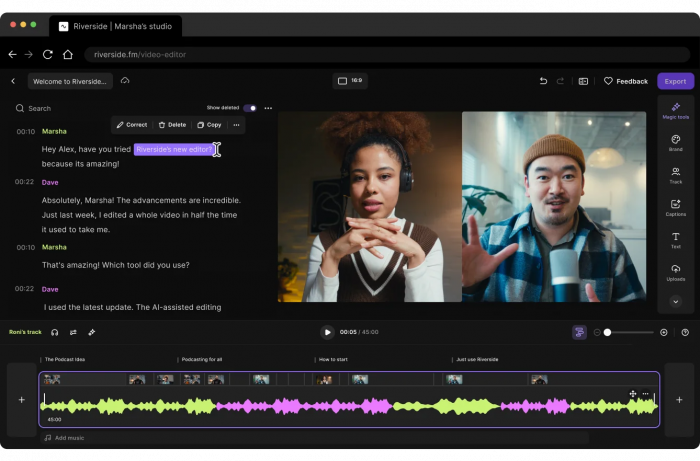
Riverside’s foundation is local recordings for each participant up to 4K, separate audio/video tracks, live streaming to YouTube/Facebook/LinkedIn/Twitch, call-ins, and strong producer controls. Its newer editing layer adds transcript editing, AI clip generation (Magic Clips), layouts, b-roll, and brand kits so you can go from recording to social-ready clips without exporting to another tool.
Feature-by-feature table
| Area | Descript | Riverside |
| Recording | In-app + imports from Zoom/Squadcast etc.; no native live streaming | Studio-grade local recording, guests, live shows, multistreaming |
| Editing model | Text-first: edit video/audio by editing transcript, timeline for fine cuts | Transcript-aware but more template/clip focused; lighter than Descript’s NLE |
| AI tools | Underlord (summaries, show notes), Studio Sound, filler removal, AI voices, eye contact | Magic Clips, AI denoise, layouts, social formats, brand kits |
| Collaboration | Strong: shared workspaces, comments, roles, teams | Teams plans with shared workspaces and roles, but less editing depth |
| Output focus | Long-form podcasts, explained videos, training content, shorts | Podcasts, interviews, webinars, live shows, short social clips |
Pricing and Value: 2026 Plans
Both tools follow a freemium model, but cost scales differently: Descript now ties usage to “media minutes” and AI credits, while Riverside ties it mainly to recording hours and video quality.
Descript’s Free plan gives 60 media minutes/month and basic AI, while paid tiers start at around 16 USD per user per month annually (Hobbyist) and 24 USD for Creator, with Business at 50 USD per user per month annually. Riverside offers a free plan with 2 hours of recording (watermarked), with Standard at 19 USD/month annually, Pro at 29 USD/month annually, and Teams at 24 USD/user/month annually; higher tiers unlock 4K, more transcription, and collaboration.
Pricing overview table (typical annual billing)
| Tool | Free tier (key limits) | Main creator tier & price (approx.) | Notes on value |
| Descript | 60 media minutes, watermarked 720p, basic AI | Creator: 24 USD/user/month, 1,800 media minutes, 4K export | Strong value if you edit heavily and rely on AI tools |
| Riverside | 2 hours recording, 720p, watermark | Standard: 19 USD/month, 1080p, unlimited recording | Excellent for recording-heavy podcasters/live shows |
| Riverside | Pro: 29 USD/month, 4K, transcription, more editing | Teams: 24 USD/user/month for collaborative workspaces | Scales well for production teams focusing on capture |
For a solo creator who mostly edits existing recordings, Descript’s Creator tier packs more editing and AI per dollar. For a show that records often with multiple guests, Riverside’s Standard or Pro can be more predictable because you’re paying for recording capabilities instead of metered AI minutes.
User Experience: Interface, Learning Curve, Reliability
Descript’s interface reflects its ambition: multiple panels, a rich timeline, and many AI options can feel powerful but busy, especially for beginners. Reviews note a learning curve yet praise the documentation and tutorials, which help teams unlock deep workflows over time.
Riverside presents a cleaner, more guided UI where you move logically from scheduling to recording to basic editing and publishing. Creators who switched from Descript to Riverside often describe the recording and overall navigation as “night and day” easier, particularly for non-technical hosts and guests.
UX head-to-head
| Aspect | Descript | Riverside |
| Interface feel | Feature-dense, can seem cluttered at first | Minimal, intuitive, very “studio-like” |
| Learning curve | Steeper initially, especially beyond basics | Faster to onboard guests and non-editors |
| Stability | Occasionally glitchy or choppy per some users | Praised for stable recording sessions |
| Onboarding guests | Depends on recording partner tools; not native live studio | Guest links, checks, browser/device prompts built in |
If your team includes editors and non-editors, Descript makes editors very productive but may intimidate non-technical stakeholders. Riverside, in contrast, keeps hosts and guests comfortable at the recording stage, then lets editors decide whether to finish in Riverside or export elsewhere.
Workflow: End-to-End Content Pipeline
A typical Descript workflow is “import or record → auto-transcribe → text-based edit → AI cleanup → timeline polishing → export long-form + clips”. This shines when you need narrative control: rearranging sections like a Word doc, removing tangents, and generating different cutdowns for multiple channels.
A Riverside workflow is “schedule guest → record locally in studio → optionally stream live → use Magic Clips and templates to create shorts → publish or export”. It is optimized around reducing friction between recording and shipping, particularly for recurring shows and repurposing live sessions into clips.
For many professional creators, the ideal stack is Riverside to record and Descript (or a similar NLE) to deeply edit. However, if you want fewer tools in your stack, Riverside is closer to “all-in-one for podcasters” while Descript is closer to “all-in-one for editors and content teams”.
Performance : Speed, Reliability, Heavy Loads
When you look at performance as “how quickly and reliably can I go from idea to publish-ready content”, Descript and Riverside optimize different bottlenecks.
On the recording side, Riverside’s local tracks and stable connections are consistently praised; creators highlight that even if the internet glitches, local captures stay clean, and uploads resume smoothly. This matters hugely for longer interviews and multi-guest panels where re-recording is expensive.
On the editing and processing side, Descript’s transcript generation and text-based editing significantly cut the time needed to clean up long-form content, especially when combined with automatic filler-word removal and Studio Sound. However, some reviewers mention occasional UI lag, dropped frames in the “studio” preview, and sporadic glitches, which can hurt perceived performance on complex projects.
Performance comparison table
| Performance dimension | Descript | Riverside |
| Recording reliability | Solid but not designed as a primary studio tool | A core strength: local tracks, resilient uploads |
| Long-session stability | Good, but some users report glitches on heavier projects | Designed for long interviews and shows; very stable in practice |
| Processing speed (AI, edits) | Fast transcription and text edits, some lag under heavy loads | Generally quick for recording uploads and AI clips |
| Time-to-first-draft | Strong for editors; text edits are far faster than timeline-only | Strong for hosts; record once, auto-generate clips quickly |
If “performance” for you means “never lose a recording and always get clean source material”, Riverside clearly wins. If it means “minimize hours spent polishing and restructuring episodes or courses”, Descript’s text-first editing and AI still have the edge.
Output Quality: Audio, Video, Clips, and Polish
Riverside’s flagship promise is studio-quality audio and up to 4K video for each participant, captured locally and synced, which directly translates to cleaner raw files. Its AI denoise and leveling tools improve that further, so most podcasts or interview shows can ship after light editing.
Descript’s raw capture quality is good but not the same studio-focused selling point; its real power is what happens after recording: Studio Sound can dramatically clean up mediocre recordings, AI eye-contact and filler removal can make talking-head content feel more professional, and the timeline helps with detailed color, audio, and b-roll passes. For complex YouTube videos, webinars that need trimming, or content that must match brand polish, these tools can elevate the final output beyond what Riverside’s editor is meant to do.
For short-form clips, Riverside’s Magic Clips and templates are tuned to “good enough quickly”, while Descript supports more granular control over captions, overlays, and storytelling structure once you invest the time.
Best Use Cases: Who Should Choose What
Descript is best suited for:
● Content teams producing multi-track podcasts, explainers, and courses who need collaborative editing, script-like control, and lots of repurposing.
● Creators who receive recordings from clients or other platforms and need a central, AI-assisted editing environment.
● Marketers and educators who care about revisions, branding, and generating multiple cutdowns from each recording.
Riverside is best suited for:
● Podcasters and interview shows that prioritize rock-solid remote recording and guest experience over deep in-app editing.
● Live creators who want to stream to multiple platforms, take call-ins, and then turn those sessions into podcasts and clips.
● Agencies and production teams that run many recordings per month and value predictable studio-grade capture.
Many professionals combine both: Riverside as the primary recording studio and Descript for narrative-heavy edits and advanced polishing.
User Ratings on G2, Capterra, Trustpilot & Overall Sentiment
Across software review platforms, both tools score highly with users but with different patterns in sentiment and complaints.
According to recent roundups, Descript is rated around 4.6–4.7 on platforms like G2 and 4.8 on Capterra, reflecting strong appreciation for its intuitive editing and transcription capabilities. However, its Trustpilot score is significantly lower (around 2.2/5), with criticisms pointing to glitches and customer support frustrations.
Riverside typically scores around 4.6 on Capterra and about 4.8 on G2, with a healthier Trustpilot rating near 4.0/5. Users frequently highlight ease of use, recording reliability, and responsive support, though some complain about browser compatibility (Safari/Firefox) and occasional technical friction for guests.
Ratings overview table
| Platform | Descript rating (approx.) | Riverside rating (approx.) |
| Platform | Descript rating (approx.) | Riverside rating (approx.) |
| G2 | ~4.6/5 from hundreds of reviews | ~4.8/5 from 1,600+ reviews |
| Capterra | ~4.8/5 | ~4.6/5 |
| Trustpilot | ~2.2/5, many support/glitch complaints | ~4.0/5, praised for ease and support |
So, if you prioritize vendor responsiveness and overall customer satisfaction, Riverside has the stronger cross-platform sentiment today. If you prioritize raw editing power and AI-enhanced post-production and can tolerate occasional quirks, Descript remains a favorite among power users.
Final verdict: which one to choose?
For a creator or team deciding between Descript and Riverside, the key question is not “which is the best tool?” but “where is the real bottleneck today?”
If the bottleneck is editing, scripting and repurposing, Descript is the more transformative choice. It changes how post‑production works, especially for talk‑heavy content, and compresses a lot of manual timeline work into a document‑like editing flow.
If the bottleneck is recording quality and remote logistics, Riverside is the safer foundation. It dramatically reduces the risk that a great guest appearance is ruined by an unstable connection, and it creates high‑quality source material that will stand up well in any editor.
In many mature setups, the answer is not either/or, but both: Riverside for capture; Descript for transcripts, editing and repurposed content. For those starting with one, the recommendation is:
● Choose Descript first if the workflow is already built around solo or small‑group recording and the biggest pain is editing time and content reuse.
● Choose Riverside first if the main goal is to launch or scale a remote video podcast or interview show that must sound and look professional from day one.
Either way, anchoring the decision to the real bottleneck rather than to generic feature lists will lead to a choice that feels right long after the first few episodes are shipped.
Post Comments
Be the first to post comment!